I know I've seen this on some blogs in the past, but I can't resist posting it here.
Check out http://howmanyofme.com/search/
This site tells you how many people in the US share your name. It is pretty neat. Of ocurse, I put my name in the box - Randall Seaver.
There are 210,458 people in the U.S. with the first name Randall.
Statistically the 305th most popular first name.
More than 99.9 percent of people with the first name Randall are male.
There are 4,179 people in the U.S. with the last name Seaver.
Statistically the 8152nd most popular last name.
Famous people with the last name Seaver:Tom Seaver
There are 3 people in the U.S. named Randall Seaver. And one named Randell Seaver. And 5 named Randy Seaver.
How many are there of you? Have you checked recently? There may be more than you think.
Most Common Last Names
1. Smith
2. Johnson
3. Williams
4. Jones (tie)
4. Brown (tie)
6. Davis
7. Miller
8. Wilson
9. Moore
10. Taylor (tie)
10. Anderson (tie)
10. Thomas (tie)
Most Common Boy Names
1. James
2. John
3. Robert
4. Michael
5. William
6. David
7. Richard
8. Charles
9. Joseph
10. Thomas
Most Common Girl Names
1. Mary
2. Patricia
3. Linda
4. Barbara
5. Elizabeth
6. Jennifer
7. Maria
8. Susan
9. Margaret
10. Dorothy
Saturday, August 30, 2008

Using FamilyTreeMaker 2008 - Post 21: Adding Media II
I installed FamilyTreeMaker 2008 in early July and uploaded a large database to see how it worked. I also started a new database to test other program features. Please see the list at Using FamilyTreeMaker 2008 - Summary of Posts for all of the posts in this series.
In this post, I want to demonstrate how to link pictures to persons in my database using the [Media] menu icon in FamilyTreeMaker 2008. For this post, I'm using my great-grandfather, Frank W. Seaver (1852-1922), in my database as a starting point for these posts. In Post 20, I added a picture of the Frank Seaver and Fred Seaver families to my FTM 2008 database.
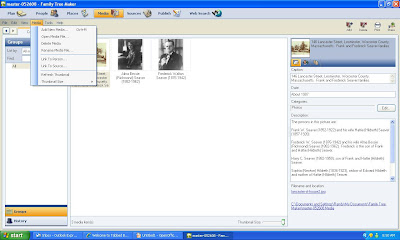
Before we try to link the picture to persons in the picture, I want to cover the "Media" menu on the second menu row on the FTM screen. When I click the "Media" menu item, the screen looks like this:
The "Media" menu items include:
* Add New Media - this works just like the "Add" button at the top right of the screen - you can add a new media item.
* Open Media File - this opens the selected media in the associated computer program on your computer. For a photograph, it opened my Windows Picture and Fax Viewer program.
* Delete Media - you get a "do you want to delete ..." and a choice of Yes or No.
* Rename Media File - you can type in another name for your file.
* Link to Person - you can link the media item to a person in your database. The rest of this post will demonstrate this.
* Link to Source - you can link the media item to a source. For example, a census image could be linked to a census source. When you click on this, you get a list of sources to link the media item to.
* Refresh Thumbnail - I'm not sure why this is here...the Help menu says it is to refresh the Media collection. So it is not for just the highlighted thumbnail.
* Thumbnail Size - Lets you change the size of the thumbnails in the Media Collection - you get a Small, Medium or Large selection. The thumbnail in my screen shot above is Large.
I wanted to link persons in my database to the persons in my photograph, so I clicked on the photograph got this screen. In the lower part of the screen is a media menu with "Links" and "Notes" tabs. I clicked on the "Links" tab and then clicked on the "New" button and the "Link to Person" item (I should have just highlighted the picture and clicked on the "Media" menu item "Link to Person" but I didn't the first time around) as shown below:
In this post, I want to demonstrate how to link pictures to persons in my database using the [Media] menu icon in FamilyTreeMaker 2008. For this post, I'm using my great-grandfather, Frank W. Seaver (1852-1922), in my database as a starting point for these posts. In Post 20, I added a picture of the Frank Seaver and Fred Seaver families to my FTM 2008 database.
Before we try to link the picture to persons in the picture, I want to cover the "Media" menu on the second menu row on the FTM screen. When I click the "Media" menu item, the screen looks like this:

The "Media" menu items include:
* Add New Media - this works just like the "Add" button at the top right of the screen - you can add a new media item.
* Open Media File - this opens the selected media in the associated computer program on your computer. For a photograph, it opened my Windows Picture and Fax Viewer program.
* Delete Media - you get a "do you want to delete ..." and a choice of Yes or No.
* Rename Media File - you can type in another name for your file.
* Link to Person - you can link the media item to a person in your database. The rest of this post will demonstrate this.
* Link to Source - you can link the media item to a source. For example, a census image could be linked to a census source. When you click on this, you get a list of sources to link the media item to.
* Refresh Thumbnail - I'm not sure why this is here...the Help menu says it is to refresh the Media collection. So it is not for just the highlighted thumbnail.
* Thumbnail Size - Lets you change the size of the thumbnails in the Media Collection - you get a Small, Medium or Large selection. The thumbnail in my screen shot above is Large.
I wanted to link persons in my database to the persons in my photograph, so I clicked on the photograph got this screen. In the lower part of the screen is a media menu with "Links" and "Notes" tabs. I clicked on the "Links" tab and then clicked on the "New" button and the "Link to Person" item (I should have just highlighted the picture and clicked on the "Media" menu item "Link to Person" but I didn't the first time around) as shown below:

When you click on the "Link to Person" item, you get a popup "Add Media Link" box that lists all of the persons in your database. You can use the Find search box to identify your person. I wanted to link the picture to Frank Seaver, so I entered "Seaver, Frank" in the Find box, as shown below:

The information for Frank Walton Seaver is shown in the right-hand portion of the box, so that you can ensure you are finding the right person. Note that you can link to a person or to a person's Fact using the buttons at the top of the box. I clicked OK on the "Add Media Link" box and the link was added to the Media "Links" list.
I entered links for all of the persons in the picture one at a time, and the resulting [Media] "Detail" screen looks like this:

You can also add Notes about the picture using the "Notes" tab. I could have put all of the Description information in the Notes section.
I wondered what the "Open Media File" item in the "Media" menu did, so I clicked on it. The screen below shows the picture opened in my Windows Picture and Fax Viewer program on my computer in a separate window.

In the "Collection" tab on the [Media] icon screen, the left-hand column is "Groups" which has "All Media," "Media category," "Source title" and "People" selections. If you click on the "Media category" item, you can obtain a list of media in the Audio, Cemetery, Census, Documents, Other, Photos, Video, vital Records and (Uncategorized) categories.
Linking pictures, or other media, to persons is very easy to do, although it would be useful to be able to just pick all of the people from a list and then click OK rather than pick them one at a time. I like the ability to Link to a Person's Fact also - for instance, a birth certificate for a specific person.
In the next series of posts, I'm going to explore the Web Search icon capabilities.
Using FamilyTreeMaker 2008 - Summary of Posts
Rather than put a list of all of the Using FamilyTreeMaker2008 posts at the end of each post, I'm going to put a link to each of them in this post, and then update this post when I add a new post. That will save bandwidth and perhaps make the separate posts more readable.
Here are the posts concerning Using FamilyTreeMaker 2008 (updated to 3 September 2008):
* Using FamilyTreeMaker 2008 - Post 1: Loading. Installing the program and uploading an existing database file.
* Using FamilyTreeMaker 2008 - Post 2: Exploring. Looking around the uploaded database file to see what the different views look like.
* Using FamilyTreeMaker 2008 - Post 3: The Menus. Most of the menus were itemized and described.
* Using FamilyTreeMaker 2008 - Post 4: Starting a New Tree. I started a new tree and added some people demonstrating the program options to do this.
* Using FamilyTreeMaker 2008 - Post 5: Adding a Source. I added sources to the Facts that I previously entered.
* Using FamilyTreeMaker 2008 - Post 6: Adding Children to a Family. I added children to a family.
* Using FamilyTreeMaker 2008 - Post 7: The Person Menu. I described the items in the Person menu and attached a spouse to a person.
* Using FamilyTreeMaker 2008 - Post 8: Finding a Person in the database. I described three ways to Find a person.
* Using FamilyTreeMaker 2008 - Post 9: Places I. I explored the vagaries of the Places icon.
* Using FamilyTreeMaker 2008 - Post 10: Places II. The different map types are discussed and displayed.
* Using FamilyTreeMaker 2008 - Post 11: Places III. The method to Resolve many places with standardized place names is explored.
* Using FamilyTreeMaker 2008 - Post 12: Charts I. Introduction to Charts and examples of pedigree and descendants charts.
* Using FamilyTreeMaker 2008 - Post 13: Charts II. Examples of Hourglass, Relationships and Vertical Pedigree Charts.
* Using FamilyTreeMaker 2008 - Post 14: Charts III. Examples of large wall charts created by FTM 2008.
* Using FamilyTreeMaker 2008 - Post 15: Genealogy Reports. Description and display of Register (descendant) and Ahnentafel (ancestor) Reports.
* Using FamilyTreeMaker 2008 - Post 16: Person Reports. Description and display of 5 different reports, including Individual Reports and Custom Reports.
* Using FamilyTreeMaker 2008 - Post 17: Relationship Reports. Description and display of Family Group Sheet, Kinship Report, Marriage Report, Parentage Report, and Outline Descendant Report.
* Using FamilyTreeMaker 2008 - Post 18: Place Usage Reports. Description and display of the Place Usage report.
* Using FamilyTreeMaker 2008 - Post 19: Source Reports. Description and display of the Source Usage reports.
* Using FamilyTreeMaker 2008 - Post 20: Adding Media I. How to add media (photos, audio, video, etc.), demonstrating adding, captioning and describing photographs.
* Using FamilyTreeMaker 2008 - Post 21: Adding Media II. How to link pictures to persons and more.
* Using FamilyTreeMaker 2008 - Post 22: Web Search I. How to use Web Search to obtain Ancestry.com images and data.
* Using FamilyTreeMaker 2008 - Post 23: Web Search II. How to merge the Web Search results into your family tree database.
* Using FamilyTreeMaker 2008 - Post 24: Web Search III. How to use Web Search to obtain Rootsweb website data into FTM 2008.
* Using Family Tree Maker 2008 - Post 25: Web Search IV. How to use the Web Clipping feature to add text from a web site to a person's Notes.
Here are the posts concerning Using FamilyTreeMaker 2008 (updated to 3 September 2008):
* Using FamilyTreeMaker 2008 - Post 1: Loading. Installing the program and uploading an existing database file.
* Using FamilyTreeMaker 2008 - Post 2: Exploring. Looking around the uploaded database file to see what the different views look like.
* Using FamilyTreeMaker 2008 - Post 3: The Menus. Most of the menus were itemized and described.
* Using FamilyTreeMaker 2008 - Post 4: Starting a New Tree. I started a new tree and added some people demonstrating the program options to do this.
* Using FamilyTreeMaker 2008 - Post 5: Adding a Source. I added sources to the Facts that I previously entered.
* Using FamilyTreeMaker 2008 - Post 6: Adding Children to a Family. I added children to a family.
* Using FamilyTreeMaker 2008 - Post 7: The Person Menu. I described the items in the Person menu and attached a spouse to a person.
* Using FamilyTreeMaker 2008 - Post 8: Finding a Person in the database. I described three ways to Find a person.
* Using FamilyTreeMaker 2008 - Post 9: Places I. I explored the vagaries of the Places icon.
* Using FamilyTreeMaker 2008 - Post 10: Places II. The different map types are discussed and displayed.
* Using FamilyTreeMaker 2008 - Post 11: Places III. The method to Resolve many places with standardized place names is explored.
* Using FamilyTreeMaker 2008 - Post 12: Charts I. Introduction to Charts and examples of pedigree and descendants charts.
* Using FamilyTreeMaker 2008 - Post 13: Charts II. Examples of Hourglass, Relationships and Vertical Pedigree Charts.
* Using FamilyTreeMaker 2008 - Post 14: Charts III. Examples of large wall charts created by FTM 2008.
* Using FamilyTreeMaker 2008 - Post 15: Genealogy Reports. Description and display of Register (descendant) and Ahnentafel (ancestor) Reports.
* Using FamilyTreeMaker 2008 - Post 16: Person Reports. Description and display of 5 different reports, including Individual Reports and Custom Reports.
* Using FamilyTreeMaker 2008 - Post 17: Relationship Reports. Description and display of Family Group Sheet, Kinship Report, Marriage Report, Parentage Report, and Outline Descendant Report.
* Using FamilyTreeMaker 2008 - Post 18: Place Usage Reports. Description and display of the Place Usage report.
* Using FamilyTreeMaker 2008 - Post 19: Source Reports. Description and display of the Source Usage reports.
* Using FamilyTreeMaker 2008 - Post 20: Adding Media I. How to add media (photos, audio, video, etc.), demonstrating adding, captioning and describing photographs.
* Using FamilyTreeMaker 2008 - Post 21: Adding Media II. How to link pictures to persons and more.
* Using FamilyTreeMaker 2008 - Post 22: Web Search I. How to use Web Search to obtain Ancestry.com images and data.
* Using FamilyTreeMaker 2008 - Post 23: Web Search II. How to merge the Web Search results into your family tree database.
* Using FamilyTreeMaker 2008 - Post 24: Web Search III. How to use Web Search to obtain Rootsweb website data into FTM 2008.
* Using Family Tree Maker 2008 - Post 25: Web Search IV. How to use the Web Clipping feature to add text from a web site to a person's Notes.
Finding Claude and Nadine Dawson
I posted on 27 August about the World War II love letters exchanged between Claude and Nadine Dawson that were saved from the trash compactor here. I wondered if this was a case for the Genealogue readers or the Unclaimed Persons team.
Chris Dunham on The Genealogue posted about the article here, and had one response from fellow genea-blogger Craig Manson. Craig just posted his findings on his own blog, Geneablogie, in An Attempted Act of Genealogical Kindness.
Craig has found death records for Claude and Nadine, 1920 and 1930 census records for Claude, school records for Claude, voter registration records, and tried to identify their children through birth indexes. Read all of Craig's study in his blog post. Craig is pretty close to solving this puzzle, and I hope he gets the recognition he deserves for working hard on it.
Thanks, Craig, for picking up this ball and running with it. Will he get a touchdown? Only time will tell.
Chris Dunham on The Genealogue posted about the article here, and had one response from fellow genea-blogger Craig Manson. Craig just posted his findings on his own blog, Geneablogie, in An Attempted Act of Genealogical Kindness.
Craig has found death records for Claude and Nadine, 1920 and 1930 census records for Claude, school records for Claude, voter registration records, and tried to identify their children through birth indexes. Read all of Craig's study in his blog post. Craig is pretty close to solving this puzzle, and I hope he gets the recognition he deserves for working hard on it.
Thanks, Craig, for picking up this ball and running with it. Will he get a touchdown? Only time will tell.
Friday, August 29, 2008
Sharon has fun with DNA
Sharon Elliott on the BackTrack blog has a challenging puzzle for her readers to solve. Go read Fun with DNA. It is a good test of logic and knowledge.
Leave a comment to solve the puzzle. I did.
Leave a comment to solve the puzzle. I did.
The Severed Arm and Hand Mystery - Video Report
I posted two weeks ago about the Severed Arm and Hand Mystery that my friend, Colleen Fitzpatrick (of Forensic Genealogy fame) was involved in solving, with newspaper links to articles about finding that it belonged to Francis Joseph Van Zandt.
Colleen emailed me today with a link to a video that was on Today at MSNBC. It discusses some of the forensic process, including a picture of the arm and hand. The video runs 2:49 and is here.
However, there is still no information publicly available (that I've seen) about the research process to find relatives for the Y-DNA match.
Colleen emailed me today with a link to a video that was on Today at MSNBC. It discusses some of the forensic process, including a picture of the arm and hand. The video runs 2:49 and is here.
However, there is still no information publicly available (that I've seen) about the research process to find relatives for the Y-DNA match.
Traffic statistics for commercial genealogy services
I posted about The Generations Network domain traffic statistics yesterday, and wanted to show the statistics for several other commercial genealogy services.
The web sites I reviewed were:
* http://www.worldvitalrecords.com/ (a general genealogy database site)
* http://www.footnote.com/ (a US government related database site)
* http://www.genealogybank.com/ (a newspaper-oriented database site)
* http://www.findmypast.com/ (a United Kingdom genealogy database site)
* http://www.genealogytoday.com (a general genealogy database site)
http://www.alexa.com/ measures Reach (percentage of all Internet users who visit a web site). Here is the Reach for these five web sites:

And here are the page views (in terms of percent of all users: for the sites:
The web sites I reviewed were:
* http://www.worldvitalrecords.com/ (a general genealogy database site)
* http://www.footnote.com/ (a US government related database site)
* http://www.genealogybank.com/ (a newspaper-oriented database site)
* http://www.findmypast.com/ (a United Kingdom genealogy database site)
* http://www.genealogytoday.com (a general genealogy database site)
http://www.alexa.com/ measures Reach (percentage of all Internet users who visit a web site). Here is the Reach for these five web sites:

And here are the page views (in terms of percent of all users: for the sites:

The www.alexa.com data shows that:
* www.worldvitalrecords.com has a three month average Reach of 0.00275% (about 5% of Ancestry.com's Reach).
* www.footnote.com has a three month average Reach of 0.00446% (about 8% of Ancestry.com)
* www.genealogybank.com has a three month average Reach of 0.00058% (about 1% of Ancestry.com)
* www.findmypast.com has a three month average Reach of 0.00132% (about 2.4% of Ancestry.com)
* www.genealogytoday.com has a three month average Reach of 0.00537% (about 10% of Ancestry.com)
The www.quantcast.com page shows, in terms of United States daily visitors per month, is:
 The Quantcast monthly traffic estimate for these sites are:
* www.worldvitalrecords.com - 335K US visits and 404K visits worldwide (addicts and regulars are 23% of audience, 51% of visits)
* www.footnote.com - 579K US visits (addicts and regulars are 19% of audience, and 40% of visits)
* www.genealogybank.com - 87K US visits (addicts and regulars are 22% of audience, 52% of visits)
* www.findmypast.com - 24K US visits (addicts and regulars are 21% of audience, 37% of visits)
* www.genealogytoday.com - 300K US visits ( addicts and regulars are 16% of audience, 33% of visits)
For comparison purposes, www.Ancestry.com had 5.0 million US visits, with addicts and regulars 45% of audience and 89% of visits.
It's unfortunate that the www.FindMyPast.com results from Quantcast is for US visits only.
It sure seems to me that none of these commercial genealogy websites have made a significant dent in Ancestry.com's customer base. The graphs show that traffic is essentially stagnant, except when a site offers a free database set or introduces new databases.
Sarah Palin is my cousin too!
Isn't that amazing? I have a distant cousin running on both tickets in the 2008 Presidential election! See here for my cousinhood with Barack Obama.
Robert Battle has an Ancestry of Sarah Palin at http://freepages.genealogy.rootsweb.ancestry.com/~battle/palin.htm. I checked the list of ancestors, and Sarah (Heath) Palin, present Governor of Alaska and Republican vice-presidential nominee, has a significant New England and Mayflower ancestry (Warren, Howland, Brewster, Tilley and Hopkins) and also has several ancestors in common with me:
* 14590 Richard Warren (1578-1628)
* 14591 Elizabeth Walker (????-1673)
* 15894 Thomas Prence (1600-1673)
Sarah (Heath) Palin is the 11th great-granddaughter of these three people, and I am the 10th great-grandson of them. So that makes Sarah my 10th cousin once removed. How cool is that?
The offer still holds for both of my cousins on the tickets - if you want to come visit me in Chula Vista, I have a guest room waiting. We can talk about our common ancestry.... unless you really care about my political opinions.
Robert Battle has an Ancestry of Sarah Palin at http://freepages.genealogy.rootsweb.ancestry.com/~battle/palin.htm. I checked the list of ancestors, and Sarah (Heath) Palin, present Governor of Alaska and Republican vice-presidential nominee, has a significant New England and Mayflower ancestry (Warren, Howland, Brewster, Tilley and Hopkins) and also has several ancestors in common with me:
* 14590 Richard Warren (1578-1628)
* 14591 Elizabeth Walker (????-1673)
* 15894 Thomas Prence (1600-1673)
Sarah (Heath) Palin is the 11th great-granddaughter of these three people, and I am the 10th great-grandson of them. So that makes Sarah my 10th cousin once removed. How cool is that?
The offer still holds for both of my cousins on the tickets - if you want to come visit me in Chula Vista, I have a guest room waiting. We can talk about our common ancestry.... unless you really care about my political opinions.
Thursday, August 28, 2008
FamilyTreeMaker 2009 Improvements
Russell Hannig on the Ancestry.com Blog has just posted about Family Tree Maker 2009 Release with a list of the improvements over FTM 2008.
The list of items added into FTM 2009 includes:
Genealogy Reports
* Register and Ahnentafel simplified reports*
* Data Errors report*
Charts
* Hourglass Chart*
* Horizontal Hourglass Chart*
* Bow Tie Chart*
* 180-Degree Fan Chart*
* Family Tree Chart*
Publishing Functionality
* Ability to show siblings within charts*
* Single-page PDF export from charts*
* Ability to add boxes in charts to a “Marked Box” category and modify box settings for these boxes*
Improved Data Manipulation Tools
* Streamlined data entry from any workspace using a full-featured edit person window*
* Ability to set spouse order (Person menu)*
* Ability to order media items for an individual*
* Find Individual tool (Edit menu)*
* Find Duplicate Individuals tool (Edit menu)*
* Ability to update multiple facts at one time (From Manage Facts or Fact options): change fact types, move description to place or place to description, mark as private*
* Insert foreign language characters into text fields*
Improvements within Research Tools
* Ability to ignore hints*
* Option to delete existing facts in individual and Web merge*
* Inclusion of married names, AKAs, and titles in index*
Improvements to Import
* OLE objects (PDF, Word, Excel, PowerPoint, RTF) from previous FTM versions*
* Import previously ignored hints lists*
Improvements to Places
* Track and print your ancestors’ migration paths on interactive maps*
* Places toolbar that allows for researching place names not currently in the file and pinpointing places such as libraries, churches, and courthouses*
COMING SOON
In addition, we are currently working on new features that will be available as part of Family Tree Maker 2009—as soon as they become available:
* Book Building
* Better Ancestry Member Tree Integration
* Improved Relationship Calculator
* Source templates based on Evidence Explained by source expert, Elizabeth Shown Mills
* And many others…
Those improvements look promising - we'll see if they satisfy all of our wants and needs over time. I'm disappointed that the Book Building and Source Templates won't be in the initial FTM 2009 release.
According to this post on the Ancestry.com blog, registered users of FamilyTreeMaker 2008 will be offered a free upgrade to FTM 2009. That's encouraging. I look forward to my invitation to upgrade to FTM 2009! That should be good for another set of Genea-Musings posts, eh?
My sense is that the FamilyTreeMaker team at TGN are making an effort to be sensitive to customers wants, needs and requests, and are adding capabilities as fast as they can proof them. There is a lot more competition now with Legacy Family Tree and RootsMagic than there was even a year ago. Customer satisfaction should be a primary concern of all software companies!
The list of items added into FTM 2009 includes:
Genealogy Reports
* Register and Ahnentafel simplified reports*
* Data Errors report*
Charts
* Hourglass Chart*
* Horizontal Hourglass Chart*
* Bow Tie Chart*
* 180-Degree Fan Chart*
* Family Tree Chart*
Publishing Functionality
* Ability to show siblings within charts*
* Single-page PDF export from charts*
* Ability to add boxes in charts to a “Marked Box” category and modify box settings for these boxes*
Improved Data Manipulation Tools
* Streamlined data entry from any workspace using a full-featured edit person window*
* Ability to set spouse order (Person menu)*
* Ability to order media items for an individual*
* Find Individual tool (Edit menu)*
* Find Duplicate Individuals tool (Edit menu)*
* Ability to update multiple facts at one time (From Manage Facts or Fact options): change fact types, move description to place or place to description, mark as private*
* Insert foreign language characters into text fields*
Improvements within Research Tools
* Ability to ignore hints*
* Option to delete existing facts in individual and Web merge*
* Inclusion of married names, AKAs, and titles in index*
Improvements to Import
* OLE objects (PDF, Word, Excel, PowerPoint, RTF) from previous FTM versions*
* Import previously ignored hints lists*
Improvements to Places
* Track and print your ancestors’ migration paths on interactive maps*
* Places toolbar that allows for researching place names not currently in the file and pinpointing places such as libraries, churches, and courthouses*
COMING SOON
In addition, we are currently working on new features that will be available as part of Family Tree Maker 2009—as soon as they become available:
* Book Building
* Better Ancestry Member Tree Integration
* Improved Relationship Calculator
* Source templates based on Evidence Explained by source expert, Elizabeth Shown Mills
* And many others…
Those improvements look promising - we'll see if they satisfy all of our wants and needs over time. I'm disappointed that the Book Building and Source Templates won't be in the initial FTM 2009 release.
According to this post on the Ancestry.com blog, registered users of FamilyTreeMaker 2008 will be offered a free upgrade to FTM 2009. That's encouraging. I look forward to my invitation to upgrade to FTM 2009! That should be good for another set of Genea-Musings posts, eh?
My sense is that the FamilyTreeMaker team at TGN are making an effort to be sensitive to customers wants, needs and requests, and are adding capabilities as fast as they can proof them. There is a lot more competition now with Legacy Family Tree and RootsMagic than there was even a year ago. Customer satisfaction should be a primary concern of all software companies!
Family Tree Magazine Launches New Website
Family Tree Magazine has launched their new web site - see www.familytreemagazine.com. My first impression is that they have added a LOT of content on this web site, mostly in the form of articles and genealogy forms.
The major headings on the web page are:
* How To - Records, Tips & Techniques, Online Genealogy, Photos & Heirlooms, Save & Share History, Libraries & Archives, and DNA
* Heritage - African-American, English, French, German, Hispanic, Irish, Italian, Polish, Scandinavian, Scottish and All groups.
* Get Started -- Basic Steps, Genealogy Glossary, Surnames and Interviewing
* Research Toolkit - Free Forms, Cheat Sheets, 101 Best Web Sites, Soundex Generator, Software Guide, Article Index, State Research Guides.
* Blogs - Genealogy Insider, Photo Detective, Now What?
* Community -- Forum, Contribute, Queries
* Audio/Video - Featured Videos, Podcasts
* Shop - Back Issues, CDs, Digital downloads, State Research Guides, FTM Merchandise, Books.
I found many excellent articles, plus some PDFs in the Cheat Sheet section of Research Toolkit - Records Checklist, Timeline of US Immigration Laws, War Service Reference Guide and a Vital Records Chart. I also appreciated the article by Rick Crume on the 50 Genealogy Databases.
At this time, the Software Guide reviews are not available, even though a summary of each program is available here.
This is a great resource for all researchers - it's very easy to use and has a lot of information organized logically and well. Did I mention that most of these resources are FREE? Of course, the Family Tree Magazine itself isn't free, and the State Research Guides are not free.
The major headings on the web page are:
* How To - Records, Tips & Techniques, Online Genealogy, Photos & Heirlooms, Save & Share History, Libraries & Archives, and DNA
* Heritage - African-American, English, French, German, Hispanic, Irish, Italian, Polish, Scandinavian, Scottish and All groups.
* Get Started -- Basic Steps, Genealogy Glossary, Surnames and Interviewing
* Research Toolkit - Free Forms, Cheat Sheets, 101 Best Web Sites, Soundex Generator, Software Guide, Article Index, State Research Guides.
* Blogs - Genealogy Insider, Photo Detective, Now What?
* Community -- Forum, Contribute, Queries
* Audio/Video - Featured Videos, Podcasts
* Shop - Back Issues, CDs, Digital downloads, State Research Guides, FTM Merchandise, Books.
I found many excellent articles, plus some PDFs in the Cheat Sheet section of Research Toolkit - Records Checklist, Timeline of US Immigration Laws, War Service Reference Guide and a Vital Records Chart. I also appreciated the article by Rick Crume on the 50 Genealogy Databases.
At this time, the Software Guide reviews are not available, even though a summary of each program is available here.
This is a great resource for all researchers - it's very easy to use and has a lot of information organized logically and well. Did I mention that most of these resources are FREE? Of course, the Family Tree Magazine itself isn't free, and the State Research Guides are not free.
Subscribe to:
Posts (Atom)