Showing posts with label Pedigree Tree. Show all posts

Saturday, June 14, 2025

Saturday Night Genealogy Fun - Tell Us About The Fathers In Your Tree

 Calling all Genea-Musings Fans: 

 It's Saturday Night again - 

Time for some more Genealogy Fun!!


Your mission, should you decide to accept it (cue the Mission Impossible! music) is to:


1)  It's Father's Day on Sunday.  This week, tell us about the fathers in your tree -- their names, their birth and death years and locations, their occupations, the number of spouses, the number of children, etc. Go back at least four generations if possible through your known second great-grandfathers.

2)  Share your father list informationin your own blog post or in a Facebook, SubStack, BlueSky or other social media post.  Leave a link to your post on this blog post to help us find your post.

Here's mine:

=======================================


Copyright (c) 2025, Randall J. Seaver

Please comment on this post on the website by clicking the URL above and then the "Comments" link at the bottom of each post.  Share it on Twitter, Facebook, or Pinterest using the icons below.  Or contact me by email at randy.seaver@gmail.comNote that all comments are moderated, and may not appear immediately.

Subscribe to receive a free daily email from Genea-Musings using www.Blogtrottr.com.

Sunday, March 6, 2022

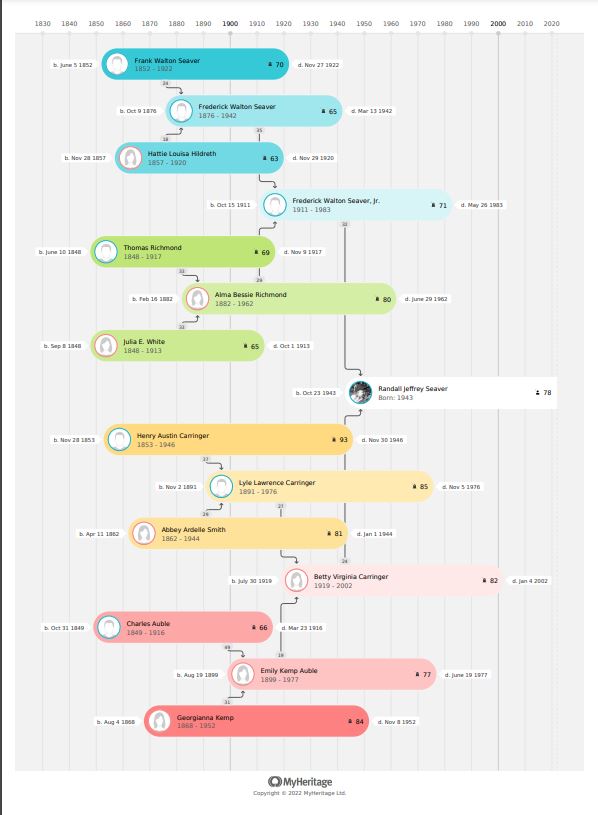
My MyHeritage 4-Generation Pedigree Chart Timeline

 MyHeritage announced their Timeline feature on Thursday in their RootsTech Keynote talk, and posted Introducing the Family Tree Timeline today.

I played around with it for a few minutes today and made a 4-generation pedigree chart:

You can save this as a PDF in a 100% Zoom view or a one-page view.  The above is a one-page view that I then saved as a PNG file using the Windows Snipping Tool.

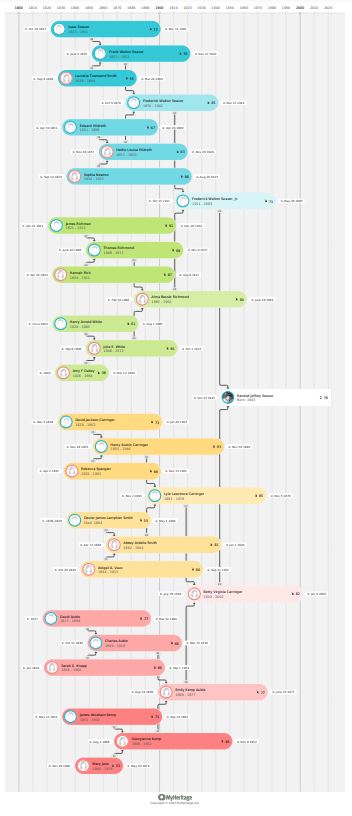
Here is the 5-generation pedigree Timeline chart:

The colors, thumbnail photos, and additional information (ages at death and ages of parents at child's birth) are useful.

Another potential Timeline Chart might be to show parents, children and grandchildren in one chart.

==============================================

Disclosure:  I receive a complimentary subscription to MyHeritage, and have received other material consideration in past years.  I uploaded my autosomal DNA raw data to their DNA product.  This does not affect my objective analysis of MyHeritage products.

The URL for this post is:  https://www.geneamusings.com/2022/03/my-myheritage-4-generation-pedigree.html

Copyright (c) 2022, Randall J. Seaver

Please comment on this post on the website by clicking the URL above and then the "Comments" link at the bottom of each post.  Share it on Twitter, Facebook, or Pinterest using the icons below.  Or contact me by email at randy.seaver@gmail.com.

Saturday, September 26, 2020

Saturday Night Genealogy Fun - Your "7 Generations in 1" Chart

 Calling all Genea-Musings Fans:

 It's Saturday Night again - 

Time for some more Genealogy Fun!!


Here is your assignment if you choose to play along (cue the Mission Impossible music, please!):

1. DNAsleuth (Ann Raymont) created a 7-in-1 chart showing 7 generations of ancestors on one page several weeks ago - see her blog post at https://dnasleuth.wordpress.com/2020/09/01/7-gen-1-sheet/.  In her post, there is a link to her Word document if you wish to use it.

2.  Linda Stufflebean's husband, Dave, took the concept a step further, and created an Excel template of the 7-in-1 chart.  You can download Dave's file from my Google Drive at   https://drive.google.com/file/d/1s7rTacxacWVCWxUEWq5pAArJCv8mCZWT/view?usp=sharing.  Linda's chart is in https://emptybranchesonthefamilytree.com/2020/09/using-excel-to-display-7-family-generations-on-1-sheet/ (I opened it to "Editor" so you can download it and work with it).

Here is an image of the blank 7-in-1 chart:


As you can see, the left column is the Generation number, and the other columns are for ancestors of Gen. 1 listed in columns for each grandparent.  So the chart covers Ancestors #1 through 127 in an ahnentafel list or a large pedigree chart.

3.  The challenge tonight is to fill out your 7-in-1 chart and show it to us.  I used the spreadsheet, added the ancestor numbers while adding the names (starting with 1 = me, 2- father, 3= mother, etc.).   I added the names and birth-death years (if known) for the first 7 generations.  Then I colored the boxes by birth place by countries, and saved my chart as an XLS file.  I then saved my chart as a JPG by using the Windows Snipping Tool to create the image. This task took me an hour to complete, so plan ahead!

4.  Show us your 7-in-1 chart in your own blog post, or in a Facebook post.  Please leave a link to your creation in a comment on this post.

Here's mine:


My columns are wider than Ann's and Linda's because I added birth-death years which really help me remember my ancestors.  I could put the color code on the bottom of the table too.

What other color coding could we do?  I want to do color coding by States/Provinces, by Death location, by Marriage Location, by Occupation, by Military Service, etc.

What other Color Coding can you think of?

Thank you to Ann Raymont for the chart concept and the Word file master, and to Linda and Dave for providing the Excel file master.

==============================================


Copyright (c) 2020, Randall J. Seaver

Please comment on this post on the website by clicking the URL above and then the "Comments" link at the bottom of each post.  Share it on Twitter, Facebook, or Pinterest using the icons below.  Or contact me by email at randy.seaver@gmail.com.

Monday, April 30, 2018

New MyHeritage Feature: Family Tree Pedigree View

MyHeritage announced today that they have added a Pedigree View to complement their Family View (which I have not liked for years).   You can read their blog post New Feature: Pedigree View for Family Trees for all of the details and example screens.

The reasons given for adding the Pedigree View were:
You asked for it, and we developed it for you! This week, we released a Pedigree View mode for family trees, created in response to popular demand from our users. Many users considered the Pedigree View as their most wanted feature on MyHeritage, so we are delighted to fill this need. 
A Pedigree View includes a root person and his/her ancestors. It does not show siblings, spouses, or anyone else who is not a direct ancestor. In this view you can navigate to anyone else in your tree and view their pedigree as well. 
The new Pedigree View doesn’t replace the current view, which we call Family View. It comes in addition, and you can toggle between the two and a third view, which is a List.
Yay!  Finally.  My opinion has always been that a Pedigree View is much easier to navigate from one ancestor to another.  In the Family view, I often have to drag-and-drop the screen several times to get to a grandparent or great-grandparent.  For DNA Matches, having a Pedigree View is essential - it should be the default view for viewing the tree of a DNA Match.

Here is my Pedigree View chart, with me as the Root Person:


The "Pedigree View" button is on the upper right of the page, next to the "Family View" button and the "List" button.

Note that the Pedigree View provides five generations of ancestors of the Root Person - that is super.

If I want two more generations of one of the ancestors on the right side of the screen, I can click the right-arrow beside the ancestor's name.  On the image above, I clicked on my 3rd great-grandmother Elizabeth Horton Dill, I saw two more generations:


If I want information about one of the persons in my tree, I can click the right-arrow at the top left of the screen above.  I highlighted Thomas Richmond in my tree above, and clicked the right-arrow at the top left, and the information appeared on the left side of the screen:


That profile card shows birth and death dates and places, a list of discoveries, and family members (parents and siblings, spouse(s) and children).  I can navigate to any of those persons from the profile card.

I can also "Research this person" for the highlighted person from within the "Discoveries" section of the profile card.  I clicked on the "Research this person" link and saw:


Note also that the "Smart Matches" (green), "Record Matches" (brown) and DNA Match (purple) badges are included in the "Discoveries" section of the Profile Card and the Pedigree View.  I clicked on the brown "Record Match" badge for Thomas Richmond and saw:


I am happy that MyHeritage has added this Pedigree View.  It was long overdue.

I do hope that MyHeritage significantly improves their Search capabilities so that I don't have to scroll through the family trees before I get to the records, and enable me to choose exact or broad or in between for a person's name, birth, death, marriage, relatives, etc.  

               =======================================================

The URL for this post is:   https://www.geneamusings.com/2018/04/new-myheritage-feature-family-tree.html

Copyright (c) 2018, Randall J. Seaver

Please comment on this post on the website by clicking the URL above and then the "Comments" link at the bottom of each post.  Share it on Twitter, Facebook, Google+ or Pinterest using the icons below.  Or contact me by email at randy.seaver@gmail.com.

Wednesday, February 21, 2018

Dear Randy: Can I Print a Pedigree Chart of my Ancestry Member Tree?

One of my correspondents asked this question recently, and my short answer was "YES."

But I wasn't sure how to do it, so this is for you, Ray:

1)  Go to your Ancestry Member Tree, and choose the Pedigree Chart view:


2)  The "Printer" icon at the bottom of the icons on the far left of the screen above will produce a Pedigree chart.  When I clicked the "Printer" icon, I saw:


That produced a 5 generation pedigree chart.

3)  I can Print that chart by clicking on the orange "Print" button on the screen above:


My "Print" dialog opened and I could click on the blue "Print" button.

However, the tree image is fairly small - it doesn't take the whole page.  That's how it is, I guess.  On my computer, I tried fiddling with the margins and options and was not able to improve it.  I eventually saved it as a PDF file.  When I printed it out, I could barely read the names and event data.

4)  Can I print more generations?  Yes, you can by clicking on each person on the Ancestry Member Tree pedigree view with an arrow to the right, and you will see that person's tree for four more generations.

5)  There are other printing options at the top of the pedigree chart (second image above) to "Create a Book," "Create a Poster," and "Create a Calendar."  Clicking one of those takes you to the MyCanvas website of Alexanders, which will create those items for a fee straight from your Ancestry Member Tree.

6)  My opinion is that this pedigree chart, when printed out, is fairly primitive and inadequate for my needs.  Desktop genealogy software, such as Family Tree Maker, RootsMagic, or Legacy Family Tree provide more options and capability, plus larger wall charts with more generations.

==========================================

The URL for this post is:  http://www.geneamusings.com/2018/02/dear-randy-can-i-print-pedigree-chart.html

Copyright (c) 2018, Randall J. Seaver

Please comment on this post on the website by clicking the URL above and then the "Comments" link at the bottom of each post.  Share it on Twitter, Facebook, Google+ or Pinterest using the icons below.  Or contact me by email at randy.seaver@gmail.com.

Wednesday, August 23, 2017

Baiting the Genealogy Hook

We just had four fun days with our eldest daughter and her two sons, Lucas (age 13) and Logan (age 11).  The boys know that I do genealogy research, but they don't know anything about it.

In past years, I have supplied relationship charts for both of them and their relationship to Prince George of England and President Obama.

They have a relatively short Italian and Danish/German ancestry on their father's side of the family, and in my ancestry (Mayflower passengers, British royals, English, Germans, Dutch, and lots of farmers) and in my wife's ancestry (Maryland, England, Germany, and Norway).

While we were driving around this weekend, I asked them if they wanted to go on a narrated tour of the Seaver "mansions" and schools in San Diego - the response was "not really."  I asked if they wanted to go out to Point Loma and have a gravestone hunt for my parents, their great-grandparents.  Nope.  Oh well.  They wanted to go shopping at Seaport Village, go to the beach, watch the eclipse, eat dinner in Little Italy, and go to the Jump Around (trampolines) in Chula Vista.

Last night after 9 p.m., I was in the Genea-Cave pecking away on my keyboard adding information and source citations to my database from Ancestry Hints, and Logan came in and asked "what are you doing?"  I think his real mission was to take some M&Ms from my stash, but I digress.

I told him that I was "feeding my family tree with information - it's what I do."  He looked puzzled.

 I also asked him "Do you want to see your Pedigree Chart?"  He said "Sure" and so I used RootsMagic to show the Pedigree View with him in the #1 spot.  It was colorful.  I asked if he could find his great-grandmother (who was born in Italy, but is still alive) and he quickly did.  I went back three more generations and showed him her great-grandparents (his 4th great-grandparents).  He was curious about all of the names - especially the Italian names.


I told him that there were records for these people, and I've been trying to find them, and have had some success.  I also told him that each of these people, and the people in his mother's family tree, have contributed to making him who he is.  He looked pensive.

I also told him that I have not found a link back to Leonardo DaVinci or Galileo yet - that may be his task in the future.

The boys really want to go to Italy to sightsee and perhaps see their ancestral home villages.  Their parents have been to one of them and met cousins.

 Hopefully, this little discussion will "bait the genealogy hook" to encourage them to find their Italian cousins (I think there are many of them, and their great-grandmother has family contacts there).

That was fun.  It was totally off the cuff.  However, Logan never did dig into the M&M stash.  Isn't genealogy software great?  Can I really hook him and reel him into the genealogy world?

What other ways have you "baited the genealogy hook?"  I need more hooks!

=============================================

The URL for this post is:  http://www.geneamusings.com/2017/08/baiting-genealogy-hook.html

Copyright (c) 2017, Randall J. Seaver

Please comment on this post on the website by clicking the URL above and then the "Comments" link at the bottom of each post.  Share it on Twitter, Facebook, Google+ or Pinterest using the icons below.  Or contact me by email at randy.seaver@gmail.com.


Tuesday, March 14, 2017

Have You Tried Pedigree Pie?

Nope, it's not something to eat, or even a celebration of Pi Day today (3/14).  It's a way to visualize your pedigree chart that was developed by the Brigham Young University Family History Technology Lab, which is a non-profit, student research lab sponsored by the Brigham Young University Computer Science Department.  James Tanner has a first look at Pedigree Pie on his Rejoice and Be Exceeding glad... blog.

1)  I wanted to try it, so I clicked on the link for Pedigree Pie (https://pedigree-pie.fhtl.byu.edu/) and there was a neat video to watch (at https://www.youtube.com/watch?v=FD5GkZm79Rs):


Apparently, this app was called "Grandma's Pie" in an earlier stage of development.

2)  I clicked the "Log In to FamilySearch" button, logged in, and was taken to my own Pedigree Pie which had information about birth places for 8 generations of my ancestors, back to the 6th great-grandparents.

There are two boxes near the top of the screen:

*  Legend - a listing of the countries depicted by the different colors
*  Percentages of 6X Great-Grandparents - a listing of the birth places by country of the 6X great-grandparents.

3)  There are three sliders at the top of the screen, under the "6X Great Grandparents" title, for:

a)  Single Generation - will show my ancestral birth places for the 6th great-grandparents:


b)  Multiple Generations - shows the birth place of each generation back through 8 generations:


Note that I had the third slider, for "Extrapolate Unknowns" inactive), so it showed a black color for my unknown ancestors.

c)  Extrapolate Unknowns  - which assumes that unknown persons have the same birth country as the last known ancestor:


The chart above has some isolated colors - like the red one in the lower part of the chart above.  I clicked on that and a popup box appeared showing the name and birth place and birth date of the person, plus a link to the person on the FamilySearch Family Tree, as shown below:

There are some "extraneous" birth places on the charts above - that is because the birth record for those persons do not identify a country, only a state in some cases, and even a church in one case.  Those birth places need to be edited in the Family Tree.

4)  A user can put any FamilySearch Family Tree Person ID in the small box at the top right of the screen - I added the PID for my grandfather, Frederick Walton Seaver (1876-1942), and saw his Pedigree Pie (this is one fourth of my total ancestry):


As you can see, his 8 generations are almost all United States born, with many English ancestors in his 8th generation of ancestors.  Some of the other birthplaces are errors - one ancestor is identified as born in Morocco.

5)  This Pedigree Pie can be useful to identify errors in birth places in the FamilySearch Family Tree.  Obviously, it depends on the accuracy of all of the input data for your ancestors in the Family Tree.

6)  James noted in his blog post that it could be used to compare the Pedigree Pie with a person's ethnicity determined by a DNA test.  I will look at that in a subsequent post.

7)  Try Pedigree Pie - you may learn something from it, and like it.

=============================================

The URL for this post is:  http://www.geneamusings.com/2017/03/have-you-tried-pedigree-pie.html

Copyright (c) 2017, Randall J. Seaver

Please comment on this post on the website by clicking the URL above and then the "Comments" link at the bottom of each post.  Share it on Twitter, Facebook, Google+ or Pinterest using the icons below.  Or contact me by email at randy.seaver@gmail.com.