Showing posts with label Photomyne. Show all posts

Tuesday, March 8, 2022

Denruth Lougeay Wins Genea-Musings Contest for Ancestry Subscription

 Last week, I posted Genea-Musings Contest For a FREE Ancestry.com All Access One Year Subscription - Expires 5 March, 8 p.m. PST thanks to the offer by Ancestry.com to hold the contest during the RootsTech 2022 conference to celebrate their new Ancestry Stories and Photomyne features.

The deadline for entries was 8 p.m. PST on Saturday (5 March).  I received only 10 entries from Genea-Musings readers, Facebook Friends and Twitter users despite the blog post and the social media exposure (of which I get very little).  

On Sunday afternoon I went to https://www.random.org/ and put "10" into the "Max" field, clicked on the "Generate" button and the first random number provided was "9."
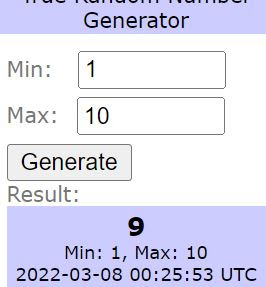
I went to my list of entrants and counting down from the top I found that #9 was Denruth Lougeay..  I emailed Denruth and told her she was the winner and she was ecstatic.  I emailed my Ancestry.com contact with her name, email and username.

In my contest, I asked the entrants to answer two questions.  Here were Denruth's responses:

1)  What Ancestry Stories will you write?

Denruth said:  "The Ancestry Stories I will write include camping in the California Sierras with our 4 yr old and 7 year old boys in the seventies… as they fish and hike and cry when they lose their lizard and sleep in the tent."

2)  What photos will you scan or enhance with the Photomyne tools? 

Denruth said:  "These faded photos will enhance they boys experience as they are now fine men at 48 and 50 who so remember those days but have not seen the photos in years. Those trips built their character…"

I look forward to hearing how Denruth progresses in her research.

Thank you to the 10 entrants to my contest.  Many of the answers to the questions were serious and informative.  Unfortunately, there can be only one winner in a contest such as this.

Thank you to Ancestry.com for offering the free subscription and providing it to the contest winner.  

=============================================

Disclosure: I receive a complimentary all-access subscription from Ancestry.com, for which I am thankful. Ancestry.com has provided material considerations for travel expenses to meetings, and has hosted events and meals that I have attended in Salt Lake City, in past years.

The URL for this post is:  https://www.geneamusings.com/2021/11/gloria-mills-of-ontario-wins-ancestry.html

Copyright (c) 2021, Randall J. Seaver

Please comment on this post on the website by clicking the URL above and then the "Comments" link at the bottom of each post.  Share it on Twitter, Facebook, Google+ or Pinterest using the icons below.  Or contact me by email at randy.seaver@gmail.com.


Thursday, March 3, 2022

First Look At Ancestry and Photomyne Photo Enhancements

Ancestry.com announced at RootsTech today that they have partnered with Photomyne to provide photograph enhancement (restore and colorize) features to Ancestry Member Tree photos on the website and the Ancestry mobile app, in addition to other Photomyne features.  You can read the Ancestry press release in Ancestry® Integrates Photomyne’s Best-in-Class Technology to Help Mobile Customers Upload, Scan, Enhance and Share Family Photos.

In this post, I want to show a comparison between the original photographs and the enhanced photographs on my Ancestry Member Tree.

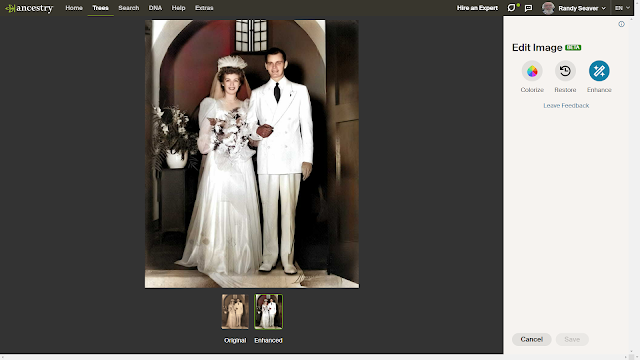
It is very easy to enhance the photographs that are in the Gallery of a profile on your Ancestry Member Tree.  Here is a photograph of my parents in black and white in the Gallery:

All you have to do is click the "Tool" icon on the screen (below the "Hire an Expert" link) and select "Edit Photo."  An "Edit Image" panel appears on the right and you can select "Colorize," "Restore" or "Enhance."  I chose "Enhance" which does both functions.  Here is the enhanced photo:
You can then "Save" the enhanced photo to your Ancestry Member Tree profile Gallery.  You can also Download either or both images to your computer using the "Tools" icon.

Easy-peasy - it takes only seconds.  

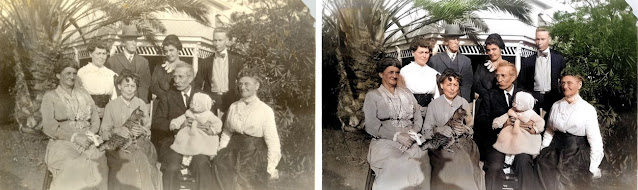
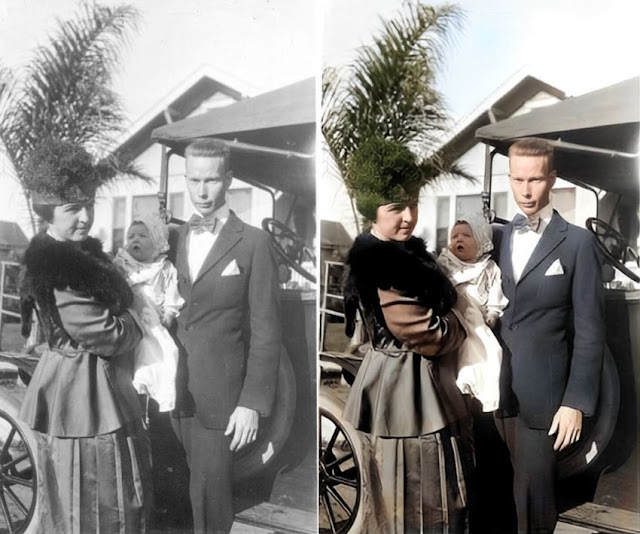
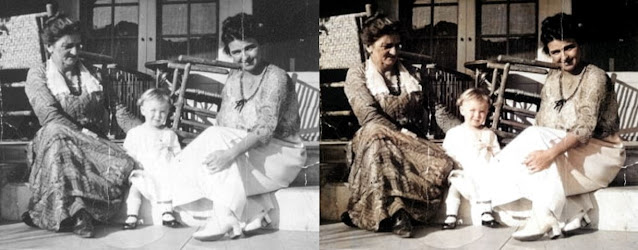
Here are several other photo comparisons I made using this technology:


This works well for black and white photos and for color photos.  

I showed these photos in my Ancestry Stories post on Tuesday in #MyAncestryStory Debuts on the Ancestry Mobile app.

                          ==============================================

Disclosure: I receive a complimentary all-access subscription from Ancestry.com, for which I am thankful. Ancestry.com has provided material considerations for travel expenses to meetings, and has hosted events and meals that I have attended in Salt Lake City, in past years.

The URL for this post is:  https://www.geneamusings.com/2022/03/first-look-at-ancestry-and-photomyne.html

Copyright (c) 2022, Randall J. Seaver

Please comment on this post on the website by clicking the URL above and then the "Comments" link at the bottom of each post. Share it on Twitter, Facebook, or Pinterest using the icons below. Or contact me by email at randy.seaver@gmail.com.