It's Saturday Night - time for more Genealogy Fun! Come on and join in this weekly event that taxes the Geneaholic's ability to devise fun and educational things for you to think and blog about.
Here is the task for this week:
1) Think of three things that you learned about Genealogy or Family History today.
2) Tell us about them in a blog post or a comment to this post.
You know, if you did this every day that after one year you would have over 1,000 learned things documented? You don't have to limit yourself to three, you know. Would that be helpful to you, and perhaps to other researchers? Think about it!
Here are my three things I have learned today (I'm writing this at 9 a.m. so the day is young for me):
* The Automated Genealogy/Canada Genealogy Centre deal to provide transcriptions and census images in a split screen format is excellent.
* The town of Centralia, Columbia County, Pennsylvania is no more because of an underground fire (see Linda Stientra's post here for a fantastic Graveyard Rabbit, and history, post).
* The early San Francisco Chronicle newspaper is online at www.Footnote.com (see Melody Lassalle's post here for a great post about searching newspapers in Footnote).
See how easy that was! Fun, too. Go for it!
Saturday, June 13, 2009

Finding 1851 Canada Census Images - Post 2
I wanted to find, and save to my hard drive, the images of my Canadian ancestral families from the 1851 Canadian Census.
I learned in Canada Census Indexes at FamilySearch Record Search that the FamilySearch Record Search index is pretty useless (it has all the people with the indexed information, provides reference numbers, but doesn't provide the parents, spouse or children in a family) and that there are no images available yet. I learned in Canadian Census Records that there is a transcription of the 1851 census at the Automated Genealogy site and that the images are available at the Canadian Genealogy Centre.
In the first post in this series, I went through the 1851 Canada census index on the Automated Genealogy web site to find the Alexander Sovereen family in Norfolk County, Ontario. In this post, my plan was to show you the next step in the process - finding the image of the census record on the Canada Genealogy Centre web site, which requires knowledge of the County, Township and Page Number found on the Automated Genealogy site.
Before I could do this, Lorine Schulze, a resident of Canada and an expert on all records Canadian, commented on Facebook that I didn't have to go to the CGC site - I could use the "Split View" link on Automated Genealogy to see the image on the CGC site. Oh. Cool. What a time saver! Thank you, Lorine! I had missed the "Split View" link at the top of the census transcription page.
Here is the top of the transcription page in the 1851 census for Windham township, Norfolk County, Canada West:

I learned in Canada Census Indexes at FamilySearch Record Search that the FamilySearch Record Search index is pretty useless (it has all the people with the indexed information, provides reference numbers, but doesn't provide the parents, spouse or children in a family) and that there are no images available yet. I learned in Canadian Census Records that there is a transcription of the 1851 census at the Automated Genealogy site and that the images are available at the Canadian Genealogy Centre.
In the first post in this series, I went through the 1851 Canada census index on the Automated Genealogy web site to find the Alexander Sovereen family in Norfolk County, Ontario. In this post, my plan was to show you the next step in the process - finding the image of the census record on the Canada Genealogy Centre web site, which requires knowledge of the County, Township and Page Number found on the Automated Genealogy site.
Before I could do this, Lorine Schulze, a resident of Canada and an expert on all records Canadian, commented on Facebook that I didn't have to go to the CGC site - I could use the "Split View" link on Automated Genealogy to see the image on the CGC site. Oh. Cool. What a time saver! Thank you, Lorine! I had missed the "Split View" link at the top of the census transcription page.
Here is the top of the transcription page in the 1851 census for Windham township, Norfolk County, Canada West:

The "Split View" link is right at the top of the screen. See it? In blue. Underlined. Got it! I clicked on that and the screen split vertically - a census page image above and the transcription below:

Each half has its own vertical scroll bar. The user can "grab and drag" the boundary between the two screens to make one bigger and the other smaller:


This really great feature on this web site permits the user to see both the census image and the transcription of the image. Well done!


Each half has its own vertical scroll bar. The user can "grab and drag" the boundary between the two screens to make one bigger and the other smaller:

I then used the Zoom In button to magnify the page image and scrolled down to the entries for the Alexander Sovereen family group:

This really great feature on this web site permits the user to see both the census image and the transcription of the image. Well done!
Why don't record database companies like FamilySearch.org, Ancestry.com, Footnote.com and others do something similar? After all, they have the indexed information in their databases. Being able to see the entire transcribed page is a real benefit to researchers, in my humble opinion.
Friday, June 12, 2009
Working in RootsMagic 4 - Post 25: Adding Media
....
Previous posts in this series are listed in Working in RootsMagic 4 - Summary of Posts.
In this post, I want to explore the Multi-Media function in RootsMagic 4. The RootsMagic 4 Feature List says:
* Improved multimedia handling
* Attach photographs, sound clips, video clips and documents to any person, family, place, source, or event
* Scan photos directly into RootsMagic
* Photo editor lets you adjust sharpness, brightness, contrast, and rotate and zoom images
* Include photos in your books, group sheets, and other printouts
I wanted to add some of the photographs I have on my computer hard drive and also some of the Ancestry.com census images that I've captured to several of my families. I decided to start with my grandparents - Frederick Walton and Alma Bessie (Richmond) Seaver. On the Family View with Frederick highlighted, I highlighted the "Media" icon (the camera) on the icon menu (note that I could not find any other way to add media in the Family or Pedigree view. You can click the "Media" button on the "Edit Person" menu.):
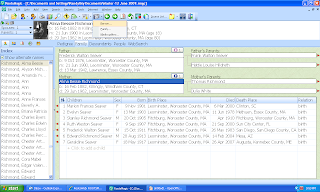
The choices on this menu are Person, Family and Media Gallery. I clicked on Person. The "Media Album" menu opened with buttons to "Add New Media," "Add from Gallery," and others. Since I had no media in my Gallery (I checked), I clicked the "Add New Media" button and the "Add Media Item" menu opened. Here I could select the "Media Type" (Image, file, sound, video), and select to find a media item on the "Disk" (computer hard drive) or "Scan" (I could scan a picture from a scanner):


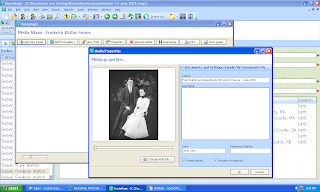
To add this media item to the Gallery and to the Media Album for this person, all you have to do is click on "Open." The Media properties" menu opens and you can type in a Caption, a Description of the media item, a date and a reference number (not sure what this is!). The screen looks like this:
I clicked on "Close" and the media item was added to the "Media Album for Frederick Walton Seaver." That was so easy that I added another picture and two census records to his Media album. When I was done, the Media Album looked like this:
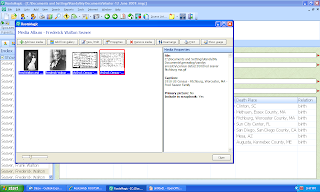
Note that the right hand image is highlighted in red - the Image Properties for that image are summarized on the right side of the Media Album menu.
Next, I wanted to add pictures to my grandmother's Media album. I did that for two of the photos I have of her, but wanted to use the same picture of their wedding and the two census records. To put those images in her Media album, I went to the "Add from Gallery" button on the "Media album" menu and clicked on those items one at a time to add them to her Media Album.
Here is the "Gallery" before I transferred the photo and census images to her "Media album."

There are other buttons on the "Media Album" menu:
* View/Edit media – Click this button to open the highlighted media item in the Edit Media dialog.
* Properties - Opens the media properties dialog. This shows you the complete path and file name of the item, and lets you add or edit caption and description, as well as date and your own file reference number for the selected item.
* Remove media – Click this button to remove the highlighted media item from the Media Gallery. You will be asked if you want to remove the selected item. Click "Remove media" to confirm you want to remove the item, or Cancel to close the dialog. If there are people, families or other items using the media, you will be told of this, and asked again if you are sure you want to delete it. If you click "Remove Media" again, the item will be deleted and the connections to people families or other items in the database will also be removed. Click Cancel to close the dialog
* Rearrange - Allows you to rearrange the order of photos in the media album. A list of the photos will appear on screen, where you can drag and drop the photo names into the desired order and click OK.
* Print – Click this button to print the highlighted image. In the Report Settings dialog:
** Print Captions (if available) – Tells RootsMagic to print the captions with the images if they are available
** Print Descriptions (if available) – Tells RootsMagic to print the Descriptions if they are available
** Choose Fonts and Layout to change the settings from the default values. (Click Reset of you want to return to the default settings.)
** Click "Generate Report" to display the image in the Report Viewer, or Cancel to close the dialog.
* Show Usage – Click this button to see who or what the highlighted media item is associated with.
From what I can tell, the media items are not "embedded" in the RootsMagic 4 database - they reside where I found them and the program links to them to show them. Users need to remember this and not change the file names or move the images out of the file folders where they reside. A user could create a separate Media file folder in their RootsMagic file folder and copy the images there and link to them from there. That way the user could move the media items around all they want, but there would be duplicate files on their computer hard drive. The RootsMagic 4 Help function says:
"When you add an item to the media album, RootsMagic does not store the item in the database itself, it stores a link to the item on your hard drive. So if you move your RootsMagic files to a different computer, you also must copy your media items to the other computer.
"If you put them in the same directory on the second computer as you had them on the original computer, the links will continue to work. If you put them in a different folder, you can use the search and replace feature to update the links."
This process was really easy and took very little time for me to add several photographs and several census images to the "Media Albums" of my grandparents.
Previous posts in this series are listed in Working in RootsMagic 4 - Summary of Posts.
In this post, I want to explore the Multi-Media function in RootsMagic 4. The RootsMagic 4 Feature List says:
* Improved multimedia handling
* Attach photographs, sound clips, video clips and documents to any person, family, place, source, or event
* Scan photos directly into RootsMagic
* Photo editor lets you adjust sharpness, brightness, contrast, and rotate and zoom images
* Include photos in your books, group sheets, and other printouts
I wanted to add some of the photographs I have on my computer hard drive and also some of the Ancestry.com census images that I've captured to several of my families. I decided to start with my grandparents - Frederick Walton and Alma Bessie (Richmond) Seaver. On the Family View with Frederick highlighted, I highlighted the "Media" icon (the camera) on the icon menu (note that I could not find any other way to add media in the Family or Pedigree view. You can click the "Media" button on the "Edit Person" menu.):

The choices on this menu are Person, Family and Media Gallery. I clicked on Person. The "Media Album" menu opened with buttons to "Add New Media," "Add from Gallery," and others. Since I had no media in my Gallery (I checked), I clicked the "Add New Media" button and the "Add Media Item" menu opened. Here I could select the "Media Type" (Image, file, sound, video), and select to find a media item on the "Disk" (computer hard drive) or "Scan" (I could scan a picture from a scanner):

I chose "Image" and clicked on "Disk" and the Browse menu for my computer files opened. I worked my way to where my Seaver Family images are located, and clicked on the image of my grandparents in their wedding outfits:

The area on the right below the picture shows the pixel count, the color count and the dots per inch count. The information at the bottom of the menu shows the type of file, the file size and the "Mem" size (I'm not sure what that is). The file name and file type are in the Fields near the bottom.
To add this media item to the Gallery and to the Media Album for this person, all you have to do is click on "Open." The Media properties" menu opens and you can type in a Caption, a Description of the media item, a date and a reference number (not sure what this is!). The screen looks like this:

I clicked on "Close" and the media item was added to the "Media Album for Frederick Walton Seaver." That was so easy that I added another picture and two census records to his Media album. When I was done, the Media Album looked like this:

Note that the right hand image is highlighted in red - the Image Properties for that image are summarized on the right side of the Media Album menu.
Next, I wanted to add pictures to my grandmother's Media album. I did that for two of the photos I have of her, but wanted to use the same picture of their wedding and the two census records. To put those images in her Media album, I went to the "Add from Gallery" button on the "Media album" menu and clicked on those items one at a time to add them to her Media Album.
Here is the "Gallery" before I transferred the photo and census images to her "Media album."

After I did this, I realized that I should have attached the wedding photograph and the census records to the "Media album of Frederick Walton Seaver and Alma Bessie Richmond" - that is, the "Family" in the Media icon menu dropdown list, rather than to their individual Media albums. Oh well - a lesson learned.
There are other buttons on the "Media Album" menu:
* View/Edit media – Click this button to open the highlighted media item in the Edit Media dialog.
* Properties - Opens the media properties dialog. This shows you the complete path and file name of the item, and lets you add or edit caption and description, as well as date and your own file reference number for the selected item.
* Remove media – Click this button to remove the highlighted media item from the Media Gallery. You will be asked if you want to remove the selected item. Click "Remove media" to confirm you want to remove the item, or Cancel to close the dialog. If there are people, families or other items using the media, you will be told of this, and asked again if you are sure you want to delete it. If you click "Remove Media" again, the item will be deleted and the connections to people families or other items in the database will also be removed. Click Cancel to close the dialog
* Rearrange - Allows you to rearrange the order of photos in the media album. A list of the photos will appear on screen, where you can drag and drop the photo names into the desired order and click OK.
* Print – Click this button to print the highlighted image. In the Report Settings dialog:
** Print Captions (if available) – Tells RootsMagic to print the captions with the images if they are available
** Print Descriptions (if available) – Tells RootsMagic to print the Descriptions if they are available
** Choose Fonts and Layout to change the settings from the default values. (Click Reset of you want to return to the default settings.)
** Click "Generate Report" to display the image in the Report Viewer, or Cancel to close the dialog.
* Show Usage – Click this button to see who or what the highlighted media item is associated with.
From what I can tell, the media items are not "embedded" in the RootsMagic 4 database - they reside where I found them and the program links to them to show them. Users need to remember this and not change the file names or move the images out of the file folders where they reside. A user could create a separate Media file folder in their RootsMagic file folder and copy the images there and link to them from there. That way the user could move the media items around all they want, but there would be duplicate files on their computer hard drive. The RootsMagic 4 Help function says:
"When you add an item to the media album, RootsMagic does not store the item in the database itself, it stores a link to the item on your hard drive. So if you move your RootsMagic files to a different computer, you also must copy your media items to the other computer.
"If you put them in the same directory on the second computer as you had them on the original computer, the links will continue to work. If you put them in a different folder, you can use the search and replace feature to update the links."
This process was really easy and took very little time for me to add several photographs and several census images to the "Media Albums" of my grandparents.
CVGS Research Group Summary - 10 June 2009
The Chula Vista Genealogical Society Research Group meeting on 10 June 2009 had nine in attendance. We tried to get a wireless signal on the laptops from the library but failed miserably. We shared information instead:
* Shirley B. printed out a working pedigree chart (7 wide, 3 tall 8.5 x 11 sheets) and pieced it together. She identified several research opportunities from the chart - Sweet, Robbins, Shelmandine, Graves and several other surnames - all from upstate New York in the 1800s.
* Dick said "if you don't do anything long enough, something will show up in your mailbox." He received a letter from a cousin providing articles about his grandfather in Wisconsin. Another letter from a man in Wisconsin contained images from a 1908 Sears Catalog for a 9 room Kit House for $1995, which Dick's grandfather ordered and built.
* Ruth is "up to here in genealogy, and loving it," working 8 to 12 hours a day finding ancestors and adding to her family tree. She learned in the past month that this is a life project, and is hooked. She bought a 40 x 25 family tree chart from ancestry to give to her father for a birthday present. Ruth also found out that her mother's gravestone in Napa has wrong dates on it and wants to fix it.
* Dorothy is back to genealogy after a 10-year hiatus. She searched for death dates and places for her Norgaard grandparents in San Diego, got the dates from the www.vitalsearch-ca.com site, but couldn't get the death certificate at the Chula Vista office of the County Recorder - she will have to go to the San Diego office. Dorothy also visited the Danish house in Balboa Park last Sunday and had a great time.
* Joan is "waiting for an epiphany - her brick walls are still standing firm." She volunteered to help a friend obtain a 1934 death record in New York - the group said she should contact the New York State Archives.
* Randy mentioned that his OASIS class is finished, that he is reviewing RootsMagic 4 on his blog, and that RootsMagic 4 seems to have the easiest-to-make source citations.
* Susi is working on filling in blanks and sources in her database, and is enjoying her Facebook Friends. We found that five of the attendees were on Facebook.
The next CVGS Research Group meeting will be the second Wednesday of July, the 8th, in the Chula Vista Civic Center Library Conference Room at 12 noon.
* Shirley B. printed out a working pedigree chart (7 wide, 3 tall 8.5 x 11 sheets) and pieced it together. She identified several research opportunities from the chart - Sweet, Robbins, Shelmandine, Graves and several other surnames - all from upstate New York in the 1800s.
* Dick said "if you don't do anything long enough, something will show up in your mailbox." He received a letter from a cousin providing articles about his grandfather in Wisconsin. Another letter from a man in Wisconsin contained images from a 1908 Sears Catalog for a 9 room Kit House for $1995, which Dick's grandfather ordered and built.
* Ruth is "up to here in genealogy, and loving it," working 8 to 12 hours a day finding ancestors and adding to her family tree. She learned in the past month that this is a life project, and is hooked. She bought a 40 x 25 family tree chart from ancestry to give to her father for a birthday present. Ruth also found out that her mother's gravestone in Napa has wrong dates on it and wants to fix it.
* Dorothy is back to genealogy after a 10-year hiatus. She searched for death dates and places for her Norgaard grandparents in San Diego, got the dates from the www.vitalsearch-ca.com site, but couldn't get the death certificate at the Chula Vista office of the County Recorder - she will have to go to the San Diego office. Dorothy also visited the Danish house in Balboa Park last Sunday and had a great time.
* Joan is "waiting for an epiphany - her brick walls are still standing firm." She volunteered to help a friend obtain a 1934 death record in New York - the group said she should contact the New York State Archives.
* Randy mentioned that his OASIS class is finished, that he is reviewing RootsMagic 4 on his blog, and that RootsMagic 4 seems to have the easiest-to-make source citations.
* Susi is working on filling in blanks and sources in her database, and is enjoying her Facebook Friends. We found that five of the attendees were on Facebook.
The next CVGS Research Group meeting will be the second Wednesday of July, the 8th, in the Chula Vista Civic Center Library Conference Room at 12 noon.
Finding 1851 Canada Census Images - Post 1
I wanted to find, and save to my hard drive, the images of my Canadian ancestral families from the 1851 Canadian Census.
I learned in Canada Census Indexes at FamilySearch Record Search that the FamilySearch Record Search index is pretty useless (it has all the people with the indexed information, provides reference numbers, but doesn't provide the parents, spouse or children in a family) and that there are no images available yet. I learned in Canadian Census Records that there is a transcription of the 1851 census at http://www.automatedgenealogy.com/ and that the images are available at the Canadian Genealogy Centre.
I am looking for my great-great-grandmother, Mary Jane Sovereen, born in 1840 in Norfolk County, Ontario, daughter of Alexander and Eliza (Putman) Sovereen. I went to the Automated Genealogy web site and clicked on the 1852 link up in the left hand corner of the page. The 1852 Province of Canada (Quebec and Ontario) page opened:

I put "Sovereen" in the Surname field and clicked on "Search." There were 42 matches - see the two screens below:


I learned in Canada Census Indexes at FamilySearch Record Search that the FamilySearch Record Search index is pretty useless (it has all the people with the indexed information, provides reference numbers, but doesn't provide the parents, spouse or children in a family) and that there are no images available yet. I learned in Canadian Census Records that there is a transcription of the 1851 census at http://www.automatedgenealogy.com/ and that the images are available at the Canadian Genealogy Centre.
I am looking for my great-great-grandmother, Mary Jane Sovereen, born in 1840 in Norfolk County, Ontario, daughter of Alexander and Eliza (Putman) Sovereen. I went to the Automated Genealogy web site and clicked on the 1852 link up in the left hand corner of the page. The 1852 Province of Canada (Quebec and Ontario) page opened:

I put "Sovereen" in the Surname field and clicked on "Search." There were 42 matches - see the two screens below:

The results are alphabetical by first name. I saw Alexander Sovereen right at the top of the list, so I clicked on the link to the transcribed page (17b, 18a (35)) and the transcribed page came up (two screens below, some overlap):


It's great that they highlighted the person I selected. As you can see, Alexander Sovereen (a farmer, born Upper Canada, Baptist, age ??, male) with Elizabeth Sovereen (born Upper Canada, Baptist, age ??, female), Mary J. Sovereen (born Upper Canada, Baptist, age 12, female) and Rachel E. Sovereen (born Upper Canada, Baptist, age 6, female). There are also a servant and a labourer, followed by Frederick Sovereen (age 66), Mary Jane Sovereen (born New Brunswick, age 61) and Mary Catherine Smith (age 17).
From my research, I know that Frederick and Mary Jane (Hutchinson) Sovereen are the parents of Alexander Sovereen and that Mary Catherine Smith is the granddaughter of Frederick and Mary Jane Sovereen, and a niece of Alexander and Eliza Sovereen.
The Automated Genealogy search function is very simple - only a Surname (so you would have to guess at spelling variations), but it's a free web site indexed by volunteers. It will not accept a partial surname (like Sover or Sov) or wild cards. You can search counties page-by-page using the links for Canada West (Ontario) and Canada East (Quebec) on the 1852 Census page.
In the next post, we'll try to find the census image on the Canadian Genealogy Centre web site.
Thursday, June 11, 2009
Ancestry.com US Subscription Deals
I went looking for subscription deals on Ancestry.com today because my current 6-month subscription expires next week. [Note: I got that one for $39.44 with FTM 2008 back in December at www.NothingButSoftware.com. Previously, I bought a one-year US subscription for $16 with FTM 16 at www.NothingButSoftware.com].
I had no hope of finding that good a deal this time, and I didn't. But these might be pretty good deals for those in the market for Family Tree Maker 2008 or 2009 software and an Ancestry subscription:
* Encore Family Tree Maker 2009 Platinum - PC - includes Family Tree Maker 2009 with a 6-month Ancestry US Deluxe subscription for $85.46.
* Family Tree Maker 2009 Deluxe -- includes Family Tree Maker 2009 and a 3-month Ancestry US Deluxe subscription for $52.95.
* Family Tree Maker 2008 Deluxe -- includes Family Tree Maker 2008 and a 3-month Ancestry US Deluxe subscription for $29.95.
Retail prices for an Ancestry 3-month subscription is $50.85, so two of them for 6-months would be $101.70. But 6 months worth of a 12-month subscription ($155.40 for one year) is $77.70.
The FTM 2009 software reatils for $39.95 but you can get it for $29.95, so the cost of the Ancestry 6-month subscription is about $55 if FTM 2009 is worth $29.95 to you. It isn't to me.
My conclusion is that I could have bought the 3-month subscription for $29.95 and saved about $20 from a retail subscription, but then I'd have to search again in three months and go through the hassle again. Plus, I would have another copy of FTM 2008 which I really don't want (since I already have FTM 2009 and nobody in my society wants FTM 2008). Or I could have bought the 6-month subscription for $85.46, but that saves only $15 from two 3-month retail subscriptions, and is less cost effective than the one-year retail subscription. Plus I would have an extra copy of FTM 2009.
All the "great" deals are gone right now...just watch them offer some next month!
I decided to pop for the one-year retail subscription for $155.40 for the US Deluxe membership. I don't have to worry about it for a year and maybe they will offer me a deal I cannot refuse next year when the economy is really in the tank.
Genealogy research for myself, my colleagues and my clients take me into Ancestry.com every day, and the site provides significant blog fodder for me besides (changing navigation, changing user interfaces, upgrading trees, upgrading databases, finding quirks, etc.).
I also decided to upgrade my two family trees on Ancestry.com from Private Member Trees to Public Member Trees - I had them private so folks wouldn't steal my notes, but they're so hard to find that it would be too much work for anyone to copy a lot of them. I kept getting several messages a week asking to be permitted to see the trees because somebody found a name when they searched. I fell behind on the responses.
I tried to shop well...failed to find a great deal. Oh well - I can raise my client rates, I guess. Oh wait, my clients don't pay ... yet.
I had no hope of finding that good a deal this time, and I didn't. But these might be pretty good deals for those in the market for Family Tree Maker 2008 or 2009 software and an Ancestry subscription:
* Encore Family Tree Maker 2009 Platinum - PC - includes Family Tree Maker 2009 with a 6-month Ancestry US Deluxe subscription for $85.46.
* Family Tree Maker 2009 Deluxe -- includes Family Tree Maker 2009 and a 3-month Ancestry US Deluxe subscription for $52.95.
* Family Tree Maker 2008 Deluxe -- includes Family Tree Maker 2008 and a 3-month Ancestry US Deluxe subscription for $29.95.
Retail prices for an Ancestry 3-month subscription is $50.85, so two of them for 6-months would be $101.70. But 6 months worth of a 12-month subscription ($155.40 for one year) is $77.70.
The FTM 2009 software reatils for $39.95 but you can get it for $29.95, so the cost of the Ancestry 6-month subscription is about $55 if FTM 2009 is worth $29.95 to you. It isn't to me.
My conclusion is that I could have bought the 3-month subscription for $29.95 and saved about $20 from a retail subscription, but then I'd have to search again in three months and go through the hassle again. Plus, I would have another copy of FTM 2008 which I really don't want (since I already have FTM 2009 and nobody in my society wants FTM 2008). Or I could have bought the 6-month subscription for $85.46, but that saves only $15 from two 3-month retail subscriptions, and is less cost effective than the one-year retail subscription. Plus I would have an extra copy of FTM 2009.
All the "great" deals are gone right now...just watch them offer some next month!
I decided to pop for the one-year retail subscription for $155.40 for the US Deluxe membership. I don't have to worry about it for a year and maybe they will offer me a deal I cannot refuse next year when the economy is really in the tank.
Genealogy research for myself, my colleagues and my clients take me into Ancestry.com every day, and the site provides significant blog fodder for me besides (changing navigation, changing user interfaces, upgrading trees, upgrading databases, finding quirks, etc.).
I also decided to upgrade my two family trees on Ancestry.com from Private Member Trees to Public Member Trees - I had them private so folks wouldn't steal my notes, but they're so hard to find that it would be too much work for anyone to copy a lot of them. I kept getting several messages a week asking to be permitted to see the trees because somebody found a name when they searched. I fell behind on the responses.
I tried to shop well...failed to find a great deal. Oh well - I can raise my client rates, I guess. Oh wait, my clients don't pay ... yet.
Interesting WorldVitalRecords Online Poll
www.WorldVitalRecords.com has a poll on their front page titled "Which of the following services would you be most delighted to see available for free?" with choices:
* Full-featured family tree software
* Huge genealogy databases
* Professional genealogy research
* Digital reference books
* Scanned records
* Tools for tracking research efforts and sources
The poll results to date (5038 responses) shows:

* Full-featured family tree software
* Huge genealogy databases
* Professional genealogy research
* Digital reference books
* Scanned records
* Tools for tracking research efforts and sources
The poll results to date (5038 responses) shows:

Of course, most people would just love to have FREE everything, as the comments in this poll reflect.
What ONE THING from that list, or any other genealogy item, would you like to have for FREE?
Canada Census Indexes at FamilySearch Record Search
I posted yesterday about Canadian Census Records and the addition of every-name indexes for the 1851, 1861, 1871 and 1891 Canadian census on the FamilySearch Record Search web site.
Even though I knew that there were no images (yet) for these census records, I wanted to take a look at the content of the new indexes derived from the FamilySearch Indexing Project.
Here is the main page of the FamilySearch Record Search site, with the drop-down box for the different regions:

I chose Canada, USA and Mexico, which now has 82 databases. Scrolling down to the Canada section:

It shows 10 databases, including the 1851, 1861, 1871 and 1891 census record indexes. I wanted to find my Sovereen families in the 1851 census, so I clicked on the 1851 Census:

I put "Sovereen" in the Last name field, and clicked on "Search:"


If you click the name link, then you can see the same information for the person:

Note that there is no way to see who is in the household for a specific person. A dwelling or family number was not indexed, apparently.
I thought that perhaps the "Narrow by Place" might be useful to group family members together. I clicked on the "Place" link and saw:

Even though I knew that there were no images (yet) for these census records, I wanted to take a look at the content of the new indexes derived from the FamilySearch Indexing Project.
Here is the main page of the FamilySearch Record Search site, with the drop-down box for the different regions:

I chose Canada, USA and Mexico, which now has 82 databases. Scrolling down to the Canada section:

It shows 10 databases, including the 1851, 1861, 1871 and 1891 census record indexes. I wanted to find my Sovereen families in the 1851 census, so I clicked on the 1851 Census:

I put "Sovereen" in the Last name field, and clicked on "Search:"

There were 52 Exact and close matches. Each person has a name link in the first column, and the second column shows a birth year (probably based on age), birth place, and residence. The third column (labelled Spouse and Children) and fourth column (Parents) are blank.
If you put your mouse over the link on the name, you can see all of the indexed information for that person:

If you click the name link, then you can see the same information for the person:

Note that there is no way to see who is in the household for a specific person. A dwelling or family number was not indexed, apparently.
I thought that perhaps the "Narrow by Place" might be useful to group family members together. I clicked on the "Place" link and saw:

There were three choices - New Jersey (1), New York (1) and Ontario (52). These are apparently all for birthplace and residence. So it is totally useless to determine occupants of a dwelling or members of a family.
A searcher could look at each entry in a surname list (such as I created above) and note the location, the page number and line number and assemble residents of a dwelling with the same name bit by bit. That would be an onerous task with a common surname, of course. And the searcher would miss the "other" family members - parents, siblings, cousins, nieces and nephews, etc. with a different surname, or even a differently spelled surname.
For a searcher in the 1851/1852 Canadian census records, the best resource is still the Automated Genealogy web site - the user can search by surname, and can then click on the page number link and see the entire transcribed census page which includes all of the information in the FamilySearch Record Search index.
The other alternative for free access is to go to a library or FHC with access to Ancestry.com.
If the FamilySearch Record Search Canadian census records are not going to have links to free page images (I don't know if they will or not, but I doubt it - they will likely link to www.Ancestry.ca page images for the census records indexed by Ancestry - probably 1851 and 1891), then they should create a links for transcribed pages. They have all the information available to them - it's a matter of will and effort to do it. It would greatly help researchers find family units and neighbors in the Canadian census records.
It struck me that many of us are really spoiled by the Ancestry.com search capabilities - the many search fields, the ability to use wild cards, ability to select exact or ranked searches, etc. Ancestry has set the bar very high for search capability. Unfortunately, the search capability on the FamilySearch Record Search site is fairly primitive. Perhaps they will improve the search capabilities in the future.
Wednesday, June 10, 2009
Canadian Census Records
Two press releases were published today about the Census Records of Canada - you can read them at:
* FamilySearch Expands Canadian Census Collection -- the FamilySearch Record Search site has added indexes for the 1851, 1861 and 1871 Canadian census records. No images yet.
* Ancestry.ca Announces Online Launch of Canadian Censuses 1851-1916 - With 32 Million Names!. The indexes and images for the 1861, 1871 and 1881 Canada census records were added to the http://www.ancestry.ca/ collection, making a full set of Canadian census records from 1851 to 1916.
There are more details about these announcements on John D. Reid's blog, Anglo-Celtic Connections in:
* FamilySearch adds 1861 and 1871 Canadian census indexes
* Canadian census index on Ancestry now virtually complete
John has more information about what is and is not available, and also about availability of census records at other web sites, some of which are free.
John summarizes the "trade-off" between Ancestry and FamilySearch, saying:
"These censuses are part of the FamilySearch records access program reported in May 2008 to provide public access to more records more quickly. In this project, Ancestry.ca provided the indexes to the 1851 and 1891 Canada Censuses, and FamilySearch created the indexes for the 1861, 1871, and 1881 Canada Censuses. It is a win-win for the public, who will have free access to all five of the pre-1900 census indexes online at FamilySearch.org."
The June/July 2009 issue of Internet Genealogy magazine had an article by Janice Nickerson titled "Canada: What's Online and What's Not." In the article, Janice summarized the Canadian census holdings at the Canada Genealogy Centre (http://www.genealogy.gc.ca/):
* 1851/1952 -- images only
* 1871 index to heads of household for Ontario only
* 1881 images and index
* 1891 images and index
* 1901 images only
* 1911 images only
The Automated Genealogy web site has census indexes for:
* 1851 for New Brunswick
* 1852 for Province of Canada (Ontario and Quebec)
* 1901 for 9 provinces (British Columbia, Manitoba, New Brunswick, Nova Scotia, Ontario, Prince Edward Island, Quebec and The Territories)
* 1906 for Alberta, Manitoba and Saskatchewan
* 1911 for 11 provinces, with links to the Canadian Genealogy Centre images
To summarize, it seems that there are FREE indexes and images for:
* 1851 New Brunswick -- index on Automated Genealogy (AA) and FamilySearch Record Search (FSRS), images at Canadian Genealogy Centre (CGC)
* 1852 -- index on AA and FSRS, images at CGC
* 1861 -- index on FSRS, no images
* 1871 -- index on FSRS, no images
* 1881 -- index on FSRS and CGC, images on CGC
* 1891 -- index on CGC, images on CGC
* 1901 -- index on AA, images on CGC
* 1906 -- index on AA, no images
* 1911 -- index on AA, images on CGC
The only things that are missing from the FREE side are the 1861, 1871 and 1906 images. There's been good progress on this!
Of course, the full set of indexes and images for the Canadian census records from 1851 to 1916 are available to users with a World Deluxe subscription to http://www.ancestry.com/ or a separate Canadian Ancestry subscription. They should also be available at public libraries with an Ancestry Library Edition subscription and at the 13 Family History Centers and the Family History Library with the Ancestry Institution subscription (including the San Diego Family History Center).
Did I miss anything or misstate something? If so, please let me know in a comment and I will edit my post for accuracy.
* FamilySearch Expands Canadian Census Collection -- the FamilySearch Record Search site has added indexes for the 1851, 1861 and 1871 Canadian census records. No images yet.
* Ancestry.ca Announces Online Launch of Canadian Censuses 1851-1916 - With 32 Million Names!. The indexes and images for the 1861, 1871 and 1881 Canada census records were added to the http://www.ancestry.ca/ collection, making a full set of Canadian census records from 1851 to 1916.
There are more details about these announcements on John D. Reid's blog, Anglo-Celtic Connections in:
* FamilySearch adds 1861 and 1871 Canadian census indexes
* Canadian census index on Ancestry now virtually complete
John has more information about what is and is not available, and also about availability of census records at other web sites, some of which are free.
John summarizes the "trade-off" between Ancestry and FamilySearch, saying:
"These censuses are part of the FamilySearch records access program reported in May 2008 to provide public access to more records more quickly. In this project, Ancestry.ca provided the indexes to the 1851 and 1891 Canada Censuses, and FamilySearch created the indexes for the 1861, 1871, and 1881 Canada Censuses. It is a win-win for the public, who will have free access to all five of the pre-1900 census indexes online at FamilySearch.org."
The June/July 2009 issue of Internet Genealogy magazine had an article by Janice Nickerson titled "Canada: What's Online and What's Not." In the article, Janice summarized the Canadian census holdings at the Canada Genealogy Centre (http://www.genealogy.gc.ca/):
* 1851/1952 -- images only
* 1871 index to heads of household for Ontario only
* 1881 images and index
* 1891 images and index
* 1901 images only
* 1911 images only
The Automated Genealogy web site has census indexes for:
* 1851 for New Brunswick
* 1852 for Province of Canada (Ontario and Quebec)
* 1901 for 9 provinces (British Columbia, Manitoba, New Brunswick, Nova Scotia, Ontario, Prince Edward Island, Quebec and The Territories)
* 1906 for Alberta, Manitoba and Saskatchewan
* 1911 for 11 provinces, with links to the Canadian Genealogy Centre images
To summarize, it seems that there are FREE indexes and images for:
* 1851 New Brunswick -- index on Automated Genealogy (AA) and FamilySearch Record Search (FSRS), images at Canadian Genealogy Centre (CGC)
* 1852 -- index on AA and FSRS, images at CGC
* 1861 -- index on FSRS, no images
* 1871 -- index on FSRS, no images
* 1881 -- index on FSRS and CGC, images on CGC
* 1891 -- index on CGC, images on CGC
* 1901 -- index on AA, images on CGC
* 1906 -- index on AA, no images
* 1911 -- index on AA, images on CGC
The only things that are missing from the FREE side are the 1861, 1871 and 1906 images. There's been good progress on this!
Of course, the full set of indexes and images for the Canadian census records from 1851 to 1916 are available to users with a World Deluxe subscription to http://www.ancestry.com/ or a separate Canadian Ancestry subscription. They should also be available at public libraries with an Ancestry Library Edition subscription and at the 13 Family History Centers and the Family History Library with the Ancestry Institution subscription (including the San Diego Family History Center).
Did I miss anything or misstate something? If so, please let me know in a comment and I will edit my post for accuracy.
SDGS Meeting on Saturday features Connie Moretti
The June meeting of the San Diego Genealogical Society is Saturday, 13 June, at 12 noon at St. Andrew's Lutheran Church (8350 Lake Murray Blvd, at Jackson Drive) in San Diego.
The program speaker is Connie Moretti who will present Geographic Finding Aids in the first session and Understanding Land Records in the second session. The talk summary and Connie's CV are:
-o-o-o-o-o-o-o-o-o-o-o-
Geographic Finding Aids…What are they and why you need them. Since most of the records important to genealogists are created and stored at the local level, it is important to know where your ancestors lived. Learn to use a variety of finding aids to determine their legal and social locations.
Understanding Land Records… Know when, why and how land records are created. Understand the different kinds of surveys used in the area covered by the United States. Learn about the indexes that can make land record research confusing. Review what each land record usually contains and how land records can assist in your genealogical research.
A retired educator, Connie teaches genealogy and computer classes at the South Bay Adult School and is a member of the Association of Professional Genealogists, National Society Daughters of the American Revolution, United States Daughters of 1812, and is past President of the California Division of the United Daughters of the Confederacy.
A 3rd generation Californian and Torrance native, she began family history research as a child in the 1940s as a member of Knott’s Berry Farm’s ‘Covered Wagon Club’. Her research specialities include: Virginia, Louisiana, Mississippi, Indiana, Tennessee, South Carolina and California. She is a regular presenter to genealogical and civic groups throughout Southern California.
If you need help in using land records, don’t miss this meeting!
-o-o-o-o-o-o-o-o-o-o-o-
I'm looking forward to meeting Connie and hearing her talks on these topics.
The program speaker is Connie Moretti who will present Geographic Finding Aids in the first session and Understanding Land Records in the second session. The talk summary and Connie's CV are:
-o-o-o-o-o-o-o-o-o-o-o-
Geographic Finding Aids…What are they and why you need them. Since most of the records important to genealogists are created and stored at the local level, it is important to know where your ancestors lived. Learn to use a variety of finding aids to determine their legal and social locations.
Understanding Land Records… Know when, why and how land records are created. Understand the different kinds of surveys used in the area covered by the United States. Learn about the indexes that can make land record research confusing. Review what each land record usually contains and how land records can assist in your genealogical research.
A retired educator, Connie teaches genealogy and computer classes at the South Bay Adult School and is a member of the Association of Professional Genealogists, National Society Daughters of the American Revolution, United States Daughters of 1812, and is past President of the California Division of the United Daughters of the Confederacy.
A 3rd generation Californian and Torrance native, she began family history research as a child in the 1940s as a member of Knott’s Berry Farm’s ‘Covered Wagon Club’. Her research specialities include: Virginia, Louisiana, Mississippi, Indiana, Tennessee, South Carolina and California. She is a regular presenter to genealogical and civic groups throughout Southern California.
If you need help in using land records, don’t miss this meeting!
-o-o-o-o-o-o-o-o-o-o-o-
I'm looking forward to meeting Connie and hearing her talks on these topics.
Subscribe to:
Posts (Atom)