Hmmm, something happened overnight to my desktop computer and/or monitor. I'm on the laptop pecking away.
Last night, I left the computer and monitor on overnight as I usually do. I know I did not leave Internet Explorer open, but I think I left Outlook Express open.
This morning, the monitor was DARK even after I moved the mouse, hit a key, etc. Uh oh. I turned the monitor off then on, and my Outlook Express Inbox flashed for one second then the screen went dark again.
So I turned off the computer and monitor, then rebooted the computer and turned on the monitor. Windows XP booted up, showing me several screens for one second, ending up with a dark screen. When I turned the monitor off then on, the startup screen for Windows was there for one second then went dark. Drat... (stronger words deleted...)
The computer is a Dell Dimension D3000 about 3 years old running Windows XP. The monitor is a Dell flat screen, about 21 months old.
What to do? How can I get it back? Any advice from my really great tech readers? Thanks!
I can receive email on my laptop at rjseaver@cox.net if you want to reach me that way.
UPDATED 2:30 pm. Thank you to Tamura Jones, Thomas MacEntee and my son-in-law James for helping with this problem. It looks like the monitor went on the blink overnight. I'm just glad it's not the graphics/video card. I will try to replace the monitor tomorrow. Should I stick with the 19" or go bigger? In the mean time, I'm on the laptop and can email, blog and read on it until the new monitor is installed.
Sunday, July 20, 2008

Saturday, July 19, 2008
Excellent CGSSD meeting today with Joel Weintraub, Ph.D.
The Computer Genealogy Society Of San Diego (CGSSD) meeting today commemorating the 20th anniversary of the founding of CGSSD was one of the best I've ever attended anywhere.
Due to another commitment, I missed the first 30 minutes of the first hour of the program. I was told that CGSSD President Corlee Morris introduced the Charter Members in attendance (there were 30, and some are still active), the Past Presidents (many were there!) and honored guests (they invited the Presidents of other local societies - a nice touch). There were presentations about CGSSD history by Corlee Morris, computer genealogy history by Dona Ritchie and on the future of computer genealogy by Gary Hoffman.
Joel Weintraub, Ph.D. was the featured speaker today, and he and his presentation were geneatastic - (defined by me as a genealogy event rated somewhere beyond 11 on a scale from 1 to 10). There are really no words to explain how good it was. Joel is knowledgeable, funny, an excellent communicator and he put together an informative and entertaining PowerPoint presentation. The audience experienced his many years as a college professor and a genealogy researcher in his presentation.
Joel's topic was "Searching the U.S. Census by Geographic Means When Name Indexes Fail." He provided a brief history of the US federal census records. He passed around some examples of actual census pages, enumerator applications and handbooks. He provided some "best-estimate" statistics for the Undercount in the 1880 to 1990 census records, and some reasons for the under-count. One of the Three Stooges, Larry Fine (actually Louis Feinberg) was a case study about the 1930 census and Ancestry indexing methods. Joel talked about the 1940 US census, and why it is the beginning of the end of "genealogy census" records - due to fewer questions asked of every person and more asked of a sampling - in 1940 the sampling was 2 lines out of 40 on every page - 5%. Lastly, Joel discussed his research at NARA-Laguna Niguel in the census records, and why and how the Steve Morse One-Step pages (at http://www.stevemorse.org) were set up and how to use them effectively to find Enumeration Districts in the 1880 to 1940 census records. Joel provided a three-page handout for the audience.
At the beginning of his talk, he asked the audience "how many of you do mostly "exact searches" on Ancestry.com, and how many of you do mostly "ranked searches?" He was surprised that the response was about 50% each (I'm not sure what he expected) - I raised my hand that I do mostly "exact searches." He has a slide in the presentation handout providing search strategies for exact and ranked searches. Even though the topic was "geographic searches" Joel didn't spend much time discussing them - he had a slide in the handout.
For me, the most interesting information imparted were:
* The undercount rates for the 1880 to 1990 census records. The undercount was in the 6.5 to 7.5% range for 1880 to 1920, and about 5% in 1930 and 1940. He said the 1870 census was the worst because of fraud and semi-literate enumerators, and that many regions in the South were 10% undercounted.
* Ancestry.com weights the last name over other search parameters in their non-exact searches.
* Ancestry.com changed their "ranked searches" to a "sorted by relevance search" recently and the search results are different. In his case study of the 1930 census, "Larry Fine" wasn't even on the list of a ranked search before June 2008, but is #1 on the "sorted by relevance" of a non-exact search. Why? Because he was initially indexed as "Lany Pine." Joel initially found him by using Fine's wife's given name, Mabel, and Larry's age, birthplace, and residence (but not Larry's given or last name). At some time, someone added the name "Larry Fine" as a correction to the Ancestry index.
* For the 1940 US census, NARA will not microfilm the population schedules, they will scan and digitize them; he said that NARA is looking to a third-party provider to scan and index them.
Joel has developed a web site with links to census records, Ancestry databases, the Steve Morse One-Step site searches, and more at http://members.cox.net/census1940/.
This was the best genealogy presentation I've ever seen - either in-person or online. Joel's communication skills - both verbally, technically and graphically are excellent. If RootsTelevision folks are reading this, I suggest that you video Joel's talk(s) if he will allow you to.
Needless to say, I highly recommend that you attend any presentation given by Dr. Joel Weintraub - even if you think that you are an "expert" in the subject.
Due to another commitment, I missed the first 30 minutes of the first hour of the program. I was told that CGSSD President Corlee Morris introduced the Charter Members in attendance (there were 30, and some are still active), the Past Presidents (many were there!) and honored guests (they invited the Presidents of other local societies - a nice touch). There were presentations about CGSSD history by Corlee Morris, computer genealogy history by Dona Ritchie and on the future of computer genealogy by Gary Hoffman.
Joel Weintraub, Ph.D. was the featured speaker today, and he and his presentation were geneatastic - (defined by me as a genealogy event rated somewhere beyond 11 on a scale from 1 to 10). There are really no words to explain how good it was. Joel is knowledgeable, funny, an excellent communicator and he put together an informative and entertaining PowerPoint presentation. The audience experienced his many years as a college professor and a genealogy researcher in his presentation.
Joel's topic was "Searching the U.S. Census by Geographic Means When Name Indexes Fail." He provided a brief history of the US federal census records. He passed around some examples of actual census pages, enumerator applications and handbooks. He provided some "best-estimate" statistics for the Undercount in the 1880 to 1990 census records, and some reasons for the under-count. One of the Three Stooges, Larry Fine (actually Louis Feinberg) was a case study about the 1930 census and Ancestry indexing methods. Joel talked about the 1940 US census, and why it is the beginning of the end of "genealogy census" records - due to fewer questions asked of every person and more asked of a sampling - in 1940 the sampling was 2 lines out of 40 on every page - 5%. Lastly, Joel discussed his research at NARA-Laguna Niguel in the census records, and why and how the Steve Morse One-Step pages (at http://www.stevemorse.org) were set up and how to use them effectively to find Enumeration Districts in the 1880 to 1940 census records. Joel provided a three-page handout for the audience.
At the beginning of his talk, he asked the audience "how many of you do mostly "exact searches" on Ancestry.com, and how many of you do mostly "ranked searches?" He was surprised that the response was about 50% each (I'm not sure what he expected) - I raised my hand that I do mostly "exact searches." He has a slide in the presentation handout providing search strategies for exact and ranked searches. Even though the topic was "geographic searches" Joel didn't spend much time discussing them - he had a slide in the handout.
For me, the most interesting information imparted were:
* The undercount rates for the 1880 to 1990 census records. The undercount was in the 6.5 to 7.5% range for 1880 to 1920, and about 5% in 1930 and 1940. He said the 1870 census was the worst because of fraud and semi-literate enumerators, and that many regions in the South were 10% undercounted.
* Ancestry.com weights the last name over other search parameters in their non-exact searches.
* Ancestry.com changed their "ranked searches" to a "sorted by relevance search" recently and the search results are different. In his case study of the 1930 census, "Larry Fine" wasn't even on the list of a ranked search before June 2008, but is #1 on the "sorted by relevance" of a non-exact search. Why? Because he was initially indexed as "Lany Pine." Joel initially found him by using Fine's wife's given name, Mabel, and Larry's age, birthplace, and residence (but not Larry's given or last name). At some time, someone added the name "Larry Fine" as a correction to the Ancestry index.
* For the 1940 US census, NARA will not microfilm the population schedules, they will scan and digitize them; he said that NARA is looking to a third-party provider to scan and index them.
Joel has developed a web site with links to census records, Ancestry databases, the Steve Morse One-Step site searches, and more at http://members.cox.net/census1940/.
This was the best genealogy presentation I've ever seen - either in-person or online. Joel's communication skills - both verbally, technically and graphically are excellent. If RootsTelevision folks are reading this, I suggest that you video Joel's talk(s) if he will allow you to.
Needless to say, I highly recommend that you attend any presentation given by Dr. Joel Weintraub - even if you think that you are an "expert" in the subject.
NYG&BS disposes of its library collection
According to an article in The New York Times today, the New York Genealogical & Biographical Society will donate their entire book, periodical, microform and manuscript collection to the New York Public Library.
Dick Hillenbrand, Dick Eastman (and again), Leland Meitzler and Schelly Talalay Dardashti (and perhaps others) have blog posts today explaining why this has happened, and opine about the effect this event will have on the genealogy research community. Please go read each of these blog posts, including the comments.
My own opinions are pretty similar to the points made in Leland's post. The handwriting was on the wall, and they pulled the trigger today. NYGBS really had no choice but to donate them to the NYPL - anywhere else would have been a public relations disaster (another one!).
I welcome this move since it brings records out of the "members only" repository into a public repository. Of course, I wasn't an NYG&BS member and I don't have an emotional attachment to NYG&BS or NYPL.
I observe that this move really does not add anything to the world of genealogy resources - it just moves these "deck chairs, er book volumes" around on the "good ship Genealogy Titanic."
IMHO, the really unique items of priceless genealogical value in a collection like this one are the manuscripts and estate collections donated by persons or obtained by and held by the Society. They are catalogued by the repository, but are usually not every-name indexed, and it often is difficult to access the records due to archival issues.
Would it be too much to ask the New York Public Library to:
* Put the NYG&BS catalog on their web site - either as part of the current NYPL catalog or as a separate catalog until the NYG&BS material can be integrated into the NYPL catalog. That way, researchers in the genealogy world can identify records of interest to be searched.
* Digitize as many unique records as possible and make them publicly available on a web site, subject to copyright restrictions.
* As NYPL catalogs and/or digitizes the NYG&BS collection, index the names in the manuscript and/or estate papers collections? The records that nobody knows what's in them. If they can't or won't do that, would they please request volunteers to do it with them or for them?
We don't want much, do we? Frankly, if we don't wish for something, we'll never get it!
UPDATED 6:30 p.m: I started this post at 7:30 a.m. this morning, but was gone until late this afternoon. The delay gave me time to think a bit about all of it, and put the links to the other bloggers in.
Dick Hillenbrand, Dick Eastman (and again), Leland Meitzler and Schelly Talalay Dardashti (and perhaps others) have blog posts today explaining why this has happened, and opine about the effect this event will have on the genealogy research community. Please go read each of these blog posts, including the comments.
My own opinions are pretty similar to the points made in Leland's post. The handwriting was on the wall, and they pulled the trigger today. NYGBS really had no choice but to donate them to the NYPL - anywhere else would have been a public relations disaster (another one!).
I welcome this move since it brings records out of the "members only" repository into a public repository. Of course, I wasn't an NYG&BS member and I don't have an emotional attachment to NYG&BS or NYPL.
I observe that this move really does not add anything to the world of genealogy resources - it just moves these "deck chairs, er book volumes" around on the "good ship Genealogy Titanic."
IMHO, the really unique items of priceless genealogical value in a collection like this one are the manuscripts and estate collections donated by persons or obtained by and held by the Society. They are catalogued by the repository, but are usually not every-name indexed, and it often is difficult to access the records due to archival issues.
Would it be too much to ask the New York Public Library to:
* Put the NYG&BS catalog on their web site - either as part of the current NYPL catalog or as a separate catalog until the NYG&BS material can be integrated into the NYPL catalog. That way, researchers in the genealogy world can identify records of interest to be searched.
* Digitize as many unique records as possible and make them publicly available on a web site, subject to copyright restrictions.
* As NYPL catalogs and/or digitizes the NYG&BS collection, index the names in the manuscript and/or estate papers collections? The records that nobody knows what's in them. If they can't or won't do that, would they please request volunteers to do it with them or for them?
We don't want much, do we? Frankly, if we don't wish for something, we'll never get it!
UPDATED 6:30 p.m: I started this post at 7:30 a.m. this morning, but was gone until late this afternoon. The delay gave me time to think a bit about all of it, and put the links to the other bloggers in.
Friday, July 18, 2008
New databases at FamilySearch Record Search
I was checking for new databases today, and noticed a lot of reddish stars on the http://www.familysearch.org/ Record Search page at http://search.labs.familysearch.org/recordsearch/start.html.


The new and/or updated indexed databases include:
* 1841 England and Wales Census - NEW - provided by http://www.findmypast.com/.
* 1850 United States Census - Updated, now 76% complete
* 1850 United States Census (Mortality Schedule) - Updated, now 77% complete.
* 1850 United States Census (Slave Schedule) - Updated, now 61% complete
* 1861 England and Wales Census - NEW - provided by http://www.findmypast.com/
* 1870 United States Census - Updated, now 31% complete
* 1930 Mexico Census - Updated, now 13% complete
There are many other databases, either browsable or indexed, on the list at the Record Search web site.
The big news this month is the index for the 1841 and 1861 England and Wales census records. I tried this out, expecting to be able to see the actual census image. However, when I clicked for the image, the www.FindMyPast.com page came up wanting me to pay to see the image (each image is a unit, 60 units for L6.95, or about 20 cents per unit).
That isn't going to work for many researchers! And it will result in enmity for FamilySearch. This is a "shoot myself in the foot" problem for them. Arggghhh.
I wonder why they don't have the 1881 Canadian and 1881 England and Wales census transcriptions on the indexed database list also? They have the 1880 US census on the list.
Using FamilyTreeMaker 2008 - Post 6: Adding Children to a Family
I installed FamilyTreeMaker 2008 two weeks ago and uploaded a large database, as described in Post 1. I went exploring in FTM 2008 after uploading the database in Post 2. In Post 3, I described all of the Menu options and in Post 4 I started a new tree and added some people to it. In Post 5, I demonstrated how to add a source for a Fact. In this post, I will demonstrate how to add a Child to a family.
Benjamin Seaver (1791-1825) and his wife Abigail Gates (1797-1867) had four children, and I wanted to add them one at a time to the family.
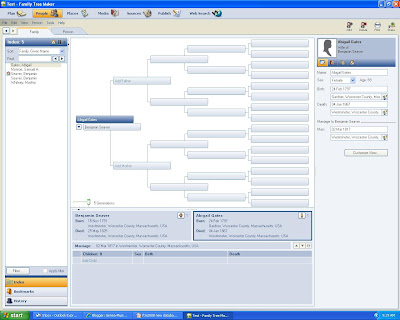
In the [People] icon screen and the Family view tab (which shows the pedigree chart), I can add a Child by clicking on the "Add Child" field below the word "Children" in the Family panel below the pedigree chart (see screen below):
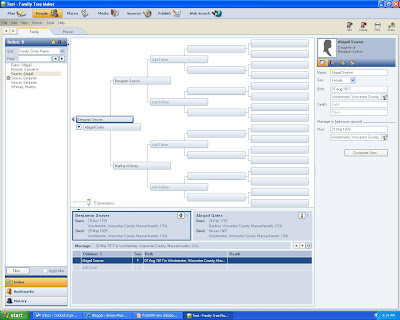
When I do that, I can type in the child's name, and when I click Enter the input boxes for that child opens in the right-hand panel. I can add the birth, marriage and death data for the Child, as shown below:
a) I could go to [Person] in the Menu line and click on "add Person" and then click on "Add Child" and a box to enter the Child's name will open.

Benjamin Seaver (1791-1825) and his wife Abigail Gates (1797-1867) had four children, and I wanted to add them one at a time to the family.
In the [People] icon screen and the Family view tab (which shows the pedigree chart), I can add a Child by clicking on the "Add Child" field below the word "Children" in the Family panel below the pedigree chart (see screen below):

When I do that, I can type in the child's name, and when I click Enter the input boxes for that child opens in the right-hand panel. I can add the birth, marriage and death data for the Child, as shown below:

In the [People] icon screen and the Person view Fact tab, I can add a Child to a family by two means:
a) I could go to [Person] in the Menu line and click on "add Person" and then click on "Add Child" and a box to enter the Child's name will open.
b) I could go to the Add icon on the top right of the Menu line and click it and click on "Add Child" and the same box will appear, as shown below:

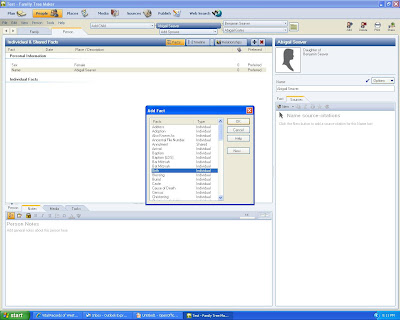
After I type in the Child's name, select Female from the Sex box, and click on OK, I get the Person page for the Child. Here, I can click on the + sign (Add a Fact) next to the [Relationships] tab and select Birth, Death or any other Fact. In the screen below, I'm about to Add a Birth fact.

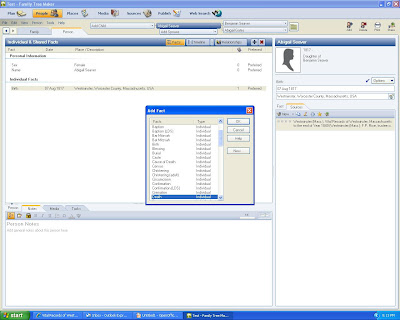
I added a birth date and birth place (using the drop down menu to insert the Place name, since I had already entered Westminster MA earlier for her father), and did the same exercise for the death date and place, choosing the Death item for the Fact:
I much prefer using the [Family] view screen method to the [Person] screen method to insert a New Child to a Family. Unfortunately, you can only do one child at a time (clicking New Child), rather than put all of the children and their birth and death dates/places in by a series of keystrokes and tabs (like in earlier FTM versions). When you're done with the first Child, then you have to click New Child to add the second Child.

I much prefer using the [Family] view screen method to the [Person] screen method to insert a New Child to a Family. Unfortunately, you can only do one child at a time (clicking New Child), rather than put all of the children and their birth and death dates/places in by a series of keystrokes and tabs (like in earlier FTM versions). When you're done with the first Child, then you have to click New Child to add the second Child.

If the Child has already been created, you can click once on the Child's name in the [Family] View and can add or edit the information in the right-hand panel. If you click twice on the Child's name in the [Family] view, you are taken to the [Person] view and can add Facts one at a time.
Adding all of the children, and their spouses, to a family takes some time - I'll try to estimate the time it takes in a future post. I think it probably takes less time to do it using the [Family] view than the [Person] view method.
In the next post, I'll explore the Places icon menu and options.
Previous posts in this series:
* Using FamilyTreeMaker 2008 - Post 1: Loading. Installing the program and uploading an existing database file.
* Using FamilyTreeMaker 2008 - Post 2: Exploring. Looking around the uploaded database file to see what the different views look like.
* Using FamilyTreeMaker 2008 - Post 4: Starting a New Tree. I started a new tree and added some people demonstrating the program options to do this.
* Using FamilyTreeMaker 2008 - Post 5: Adding a Source. I added sources to the Facts that I previously entered.
52nd Carnival of Genealogy - on AGE

The 52nd Edition of the Carnival of Genealogy has been posted by Lisa on her 100 Years in America blog - there are 29 entries on the subject of AGE in this Carnival here. Lisa did a wonderful job categorizing and summarizing the posts. Please spend some time reading the submissions.
My own article was Age - mind over matter?
The next edition of the Carnival of Genealogy will be a “carousel” edition - with a variety of topics. All subjects are welcome but please limit yourself to one submission. Submit any article you’d like (genealogy-related of course!) and if you'd like an introduction for it, please write your own. Jasia will be hosting the next edition on the Creative Gene blog but she won't be writing any introductions this time around. The deadline for submissions is August 1.
Submit your blog article using the carnival submission form. Past posts and future hosts can be found at the blog carnival index page. Want to know more about the Carnival of Genealogy? See Jasia's Frequently Asked Questions page.
My own article was Age - mind over matter?
The next edition of the Carnival of Genealogy will be a “carousel” edition - with a variety of topics. All subjects are welcome but please limit yourself to one submission. Submit any article you’d like (genealogy-related of course!) and if you'd like an introduction for it, please write your own. Jasia will be hosting the next edition on the Creative Gene blog but she won't be writing any introductions this time around. The deadline for submissions is August 1.
Submit your blog article using the carnival submission form. Past posts and future hosts can be found at the blog carnival index page. Want to know more about the Carnival of Genealogy? See Jasia's Frequently Asked Questions page.
Thursday, July 17, 2008
New Face on LDS FamilySearch.org site
The LDS genealogy web site http://www.familysearch.org/ has had a makeover - it now looks like this:

On the [Search] drop-down menu, you can select
* Advanced Search - it's the same old terrible search engine
* Record Search Pilot - looks like there are new and updated databases
* Library Catalog - looks the same as before
* BYU Archives - looks the same as before
* Web Sites - looks the same, I think.
The other menu items on the top line are Index Records, Research Helps, Library, Share and Help.
Is this the start of the New FamilySearch? At least it looks a little more modern.
* Advanced Search - it's the same old terrible search engine
* Record Search Pilot - looks like there are new and updated databases
* Library Catalog - looks the same as before
* BYU Archives - looks the same as before
* Web Sites - looks the same, I think.
The other menu items on the top line are Index Records, Research Helps, Library, Share and Help.
Is this the start of the New FamilySearch? At least it looks a little more modern.
Hat tip to Hugh Watkins at Genealoge.
NGSQ Table of Contents - June 2008 issue
The June 2008 issue of the National Genealogical Society Quarterly (Volume 96, Number 2) came last week, and I enjoyed reading the articles and seeing what new books were reviewed.
The Table of Contents includes:
FEATURE ARTICLES:
* Catherine (nee Keller) (Kuhnley) Wolfe of Pennsylvania: Three Decades Missing by Judy Kellar Fox, CG - page 85
* The Three Identities of Charles D. McLain of Muskegon, Michigan by Thomas W. Jones, Ph.D., CG, CGL, FASG - page 101
* Tracing the Llavina Costa Family of Catalonia, Spain: Unexpected Findings in an Unexpected Source by Peggy Ryskamp, CG - page 121
* Caspar Diderich Jager and "Heinrich" Jager of St. Louis: One Man or Two? by Carolyn L. Whitton, CG - page 129
NOTES AND DOCUMENTS:
* Maritime Proofs of Citizenship: The Essential Evidence behind Seamen's Protection Certificates, 1792-1875 by John P. Deeben - page 139.
REVIEWS:
* Knowing Who I Am: A Black Entrepreneur's Struggle and Success in the American South, by Earl M. Middleton with Joy W. Barnes, 2008.
* One Drop: My Father's Hidden Life - A Story of Race and Family Secrets, by Bliss Broyard, 2007.
* Fear in North Carolina: The Civil War Journals and Letters of the Henry Family, compiled and edited by Karen L. Clinard and Richard Russell, 2008.
* Finding Your Canadian Ancestors: A Beginner's Guide, by Sherry Irvine and Dave Obee, 2007.
* The Great Landowners of Great Britain and Ireland: A List of all Owners of Three Thousand Acres and Upwards, worth L3,000 a Year..., by John Bateman, 1883, CDROM.
* The Landowners of Ireland, an Alphabetical List of the Owners of Estates of 500 Acres or 500 Valuation and upwards..., by U.H. Hussey De Burgh, 1878, CDROM.
-----------------------------
I noticed that the first feature article, by Judy Kellar Fox, is available on the BCG web site page for sample application portfolios - the PDF of the article is at Case Study: Conflicting or Indirect Evidence.
The Table of Contents includes:
FEATURE ARTICLES:
* Catherine (nee Keller) (Kuhnley) Wolfe of Pennsylvania: Three Decades Missing by Judy Kellar Fox, CG - page 85
* The Three Identities of Charles D. McLain of Muskegon, Michigan by Thomas W. Jones, Ph.D., CG, CGL, FASG - page 101
* Tracing the Llavina Costa Family of Catalonia, Spain: Unexpected Findings in an Unexpected Source by Peggy Ryskamp, CG - page 121
* Caspar Diderich Jager and "Heinrich" Jager of St. Louis: One Man or Two? by Carolyn L. Whitton, CG - page 129
NOTES AND DOCUMENTS:
* Maritime Proofs of Citizenship: The Essential Evidence behind Seamen's Protection Certificates, 1792-1875 by John P. Deeben - page 139.
REVIEWS:
* Knowing Who I Am: A Black Entrepreneur's Struggle and Success in the American South, by Earl M. Middleton with Joy W. Barnes, 2008.
* One Drop: My Father's Hidden Life - A Story of Race and Family Secrets, by Bliss Broyard, 2007.
* Fear in North Carolina: The Civil War Journals and Letters of the Henry Family, compiled and edited by Karen L. Clinard and Richard Russell, 2008.
* Finding Your Canadian Ancestors: A Beginner's Guide, by Sherry Irvine and Dave Obee, 2007.
* The Great Landowners of Great Britain and Ireland: A List of all Owners of Three Thousand Acres and Upwards, worth L3,000 a Year..., by John Bateman, 1883, CDROM.
* The Landowners of Ireland, an Alphabetical List of the Owners of Estates of 500 Acres or 500 Valuation and upwards..., by U.H. Hussey De Burgh, 1878, CDROM.
-----------------------------
I noticed that the first feature article, by Judy Kellar Fox, is available on the BCG web site page for sample application portfolios - the PDF of the article is at Case Study: Conflicting or Indirect Evidence.
Webinar scheduled for New Ancestry Search
I received an email from Ancestry saying:
----------------------------
We’re holding a public webinar on Wednesday, July 30, at 8:30 pm ET for anyone who is interested in learning more about how to use the new search on Ancestry.com. Geared toward intermediate and advanced researchers, the webinar will focus on how to use the tools in Ancestry.com’s new search:
* Record Previews
* Image Snapshots
* Refined Searches
* Type-ahead Tools
* Global Searches
* Advanced Searches
* Filters
* Keyword Searches
Kendall Hulet, Director of Product Management for Ancestry.com, will host this webinar. Kendall has worked specifically on product searches for a few years at Ancestry.com.
Anyone can register to attend the webinar by visiting: http://event.on24.com/r.htm?e=112633&s=1&k=F61A5B2CBEC642037CADDF67687EA541. The webinar is open to everyone; you do not have to be a member of Ancestry.com to register for or attend the webinar.
---------------------------------------
I've participated in one of the Ancestry webinars before, and have viewed/listened to several others on Ancestry after the "live" presentation. The benefit of participating is to be able to ask questions and give feedback. The webinars are worthwhile, IMHO.
----------------------------
We’re holding a public webinar on Wednesday, July 30, at 8:30 pm ET for anyone who is interested in learning more about how to use the new search on Ancestry.com. Geared toward intermediate and advanced researchers, the webinar will focus on how to use the tools in Ancestry.com’s new search:
* Record Previews
* Image Snapshots
* Refined Searches
* Type-ahead Tools
* Global Searches
* Advanced Searches
* Filters
* Keyword Searches
Kendall Hulet, Director of Product Management for Ancestry.com, will host this webinar. Kendall has worked specifically on product searches for a few years at Ancestry.com.
Anyone can register to attend the webinar by visiting: http://event.on24.com/r.htm?e=112633&s=1&k=F61A5B2CBEC642037CADDF67687EA541. The webinar is open to everyone; you do not have to be a member of Ancestry.com to register for or attend the webinar.
---------------------------------------
I've participated in one of the Ancestry webinars before, and have viewed/listened to several others on Ancestry after the "live" presentation. The benefit of participating is to be able to ask questions and give feedback. The webinars are worthwhile, IMHO.
Using FamilyTreeMaker 2008 - Post 5: Adding a Source
I installed FamilyTreeMaker 2008 two weeks ago and uploaded a large database, as described in Post 1. I went exploring in FTM 2008 after uploading the database in Post 2. In Post 3, I described all of the Menu options (except for the [Person] [Place] [Media] [Sources] [Publish] and [Web Search], and in Post 4 I started a new tree and added some people to it.
In this post, I'm going to add a source to an event in my new family tree.
In the last post, I had added Benjamin Seaver (1791-1825), his parents and his spouse, Abigail Gates (1797-1867). I wanted to add source information to the birth, marriage and death information for Benjamin and Abigail to my database. In the [People] icon screen and the [Person] view [Facts] frame, I clicked on the "New" button in the [Source] tab in the right hand panel. An input box popped up and I entered the title of the source, "Vital Records of Westminster, Massachusetts to the End of Year 1849." and clicked the "Edit" button next to the information. A small box popped up over the input box asking "Create a new source?" and I checked the box "Edit source now?" The screen looks like this at this point.

When I checked "Edit screen now?" and clicked "OK," a second window input box opened to fill out with the rest of the source information - the Author/Originator, Publisher, Publisher location, Publish date, Source Repository, Call number, and Comments. I filled in what I knew about this source, including the Citation detail (such as the page number) in the first input box. For the Repository entry, I entered NEHGS and clicked the Edit button to add more repository information, as shown in the screen below (all three input screens are shown):
In this post, I'm going to add a source to an event in my new family tree.
In the last post, I had added Benjamin Seaver (1791-1825), his parents and his spouse, Abigail Gates (1797-1867). I wanted to add source information to the birth, marriage and death information for Benjamin and Abigail to my database. In the [People] icon screen and the [Person] view [Facts] frame, I clicked on the "New" button in the [Source] tab in the right hand panel. An input box popped up and I entered the title of the source, "Vital Records of Westminster, Massachusetts to the End of Year 1849." and clicked the "Edit" button next to the information. A small box popped up over the input box asking "Create a new source?" and I checked the box "Edit source now?" The screen looks like this at this point.

When I checked "Edit screen now?" and clicked "OK," a second window input box opened to fill out with the rest of the source information - the Author/Originator, Publisher, Publisher location, Publish date, Source Repository, Call number, and Comments. I filled in what I knew about this source, including the Citation detail (such as the page number) in the first input box. For the Repository entry, I entered NEHGS and clicked the Edit button to add more repository information, as shown in the screen below (all three input screens are shown):

After I had filled in all the information, I clicked on OK in all open screen boxes and another screen box opened for input of the source rating for this source. I clicked the buttons for Source:Derivative (not Original); Clarity:Clear (not Marginal); Information: Primary (not Secondary); and Evidence:Direct (not Incorrect). The box appears in the screen below:

The source citation format used by the program also appears under the "Source" heading in the right-hand screen panel.
Under the "Source" heading, there are icons to create a New source, Copy this source citation, Edit this source citation, Unlink this citation, Rate this citation, or View the usage of this source citation.
If I am adding a Source citation to an unsourced Fact, I can click on the down arrow next to the New button and select from Add New Source Citation or Use Existing Source Citation. If I select Use Existing source citation, I get a list of previously entered source citations; these previously used source citations may be duplicated if there are different Citation details input for a given Source.
The Source entry process is fairly clear and easy to use. Editing a source is easy to do also. I really prefer this source entry capability over the source entry in earlier versions of FTM.
In the next post, I'll explore adding children to a family, their Facts and adding a Spouse to one of them.
Previous posts in this series:
* Using FamilyTreeMaker 2008 - Post 1: Loading. Installing the program and uploading an existing database file.
* Using FamilyTreeMaker 2008 - Post 2: Exploring. Looking around the uploaded database file to see what the different views look like.
* Using FamilyTreeMaker 2008 - Post 3: The Menus. Most of the menus were itemized and described.
* Using FamilyTreeMaker 2008 - Post 4: Starting a New Tree. I started a new tree and added some people demonstrating the program options to do this.
Subscribe to:
Posts (Atom)