The July meeting of the Chula Vista Genealogical Society Research Group was today at the Library. There were 13 attendees at this meeting, and they all had something to share.
We started with introductions, and welcomed two visitors (Frances from Chula Vista, and Cynthia from Washington DC) and Ellie, a member from the Bay Area. We started with asking the attendees what genealogy activities they've done this past month:
* Randy discussed attending the SCGS Genealogy Jamboree in Burbank, and passed the syllabus around plus his blog posts about the Jamboree. He also showed the Google Maps Street Views and how it can be used to view ancestral homes.
* Dave found a cousin in Georgia and they've been sharing lots of information about their families.
* Jeanne found some cousins addresses using www.whitepages.com and found them on Google maps. David (10 years old) read the book Private Eyes for Idiots and wants to apply the lessons to genealogy research.
* Ellie has been working through her late mother's scrapbooks, and shared a postcard in German. She is putting a book together using Microsoft Publishing.
* Cynthia has been visiting the DAR library and the Archives in Washington, DC, but has had trouble finding information about her Russian ancestors.
* Marie has been talking to a Nebraska home town neighbor of her parents, who shared lots of juicy stories about her mother and her siblings as teenagers.
* Virginia enjoyed the SCGS Jamboree, especially the Naturalization and Genealogy Organization talks. She contributed information to a family newsletter editor.
* Shirley also enjoyed the Jamboree, and after hearing Leland Meitzler's talk about "Genealogy Organization in the 21st Century," she bought a 500 gb hard derive and has started building her digital archive of documents.
* Dick received the NPRC information about his father's WW 1 Army service - there were only four pages because of the fire in 1973.
* Frances is just starting her research, and has visited Santa Barbara to find cemetery records and has talked to her grandparents about their family.
* Bob found a 1920 picture and article on the San Diego Historical Society web site about his great-grandfather who settled near Julian in San Diego County and had a store in Ensenada in Baja California. He also obtained an enlistment record for him in the Spanish-American War that said he was blue-eyed, not brown-eyed. Now Bob knows where all the blue eyes in his extended family came from!
* Nancy is wondering how to find a family Bible with the names and dates of one of her families. She has a typed piece of paper from the Bible records, but would like to find the Bible.
Randy briefly discussed the Genealogy News of the month.
Ellie asked the group to help her find more records of Bernhart Heinrich Kopcke, her grandmother's older brother. She thinks he was born before 1880, emigrated from Germany after 1880, and died around 1900, but has a photograph with his name on the back that shows an older man. He lived in Arkansas and Texas for some period. She has checked several online resources, including passenger lists, 1900 census records and the FHL Catalog. The group suggested posting to surname and locality mailing lists and message boards, looking in the 1910 census in case he "went missing," doing dating of the clothing in the picture, naturalization records, and a name change.
The CVGS Research Group meets every second Wednesday at 12 noon in the Conference Room at the Chula Vista Civic Center Branch Library.
Wednesday, July 9, 2008

Genea-Musings Readability
John Newmark on his Transylvanian Dutch blog has used the Readability tests found at Juicy Studio (http://juicystudio.com/services/readability.php) to determine the readability of his blog content. He found that his blog has a 6th to 10th grade reading level, about what Time and Newsweek magazines have.
What about Genea-Musings? What reading level are my posts? Am I too prolix? Too terse (yeah, that'll be the day!). Taking John's cue, I chose one month of posts from my Archives - June 2008 - that I think are fairly representative. Here is what I found:
Readability Results
The following table contains the readability results for http://www.geneamusings.com/2008_06_01_archive.html .
Total sentences -- 2888
Total words -- 39928
Average words per Sentence -- 13.83
Words with 1 Syllable -- 26476
Words with 2 Syllables -- 8041
Words with 3 Syllables -- 3670
Words with 4 or more Syllables -- 1741
Percentage of word with three or more syllables -- 13.55%
Average Syllables per Word -- 1.52
Gunning Fog Index -- 10.95
Flesch Reading Ease -- 64.55
Flesch-Kincaid Grade -- 7.69
The key readability scales are the last three:
The Gunning Fog Index relates the reading level to the years of school required to understand the content. My Fog Index of 10.95 means it takes a high school education to understand Genea-Musings - of course, many readers will debate that! 10.95 corresponds to the Wall Street Journal level of writing.
The Flesch Reading Ease of 64.55 is right in the middle of the 60 to 70 range recommended for authors to aim for. The Flesch-Kincaid Grade is another grade level indicator - my 7.69 means a 7th or 8th grade education is required.
What is the Gunning Fog Index for other bloggers (using their current blog page):
* Dick Eastman -- 10.29
* Leland Meitzler -- 10.10
* Juliana Smith -- 10.42
* DearMYRTLE -- 11.72
* Chris Dunham -- 12.22
* Terry Thornton - 9.73
* Jasia - 10.65
I wonder if any genea-blogger can top Chris's score?
Enough! Thanks, John, for finding another time-waster!
What about Genea-Musings? What reading level are my posts? Am I too prolix? Too terse (yeah, that'll be the day!). Taking John's cue, I chose one month of posts from my Archives - June 2008 - that I think are fairly representative. Here is what I found:
Readability Results
The following table contains the readability results for http://www.geneamusings.com/2008_06_01_archive.html .
Total sentences -- 2888
Total words -- 39928
Average words per Sentence -- 13.83
Words with 1 Syllable -- 26476
Words with 2 Syllables -- 8041
Words with 3 Syllables -- 3670
Words with 4 or more Syllables -- 1741
Percentage of word with three or more syllables -- 13.55%
Average Syllables per Word -- 1.52
Gunning Fog Index -- 10.95
Flesch Reading Ease -- 64.55
Flesch-Kincaid Grade -- 7.69
The key readability scales are the last three:
The Gunning Fog Index relates the reading level to the years of school required to understand the content. My Fog Index of 10.95 means it takes a high school education to understand Genea-Musings - of course, many readers will debate that! 10.95 corresponds to the Wall Street Journal level of writing.
The Flesch Reading Ease of 64.55 is right in the middle of the 60 to 70 range recommended for authors to aim for. The Flesch-Kincaid Grade is another grade level indicator - my 7.69 means a 7th or 8th grade education is required.
What is the Gunning Fog Index for other bloggers (using their current blog page):
* Dick Eastman -- 10.29
* Leland Meitzler -- 10.10
* Juliana Smith -- 10.42
* DearMYRTLE -- 11.72
* Chris Dunham -- 12.22
* Terry Thornton - 9.73
* Jasia - 10.65
I wonder if any genea-blogger can top Chris's score?
Enough! Thanks, John, for finding another time-waster!
"In, About and Around San Diego" Program at SDGS on Saturday, 12 July
The San Diego Genealogical Society meeting on Saturday, 12 July will feature the annual Ice Cream Social and Ken Kramer's "In, About, and Around San Diego" video program.
The meeting will be at St. Andrew's Lutheran Church, located at 8350 Lake Murray Blvd. (at Jackson Drive) in San Diego. The meeting will start at 12 noon. There will be a break for the Ice Cream at about 1 p.m.
The program description and Ken Kramer's CV reads:
"Do you enjoy stories about San Diego the way it used to be -- stories that recount the unusual, the little known anecdotes that make the history of our city so interesting? If so, don't miss Ken Kramer's talk about the people and history of the place we call home. He takes a look at the funny, odd, and fascinating things that make our region unique in his light-hearted, humorous manner that has earned him many broadcast awards.
"Mr. Kramer hosts the 'About San Diego' broadcast every Sunday at 6 p.m. on NBC (channel 7/39). He began telling stories about San Diego on KSDO-AM radio during the morning and 'drive-time' afternoon broadcasts back in 1985. For the next 14 years, it was a daily listening mainstay for thousands of San Diegans, winning 'Golden Mike' and San Diego Press Club and other awards. In 1994, Mr. Kramer brought his historical video vignettes to NBC 7/39 which are still broadcast on the 'News at 11' each Friday night (and repeated on the Saturday and Sunday morning news). They have won four Emmy Awards."
At the Ice Cream Social, you can order up your own ice cream sundae with all the fixings. Different ice cream flavors will be $1 per scoop and each topping will be 25 cents. The big decision will be whether to have 1, 2 or 3 scoops - and is that with sprinkles, fudge or caramel? This will be a great way to cool down and enjoy the summer.
NOTE: Previously published in the San Diego Genealogical Society Newsletter, Volume 41, Number 6, July 2008.
I am really looking forward to this meeting. I look forward to being a 3-scooper and support my society! I watch Ken Kramer as often as I can, and will enjoy his presentation.
The meeting will be at St. Andrew's Lutheran Church, located at 8350 Lake Murray Blvd. (at Jackson Drive) in San Diego. The meeting will start at 12 noon. There will be a break for the Ice Cream at about 1 p.m.
The program description and Ken Kramer's CV reads:
"Do you enjoy stories about San Diego the way it used to be -- stories that recount the unusual, the little known anecdotes that make the history of our city so interesting? If so, don't miss Ken Kramer's talk about the people and history of the place we call home. He takes a look at the funny, odd, and fascinating things that make our region unique in his light-hearted, humorous manner that has earned him many broadcast awards.
"Mr. Kramer hosts the 'About San Diego' broadcast every Sunday at 6 p.m. on NBC (channel 7/39). He began telling stories about San Diego on KSDO-AM radio during the morning and 'drive-time' afternoon broadcasts back in 1985. For the next 14 years, it was a daily listening mainstay for thousands of San Diegans, winning 'Golden Mike' and San Diego Press Club and other awards. In 1994, Mr. Kramer brought his historical video vignettes to NBC 7/39 which are still broadcast on the 'News at 11' each Friday night (and repeated on the Saturday and Sunday morning news). They have won four Emmy Awards."
At the Ice Cream Social, you can order up your own ice cream sundae with all the fixings. Different ice cream flavors will be $1 per scoop and each topping will be 25 cents. The big decision will be whether to have 1, 2 or 3 scoops - and is that with sprinkles, fudge or caramel? This will be a great way to cool down and enjoy the summer.
NOTE: Previously published in the San Diego Genealogical Society Newsletter, Volume 41, Number 6, July 2008.
I am really looking forward to this meeting. I look forward to being a 3-scooper and support my society! I watch Ken Kramer as often as I can, and will enjoy his presentation.
Tuesday, July 8, 2008
Enea-Musingsgay
Well, footnoteMaven has done it again - she told us not to read her post titled Do Not, I Repeat, do Not Read This Post. She links to a Dialectizer that turns written words into words written in several dialects - including Redneck, Moron, Jive, Cockney, Elmer Fudd, Sweidsh Chef, Pig Latin and Hacker.
I couldn't resist, of course, and dialectized my Geneaholic blog posts - here's yesterday's post.
Ondaymay, Ulyjay 7, 2008
Enealogygay Ournaljay - 07/07/08
Iyay ayedstay omehay odaytay otay ytray otay atchcay upyay onyay omesay enealogygay orkway. Audreyyay idn'tday akeway upyay untilyay 9:30, osay Iyay adhay ymay emailyay andyay ogsblay eadray, andyay asway almostyay oneday ithway ymay "Ancestryyay Ensuscay Indexingyay errorsyay" ostpay enwhay utyday alledcay - otay oldhay erhay ilewhay Amitay ackedpay upyay. Eythay eftlay atyay 11, utbay Iyay otgay ymay ourhay ofyay ovinglay ayay 2-onthmay oldyay inyay. Iyay amecay ackbay otay ethay omputercay, andyay ostedpay "Ancay Youray Oftwaresay Oday Isthay? - Eriessay 3: AFPAY/AQyay" ourtesycay ofyay Amuratay Onesjay.
It will take some time for me to learn to write my blog posts in anything but Seaverspeak. What I really need is a reverse dialectizer that translates what I write into readable prose.
Thanks, footnoteMaven for another great time waster.
PS. wow - you should see what the spell-checker thought about this post!
I couldn't resist, of course, and dialectized my Geneaholic blog posts - here's yesterday's post.
Ondaymay, Ulyjay 7, 2008
Enealogygay Ournaljay - 07/07/08
Iyay ayedstay omehay odaytay otay ytray otay atchcay upyay onyay omesay enealogygay orkway. Audreyyay idn'tday akeway upyay untilyay 9:30, osay Iyay adhay ymay emailyay andyay ogsblay eadray, andyay asway almostyay oneday ithway ymay "Ancestryyay Ensuscay Indexingyay errorsyay" ostpay enwhay utyday alledcay - otay oldhay erhay ilewhay Amitay ackedpay upyay. Eythay eftlay atyay 11, utbay Iyay otgay ymay ourhay ofyay ovinglay ayay 2-onthmay oldyay inyay. Iyay amecay ackbay otay ethay omputercay, andyay ostedpay "Ancay Youray Oftwaresay Oday Isthay? - Eriessay 3: AFPAY/AQyay" ourtesycay ofyay Amuratay Onesjay.
It will take some time for me to learn to write my blog posts in anything but Seaverspeak. What I really need is a reverse dialectizer that translates what I write into readable prose.
Thanks, footnoteMaven for another great time waster.
PS. wow - you should see what the spell-checker thought about this post!
Can Your Software Do This? - Series 3: Legacy Family Tree
I posted my latest genealogy software question on 6 July - Can your genealogy software provide a list or report with the ages at death of selected people in your database? Preferably the ancestors of a person, in descending order from most years to fewest years. Or just the top 20 persons, say.
Reader Don emailed me with his method of generating a list of ancestors with their Age at Death for Legacy Family Tree 6 (and it seems to be essentially the same for Legacy Family Tree 7). In order to get only my ancestors, I had to add several steps to Don's list, and to get the Age at Death I had to add a step. I have highlighted my additions to Don's steps in the list below, and modified the formatting a bit (to eliminate HTML things):
* Select the person you want the list of Age of ancestors for. I picked myself and put me in the primary position.
* Click on the [Name List] icon in the top icon row
* Click on the [Options] button on the Name List screen
* Click on the [Advanced Tagging] item
* Click on the [Ancestors] button
* In the [Ancestors Options] screen, click "Direct Line" and unclick the "Include Other Spouses," "Include Siblings," "Entire ancestor Line" and the "Include Multiple Parents" boxes. Click [OK]
* In the {Advanced Tagging] screen, type in a description for your tag. Note the Tag number you created. Mine was Tag 1.
* Click on [Close]
* Click on the [Show All Tagged] item and select the Tag number you created.
* Click on [Close]
The Name list on the Search List screen should show all of the Tagged Individuals.
* Click on the [Close] button.
* Click the [Search] button on the top icon row
* Select the [Detailed Search] tab on the Search screen
There are three sets of boxes here - the Primary Condition, Second and Third conditions. For the Primary Condition:
* In the [Look for whom] box select – Individual
* In the [Where to look] box select – Birth
* In the [How to look] box select – before
* In the [What to look for] box, type in "2007"
For the Second Condition:
* click the box for the "Second Condition" and "And"
* In the [Look for whom] box select – individual
* In the [Where to look] box select – death date
* In the [How to look] box select – before
* In the [What to look for] box, enter – "2007"
* Select [Create List] button on the Search screen.
* Select the [Search] button
* Click on the [Show All Tagged] item and select the Tag number you created.
The list of tagged people will be in the left-hand list.
* Click the [Print] button on the Search List screen
The List Reports Options screen will now appear
* Click on the [Options] tab
* Select a title = what you want included. I typed in "Age at Death Report" and unclicked all of the other option buttons.
* Click on the [*Row 1] tab
* I selected and set up the following
** Surname, given names; sex; Birth Date; Age at Death; Death Date; and Spouse.
** You can add other items via 2 more rows of settings and addition to the report if you so desire.
** You may have to use the [Customize ...] button in order to get the "Age at Death" item on the list.
* To preview the report, click on the [Preview] button in the upper right hand corner of the List Report Options screen. Don't click on the [Print] button until you want to print the report! You can also [Save] the report.
My list of 1,995 individuals took almost 100 seconds to create. It opened in a report format 197 pages long, with 10 persons on each page. There are page format options that would probably reduce the page count.
The list was in alphabetical order, not in Age at Death order. The persons without either a birth date or a death date were included.
Perhaps there is another keystroke sequence to get the report in an "Age at Death" sequence - if a reader can tell me how to do that, I will add it to this post.
Reader Geoff left a comment that listed:
1) Open the Name List by clicking on the [Name List] button.
2) Click on the [Print] button.
3) Click on the [Customize] button, select a field name to replace by clicking on the [...] button, then select "Age At Death."
4) Preview the report.
That works (with many intermediate clicks as noted above) - but you get everybody in your database on the list (I let it work for two minutes and it was 1,200 pages long and still going!). I think that you have to tag "Ancestors" in order to get an ancestors-only list.
Thank you to Don and Geoff for leading me through this. Which genealogy software will be next?
UPDATED 10 p.m.: Tamura emailed that I missed a step - so I added the [Ancestors Options] line and edited several more. This is not easy to do - I switch back and forth between Blogger and the software program and it's easy to miss a step while reconstructing the process. Thanks, Tamura.
Reader Don emailed me with his method of generating a list of ancestors with their Age at Death for Legacy Family Tree 6 (and it seems to be essentially the same for Legacy Family Tree 7). In order to get only my ancestors, I had to add several steps to Don's list, and to get the Age at Death I had to add a step. I have highlighted my additions to Don's steps in the list below, and modified the formatting a bit (to eliminate HTML things):
* Select the person you want the list of Age of ancestors for. I picked myself and put me in the primary position.
* Click on the [Name List] icon in the top icon row
* Click on the [Options] button on the Name List screen
* Click on the [Advanced Tagging] item
* Click on the [Ancestors] button
* In the [Ancestors Options] screen, click "Direct Line" and unclick the "Include Other Spouses," "Include Siblings," "Entire ancestor Line" and the "Include Multiple Parents" boxes. Click [OK]
* In the {Advanced Tagging] screen, type in a description for your tag. Note the Tag number you created. Mine was Tag 1.
* Click on [Close]
* Click on the [Show All Tagged] item and select the Tag number you created.
* Click on [Close]
The Name list on the Search List screen should show all of the Tagged Individuals.
* Click on the [Close] button.
* Click the [Search] button on the top icon row
* Select the [Detailed Search] tab on the Search screen
There are three sets of boxes here - the Primary Condition, Second and Third conditions. For the Primary Condition:
* In the [Look for whom] box select – Individual
* In the [Where to look] box select – Birth
* In the [How to look] box select – before
* In the [What to look for] box, type in "2007"
For the Second Condition:
* click the box for the "Second Condition" and "And"
* In the [Look for whom] box select – individual
* In the [Where to look] box select – death date
* In the [How to look] box select – before
* In the [What to look for] box, enter – "2007"
* Select [Create List] button on the Search screen.
* Select the [Search] button
* Click on the [Show All Tagged] item and select the Tag number you created.
The list of tagged people will be in the left-hand list.
* Click the [Print] button on the Search List screen
The List Reports Options screen will now appear
* Click on the [Options] tab
* Select a title = what you want included. I typed in "Age at Death Report" and unclicked all of the other option buttons.
* Click on the [*Row 1] tab
* I selected and set up the following
** Surname, given names; sex; Birth Date; Age at Death; Death Date; and Spouse.
** You can add other items via 2 more rows of settings and addition to the report if you so desire.
** You may have to use the [Customize ...] button in order to get the "Age at Death" item on the list.
* To preview the report, click on the [Preview] button in the upper right hand corner of the List Report Options screen. Don't click on the [Print] button until you want to print the report! You can also [Save] the report.
My list of 1,995 individuals took almost 100 seconds to create. It opened in a report format 197 pages long, with 10 persons on each page. There are page format options that would probably reduce the page count.
The list was in alphabetical order, not in Age at Death order. The persons without either a birth date or a death date were included.
Perhaps there is another keystroke sequence to get the report in an "Age at Death" sequence - if a reader can tell me how to do that, I will add it to this post.
Reader Geoff left a comment that listed:
1) Open the Name List by clicking on the [Name List] button.
2) Click on the [Print] button.
3) Click on the [Customize] button, select a field name to replace by clicking on the [...] button, then select "Age At Death."
4) Preview the report.
That works (with many intermediate clicks as noted above) - but you get everybody in your database on the list (I let it work for two minutes and it was 1,200 pages long and still going!). I think that you have to tag "Ancestors" in order to get an ancestors-only list.
Thank you to Don and Geoff for leading me through this. Which genealogy software will be next?
UPDATED 10 p.m.: Tamura emailed that I missed a step - so I added the [Ancestors Options] line and edited several more. This is not easy to do - I switch back and forth between Blogger and the software program and it's easy to miss a step while reconstructing the process. Thanks, Tamura.
Wordle -- be creative!
OK, who got me hooked on Wordle? Was it Janet the Researcher? FootnoteMaven? Miriam Midkiff? Yep - all of the above, and more!
Here's my first attempt at a surname cloud - my ancestral names of course:

I tried to do a Genea-Musings cloud and it picked up words from the latest posts. As shown below:

Here's a prospective advertising Wordle for my genealogy cave:

The default is that the more times a word is used, the larger it will be in print. There is a choice of fonts and colors to choose from.
You can enter an URL for a blog or web site, or you can enter a series of words of your choice. The only way I've found to save the words of your choice is to copy them into a file before you create the Wordle graphic.
You have to save your Wordle to the Gallery in order to obtain the code to put it in your blog.
I didn't find an easy way to capture the image other than to do a screen capture.
FootnoteMaven suggested putting these on T-shirts. A person could use it to publicize their web site or company. A society could use it to publicize their resources or capabilities. Lots of possibilities here!
This is addictive... thanks to my fellow (hmmm, they're all female so far, what's the female complement to "fellow"?) genea-bloggers for making me spend a little time having fun.
Here's my first attempt at a surname cloud - my ancestral names of course:
I tried to do a Genea-Musings cloud and it picked up words from the latest posts. As shown below:
Here's a prospective advertising Wordle for my genealogy cave:
The default is that the more times a word is used, the larger it will be in print. There is a choice of fonts and colors to choose from.
You can enter an URL for a blog or web site, or you can enter a series of words of your choice. The only way I've found to save the words of your choice is to copy them into a file before you create the Wordle graphic.
You have to save your Wordle to the Gallery in order to obtain the code to put it in your blog.
I didn't find an easy way to capture the image other than to do a screen capture.
FootnoteMaven suggested putting these on T-shirts. A person could use it to publicize their web site or company. A society could use it to publicize their resources or capabilities. Lots of possibilities here!
This is addictive... thanks to my fellow (hmmm, they're all female so far, what's the female complement to "fellow"?) genea-bloggers for making me spend a little time having fun.
Monday, July 7, 2008
Hudson and Mohawk Valley Genealogies
I'm trying to fill in narrative data for some of my ancestral families that are in my database, but are unsourced in my database. For most of these families, I obtained family trees or narrative data from other researchers many years ago, and I also have "paper" from derivative books for many of these in notebooks on my bookcases in my genealogy cave.
I have quite a few Dutch and English families who immigrated into the Hudson and Mohawk valleys in the 1600's and early 1700's. There are several well-known books that summarize these families, and some of them are transcribed and available on several web sites.
The most useful ones to me today were found on the excellent USGenWeb site for Schenectady County, New York Genealogy and History, at http://www.schenectadyhistory.org. Here there are links to:
1) The People link has the following databases available:
** Genealogies of Schenectady County families
** Jonathan Pearson's Genealogies of the First Settlers of Schenectady
** Schenectady families in Hudson-Mohawk Genealogical and Family Memoirs
** Surnames of Schenectady County Families (from the family files of the Historical Society)
** Congressional Representatives serving Schenectady County
** New York State Senators serving Schenectady County
** New York State Assembly Members serving Schenectady County
** Officials of the City of Schenectady
** Our Hall of Fame (1938)
** List of Pensioners on the Roll 1883
The Jonathan Pearson books on the First Settlers of Schenectady families and the Hudson-Mohawk Genealogical Family Memoirs were the most useful to me today. The latter work has an overall surname index, and is separated by counties of the Hudson and Mohawk region. Volume IV is not completely online yet - the list of surnames not covered is here.
2) Places
3) Research Topics
4) Books -- There is an excellent bibliography of Schenectady area books.
5) Research Sites -- records available, researchers and repositories.
This web site is a marvelous help to researchers like me who are trying to understand the history, geography, commerce and other features of this area, and how my ancestral families lived in this area.
If you have Schenectady area ancestry, and haven't visited this web page recently, you should!
I have quite a few Dutch and English families who immigrated into the Hudson and Mohawk valleys in the 1600's and early 1700's. There are several well-known books that summarize these families, and some of them are transcribed and available on several web sites.
The most useful ones to me today were found on the excellent USGenWeb site for Schenectady County, New York Genealogy and History, at http://www.schenectadyhistory.org. Here there are links to:
1) The People link has the following databases available:
** Genealogies of Schenectady County families
** Jonathan Pearson's Genealogies of the First Settlers of Schenectady
** Schenectady families in Hudson-Mohawk Genealogical and Family Memoirs
** Surnames of Schenectady County Families (from the family files of the Historical Society)
** Congressional Representatives serving Schenectady County
** New York State Senators serving Schenectady County
** New York State Assembly Members serving Schenectady County
** Officials of the City of Schenectady
** Our Hall of Fame (1938)
** List of Pensioners on the Roll 1883
The Jonathan Pearson books on the First Settlers of Schenectady families and the Hudson-Mohawk Genealogical Family Memoirs were the most useful to me today. The latter work has an overall surname index, and is separated by counties of the Hudson and Mohawk region. Volume IV is not completely online yet - the list of surnames not covered is here.
2) Places
3) Research Topics
4) Books -- There is an excellent bibliography of Schenectady area books.
5) Research Sites -- records available, researchers and repositories.
This web site is a marvelous help to researchers like me who are trying to understand the history, geography, commerce and other features of this area, and how my ancestral families lived in this area.
If you have Schenectady area ancestry, and haven't visited this web page recently, you should!
Can Your Software Do This? - Series 3: PAF/AQ
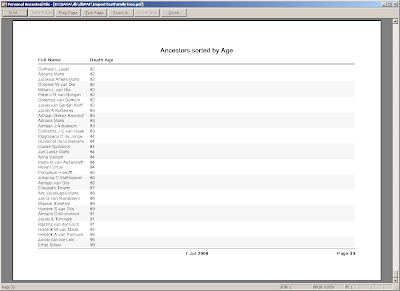
I posted my latest genealogy software question on 6 July - Can your genealogy software provide a list or report with the ages at death of selected people in your database? Preferably the ancestors of a person, in order from most years to fewest years. Or just the top 20 persons, say.
Here is how reader Tamura Jones made a custom report in Personal Ancestral File 5 to make a list of ancestors and their age at death:
======================
Here's how to do it in PAF. Reports in Ancestral Quest are practically identical.
* Choose File Print Reports (PAF's programmers apparently think reports are always printed)
* Choose the Custom tab to create a custom report
* There are four steps:
1. Choosing the persons
2. Choosing the fields
3. Choosing the sort order
...to get to
4. Viewing the results
Step 1. Choosing the persons
** Hit the Select button to select the person and his ancestors
** Choose the proband from the list, by name or by number
** Choose "Ancestors" from the drop-down relationship filter
** PAF will display the number of selected persons
** Choose "Select"
In the Ancestors dialog box that pops up
** Allow the default of 999 generations of ancestors
** be sure to set the descendants generations to zero to not include other descendants of your ancestors
** be sure uncheck "include spouses" (other spouses really)
** leave "include all parents" unchecked
** Choose OK to go back the custom report tab
Step 2. Choosing the fields
** Choose the "Fields" button
** Add "Full Name"
** Add "Age at Death"
** Choose OK to go back the custom report tab
Step 3. Choosing the sort order
** Choose "Sort Order" button
** Add "Age of Death"
** Add "Surname, Given" instead of "Full Name" for better sort results
** Choose "Ascending" or "Descending" as you like it
** Choose OK to go back the custom report tab
Step 4. Viewing the results
** Here you usually choose "Preview", after which you can save to RTF
** You may need to change the page layout from portrait to landscape
** You can print directly to a comma delimited file if you like
** You can save the custom report for future use.
=======================
Thank you, Tamura, for the directions for PAF. Well done! Here is a screen shot from Tamura of the results (a later page in the report):
Here is how reader Tamura Jones made a custom report in Personal Ancestral File 5 to make a list of ancestors and their age at death:
======================
Here's how to do it in PAF. Reports in Ancestral Quest are practically identical.
* Choose File Print Reports (PAF's programmers apparently think reports are always printed)
* Choose the Custom tab to create a custom report
* There are four steps:
1. Choosing the persons
2. Choosing the fields
3. Choosing the sort order
...to get to
4. Viewing the results
Step 1. Choosing the persons
** Hit the Select button to select the person and his ancestors
** Choose the proband from the list, by name or by number
** Choose "Ancestors" from the drop-down relationship filter
** PAF will display the number of selected persons
** Choose "Select"
In the Ancestors dialog box that pops up
** Allow the default of 999 generations of ancestors
** be sure to set the descendants generations to zero to not include other descendants of your ancestors
** be sure uncheck "include spouses" (other spouses really)
** leave "include all parents" unchecked
** Choose OK to go back the custom report tab
Step 2. Choosing the fields
** Choose the "Fields" button
** Add "Full Name"
** Add "Age at Death"
** Choose OK to go back the custom report tab
Step 3. Choosing the sort order
** Choose "Sort Order" button
** Add "Age of Death"
** Add "Surname, Given" instead of "Full Name" for better sort results
** Choose "Ascending" or "Descending" as you like it
** Choose OK to go back the custom report tab
Step 4. Viewing the results
** Here you usually choose "Preview", after which you can save to RTF
** You may need to change the page layout from portrait to landscape
** You can print directly to a comma delimited file if you like
** You can save the custom report for future use.
=======================
Thank you, Tamura, for the directions for PAF. Well done! Here is a screen shot from Tamura of the results (a later page in the report):

Ancestry Census Indexing errors
On the APG mailing list, Neal Underwood just posted a note concerning Ancestry census indexing errors - particularly with "India" as a birthplace instead of Indiana. Neal's list:
1850 - 16
1860 - 9,023
1870 - 27,984 (9,603 in the state of Indiana; 7,303 in Iowa)
1880 - 1,291 (indexed by LDS volunteers)
1900 - 17,953
1910 - 13,284
1920 - 20,283
1930 - 5,291
The search for "India" finds West India, East India, India and other anomalies. The search for "Ind" finds "Indies" and "Indian" also - there are 157,865 entries with a birthplace including "Indian."
In 1900, there were 2,508,257 persons listed with "Indiana" as their birthplace, and another 551 with "Ind." The error rate for "India" and "Ind" is about 0.74% - about 1 in 135. But if your family is that one, then you won't find them if you specified "Indiana" as a birthplace.
** I had heard that "Kenya" was also indexed in place of Kentucky and found (but not nearly as many as India!):
1850 - 0
1860 - 1,592
1870 - 908
1880 - 0
1900 - 460
1910 - 239
1920 - 393
1930 - 25
Most of the "Kenya" listings are really for Kentucky, although there may be some for the African country, but it's nearly impossible to sort them out.
There are 2,422,891 people with a birthplace of "Kentucky" in the 1900 census, so the error rate is a bit lower - only about 0.03%, or 1 in about 3700.
** There are some listings for "Africa" as well - 1,558 in the 1900 census.
** There are also some listings for "Old" in the census indexes:
1850 - 18
1860 - 37
1870 - 479
1880 - 1,580
1900 - 785
1910 - 437
1920 - 1460
1930 - 652 and 58 "O" also
Many of the later "Old" were for "Old Mexico" (as opposed to "New Mexico"), many of the earlier ones were for "Old Deu" or similar.
** The Ancestry census indexes are not always consistent. For instance, in the 1930 census there are:
Washington - 174,417 (including some for District of Columbia)
Wash - 165 (including Wash DC and Wash Terry) - the latter meaning "Territory" I think
Was - 10 (including "this child was" - huh?
Using a wild card for Washington - "Was*" resulted in 174,629, or 212 more than just using "Washington".
** The same thing happens when you use a two word state abbreviation, like "North Dakota"
North Dakota - 128,633
ND - 10
South Dakota - 198,035
SD - 6
Dakota - 333,838
Several thousand people just listed Dakota or Dakota Territory for the birthplace.
Obviously, if you cannot find an ancestor using a birth place fully written out, you should try the wild card and also the common abbreviation for the state.
1850 - 16
1860 - 9,023
1870 - 27,984 (9,603 in the state of Indiana; 7,303 in Iowa)
1880 - 1,291 (indexed by LDS volunteers)
1900 - 17,953
1910 - 13,284
1920 - 20,283
1930 - 5,291
The search for "India" finds West India, East India, India and other anomalies. The search for "Ind" finds "Indies" and "Indian" also - there are 157,865 entries with a birthplace including "Indian."
In 1900, there were 2,508,257 persons listed with "Indiana" as their birthplace, and another 551 with "Ind." The error rate for "India" and "Ind" is about 0.74% - about 1 in 135. But if your family is that one, then you won't find them if you specified "Indiana" as a birthplace.
** I had heard that "Kenya" was also indexed in place of Kentucky and found (but not nearly as many as India!):
1850 - 0
1860 - 1,592
1870 - 908
1880 - 0
1900 - 460
1910 - 239
1920 - 393
1930 - 25
Most of the "Kenya" listings are really for Kentucky, although there may be some for the African country, but it's nearly impossible to sort them out.
There are 2,422,891 people with a birthplace of "Kentucky" in the 1900 census, so the error rate is a bit lower - only about 0.03%, or 1 in about 3700.
** There are some listings for "Africa" as well - 1,558 in the 1900 census.
** There are also some listings for "Old" in the census indexes:
1850 - 18
1860 - 37
1870 - 479
1880 - 1,580
1900 - 785
1910 - 437
1920 - 1460
1930 - 652 and 58 "O" also
Many of the later "Old" were for "Old Mexico" (as opposed to "New Mexico"), many of the earlier ones were for "Old Deu" or similar.
** The Ancestry census indexes are not always consistent. For instance, in the 1930 census there are:
Washington - 174,417 (including some for District of Columbia)
Wash - 165 (including Wash DC and Wash Terry) - the latter meaning "Territory" I think
Was - 10 (including "this child was" - huh?
Using a wild card for Washington - "Was*" resulted in 174,629, or 212 more than just using "Washington".
** The same thing happens when you use a two word state abbreviation, like "North Dakota"
North Dakota - 128,633
ND - 10
South Dakota - 198,035
SD - 6
Dakota - 333,838
Several thousand people just listed Dakota or Dakota Territory for the birthplace.
Obviously, if you cannot find an ancestor using a birth place fully written out, you should try the wild card and also the common abbreviation for the state.
Sunday, July 6, 2008
Can Your Software Do This? - Series 3: FTM 16
I posted my latest genealogy software question earlier today - Can your genealogy software provide a list or report with the ages at death of selected people in your database? Preferably the ancestors of a person, in order from most years to fewest years. Or just the top 20 persons, say.
Here is how I managed to make a custom report in FamilyTreeMaker 16 to at make a list of my ancestors and their age at death:
1) click on the [Reports]icon
2) Select [Custom]
3) Click on [Contents]menu item
4) Click on [Individuals to Include in Report] item
5) Click button for [Selected Individuals]
6) Clickbutton for [Individuals to Include]
7) Put the name of a person in the box - I chose myself
8) Click on the [Ancestors>] button. The list of ancestors of the selected person should be in the right hand column
9) Click OK.
10) Click on the [Content] menu item
11) Click on the [Items to Include in Report] item
12) Select items from the left hand list to be included. Use the right [>] button to put the items in the right-hand column. I included [Name], [Spouse}, [Age at first marriage] and [Age at death] for my report.
13) Click on the [OK]button
14) You should see a text report of all of your ancestors with the items requested. Mine is 29 pages long.
15) Click on the [Format] menu item
Here is how I managed to make a custom report in FamilyTreeMaker 16 to at make a list of my ancestors and their age at death:
1) click on the [Reports]
2) Select [Custom]
3) Click on [Contents]
4) Click on [Individuals to Include in Report] item
5) Click button for [Selected Individuals]
6) Click
7) Put the name of a person in the box - I chose myself
8) Click on the [Ancestors
9) Click OK.
10) Click on the [Content] menu item
11) Click on the [Items to Include in Report] item
12) Select items from the left hand list to be included. Use the right [>] button to put the items in the right-hand column. I included [Name], [Spouse}, [Age at first marriage] and [Age at death] for my report.
13) Click on the [OK]
14) You should see a text report of all of your ancestors with the items requested. Mine is 29 pages long.
15) Click on the [Format] menu item
16) Click on [Sort Report]
17) In the "Sort by" box, pick [Age at death], click on [Descending] in the Oder button, and hit [OK]
18) A great 29 page report sorted by maximum age down to minimum age at death appears.
That seems like a very convoluted process, doesn't it? But the software did exactly what I wanted it to do - it made a list from oldest ancestor's age to youngest.
The Help button for FTM16 doesn't help at all - it doesn't describe how to do this task - I learned it by experimenting with the Custom Report buttons.
The following persons in my database who died at an age 100 or greater:
* Thomas Follansbee (ca 1621 - 1726) - 105 years (married to Mary --?--)
* John Wooden (ca 1620-1721) - 101 years (married to Mary --?--)
* Mary Samborne (1690-1790) - 100 years (married to William Healey)
* Mary Brownell (ca 1639 - ca 1740) - 100 years (married to Robert Hazard)
* Laurence Copeland (ca 1599-1699) - 100 years (married to Lydia Townsend)
Did you notice that all of the centenarians in my ancestry are from the 17th and early 18th centuries? Why is that? It shows that people did live to be 100 in those centuries, but also that the more ancestors you have in a time period, the more likely you are to have a centenarian! If I included everybody in my database, I might have many more "centenarian relatives," and perhaps some in the 19th and 20th centuries too!
Of course, my database is incomplete - I don't have birth or death dates for many people, so I probably have several more centenarians. Also, my database may have errors in it and the birth and death dates for individuals may be wrong.
What am I going to use this for, you ask? Well, the next Carnival of Genealogy is about AGE and I thought I'd better get a head start on it before I forget about it.
UPDATED: 8:30 pm. - figured out how to get it in age order, so I edited out some things and added several steps. Early versions of this post might be incomplete because I used the forward and backward carat signs and it thought I was an HTML programmer. Sorry about that!
UPDATED: 7 July, 9 a.m.: I knew I was going to embarrass myself if I put the names and ages in this post. Tamura Jones kindly informed me via email that Catalyntje deVos was born around 1627, and not in 1609, so I removed her from my list. Tamura also questioned the Henry Beck age - which I will address soon.
UPDATED: 7 July, 9:30 a.m. Caleb Beck died in 1686, not 1727-8, so he is off the list too! I admit that I was a great "name collector" in my early days of genealogy, but not a good genealogist... I'm trying to get better, but there are lots of errors lurking in my databases. Everybody else keeps finding them!
Subscribe to:
Posts (Atom)