It's Saturday Night and time to share some Genealogy Fun around the genea-blogosphere.
One of the fads on Facebook is Top 5 lists - 5 favorite Disney characters, 5 things I can grab where I'm sitting, 5 jobs I've had, etc.
Let's do a Top Ten list of Favorite Genealogy Web Sites. These can be record databases, data portals, how-to sites, family trees, software, entertainment, blogs, etc. Your choice, your opinion - what educates, helps, or entertains you in your genealogy quest for a big GEDCOM file?
Here are mine (in approximate order):
1. www.ancestry.com - record databases, family trees, learning center, DNA
2. www.footnote.com - unique Archives content, Footnote pages
3. www.familysearch.org - IGI, AF, Record Search, FHLC catalog
4. www.usgenweb.org - state and county web pages, projects, archives
5. www.rootsweb.com - databases, WorldConnect database, boards, lists, free web pages
6. www.newenglandancestors.org - databases, publications, education
7. www.cyndislist.com - organized links!!! to everything genealogy
8. www.eogn.com - news and commentary blog and forum
9. www.rootstelevision.com - genealogy videos - love them!
10. www.werelate.org - family tree wiki - I wish more sites did this!
I could easily do a Top 50 I think, but I won't.
Tell us yours - either post your list in comments on this post or on your own blog.
If we get enough participation, I will catalog the results in a blog post.
I may do this one every six months or so just to see how the list changes.
Saturday, May 2, 2009

Working in RootsMagic 4 - Post 17: Creating Lists - Part 6
Previous posts in this series are listed in Working in RootsMagic 4 - Summary of Posts.
In this post, I'm going to finish my look at the Lists that can be created using the Reports > Lists menu. In the "Family" View with my grandfather, Frederick Seaver, highlighted, I clicked on the "Report" menu item and clicked the "Lists" option. The Lists menu opened and I maximized it so that I could see all of the icons. I chose "All Reports" from the left hand column and the 33 list options showed (in icon format). The last six (28 to 33) are (I'm going to show only the reports, not the steps to create them from now on):
28) Statistics List - a list of statistics for a group of people. The only choice in the "Report Settings" for this item is to select either "Everyone" or "Select from list" for the report. I selected "Everyone" and got:
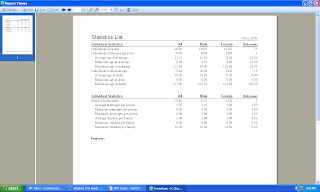
The list tells me how many people, males, females and unknown gender I have total, with a marriage event and a death date. The second group provides some averages for marriages and children.
29) Surnames Statistics List - Statistics on the surnames in the database. The user can select to Sort the list by alphebetical surname, surname frequency, frequency of males and females by surname, earliest occurrence of a surname and most recent occurrence of the surname. I chose "Surname Frequency" and got this report:

30. Timeline Chart -- a wall chart with bars representing the lifespan of people. This was covered in Post 9.
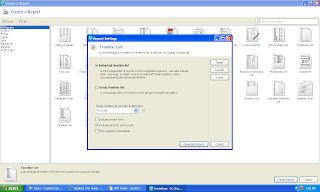
31. Timeline List -- a chronological list of events for a person or group of people. The "Report Settings" menu is shown below.
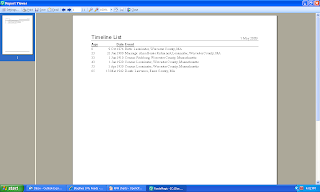
I decided to get the list for my grandfather, Frederick W. Seaver: The report below doesn't show the person's name, and it should:
32) To-Do List -- A list of the to-do items in the database. The view below shows the "Report Settings" menu for this item:
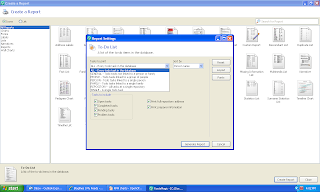
I don't have any To-Do items in my database at present. The program probably shows a text list of the To-Do items.
33. Wall Chart - A large chart which can contain ancestors, descendants or both for a person. I described this in Post 8.
That completes the description of the 33 reports and charts included in the Report > Lists menu.
Next on the Reports menu is the Individual's Report.
In this post, I'm going to finish my look at the Lists that can be created using the Reports > Lists menu. In the "Family" View with my grandfather, Frederick Seaver, highlighted, I clicked on the "Report" menu item and clicked the "Lists" option. The Lists menu opened and I maximized it so that I could see all of the icons. I chose "All Reports" from the left hand column and the 33 list options showed (in icon format). The last six (28 to 33) are (I'm going to show only the reports, not the steps to create them from now on):
28) Statistics List - a list of statistics for a group of people. The only choice in the "Report Settings" for this item is to select either "Everyone" or "Select from list" for the report. I selected "Everyone" and got:

The list tells me how many people, males, females and unknown gender I have total, with a marriage event and a death date. The second group provides some averages for marriages and children.
29) Surnames Statistics List - Statistics on the surnames in the database. The user can select to Sort the list by alphebetical surname, surname frequency, frequency of males and females by surname, earliest occurrence of a surname and most recent occurrence of the surname. I chose "Surname Frequency" and got this report:

The report above shows that the [no name] surname is the most common in my database - I have 1238 entries in my 23,000 person database with no surname. The most common surname in my database is RANDOLPH (498 entries). My SEAVER surname has only 86 entries (of course, I have another database for this!).
30. Timeline Chart -- a wall chart with bars representing the lifespan of people. This was covered in Post 9.
31. Timeline List -- a chronological list of events for a person or group of people. The "Report Settings" menu is shown below.

I decided to get the list for my grandfather, Frederick W. Seaver: The report below doesn't show the person's name, and it should:

32) To-Do List -- A list of the to-do items in the database. The view below shows the "Report Settings" menu for this item:

I don't have any To-Do items in my database at present. The program probably shows a text list of the To-Do items.
33. Wall Chart - A large chart which can contain ancestors, descendants or both for a person. I described this in Post 8.
That completes the description of the 33 reports and charts included in the Report > Lists menu.
Next on the Reports menu is the Individual's Report.
Friday, May 1, 2009
Ancestry.com Response to Census Quirk Problem
I've exchanged several emails today with Tony Macklin from Ancestry.com who confirmed that my post yesterday, titled Ancestry.com Quirk - Different Results for Old Search and New Search is a real problem for Ancestry's New Search option.
Tony said I could pass this information on:
"It turns out that you’ve uncovered a very specific bug in the code for lifespan filter (that we launched on Weds) that had managed to slip by our QA process.
"What is happening with your search is that on new search, lifespan filter SHOULD be looking for records where birth date could be anywhere from 1821 to 1825. However, because of the bug, it is ACTUALLY only returning results where the person was born BEFORE 1821 and lived until AFTER 1825. Unfortunately, this only impacts new search as this code only appears in the new search UI. Once we correct this, you should see the results returning exactly as you expected.
"We are correcting this as a matter of priority, and will push it live to the site as soon as we can within the next week. I’ll let you know as soon as I have an exact date."
And then later, he explained it a bit more:
"The original search results you had were:
........................... Name ............ Birth ... Possible lifespan
1850 census Issac Seaber 1824 1824-1924
1860 census Issac Seabury 1821 1821-1921
1860 census Issac Seaver 1824 1824-1924
1870 census Issac Seaver 1824 1824-1924
1880 census Issac Seaver 1824 1824-1924
1900 census Issac Seaver 1823 1823-1923
"The search should be asking for records where the person could have been born from 1821 onwards –
"Instead it is incorrectly asking for records for people that could have been alive in 1823 – so only two of these are returned.
"We are working on this right now, and are aiming to have the fix live within a matter of days."
I really appreciate Tony taking the time to provide a clear reason why this "quirk" happened. As a former FORTRAN programmer, I can clearly see how this happened - someone coded it wrong and the QA process didn't catch it.
This came up when they rolled out the improvement on Wednesday that limits search results to a range of 107 years if the user puts in only a birth or death year. That complicated the coding and a mistake was made so that only persons alive in the year specified were included in the search results. Tony's explanation clearly demonstrates how this happened in my case.
Clearly, this problem occurs in more than the census searches. The message for the next few days is clear - use the "Old Search" which handles the birth year range correctly. If you've done searches in Ancestry's "New Search" in the past three days, and gotten no matches, you should go back and use "Old Search."
If you are "stuck" in "New Search," you can access "Old Search" at http://search.ancestry.com/search/default.aspx?new=0.
In "Old Search," I use the Advanced Search box to input information and choose which items I want to make "Exact."
Tony said I could pass this information on:
"It turns out that you’ve uncovered a very specific bug in the code for lifespan filter (that we launched on Weds) that had managed to slip by our QA process.
"What is happening with your search is that on new search, lifespan filter SHOULD be looking for records where birth date could be anywhere from 1821 to 1825. However, because of the bug, it is ACTUALLY only returning results where the person was born BEFORE 1821 and lived until AFTER 1825. Unfortunately, this only impacts new search as this code only appears in the new search UI. Once we correct this, you should see the results returning exactly as you expected.
"We are correcting this as a matter of priority, and will push it live to the site as soon as we can within the next week. I’ll let you know as soon as I have an exact date."
And then later, he explained it a bit more:
"The original search results you had were:
........................... Name ............ Birth ... Possible lifespan
1850 census Issac Seaber 1824 1824-1924
1860 census Issac Seabury 1821 1821-1921
1860 census Issac Seaver 1824 1824-1924
1870 census Issac Seaver 1824 1824-1924
1880 census Issac Seaver 1824 1824-1924
1900 census Issac Seaver 1823 1823-1923
"The search should be asking for records where the person could have been born from 1821 onwards –
"Instead it is incorrectly asking for records for people that could have been alive in 1823 – so only two of these are returned.
"We are working on this right now, and are aiming to have the fix live within a matter of days."
I really appreciate Tony taking the time to provide a clear reason why this "quirk" happened. As a former FORTRAN programmer, I can clearly see how this happened - someone coded it wrong and the QA process didn't catch it.
This came up when they rolled out the improvement on Wednesday that limits search results to a range of 107 years if the user puts in only a birth or death year. That complicated the coding and a mistake was made so that only persons alive in the year specified were included in the search results. Tony's explanation clearly demonstrates how this happened in my case.
Clearly, this problem occurs in more than the census searches. The message for the next few days is clear - use the "Old Search" which handles the birth year range correctly. If you've done searches in Ancestry's "New Search" in the past three days, and gotten no matches, you should go back and use "Old Search."
If you are "stuck" in "New Search," you can access "Old Search" at http://search.ancestry.com/search/default.aspx?new=0.
In "Old Search," I use the Advanced Search box to input information and choose which items I want to make "Exact."
Correcting Records on Ancestry.com
Many Ancestry.com subscribers complain about the indexing errors that occur in the Ancestry.com databases, but how many of us do something about it? Fortunately, Ancestry.com permits users to add a correction when a name is not transcribed accurately, is hard to read, has a maiden name, has a name change, etc.
I did this today when I could not find Ranslow Smith (1805-1875) in any US census from 1850 to 1870. The reason was simple - he is "Rauslow" in 1850 in Dodge County WI, he is "Rauslon" in 1860 in Dodge County WI, and "Ronsle" in 1870 in Taylor County, IA. If he had lived longer, I'm sure the name would be wrong in the 1880 and 1900 census records too!
Here is what I did today for the 1860 US Census entry. Here is the search result for Ranslow Smith:

In the left column is a link for "Comments and Corrections." I clicked on it:

The page above permits the user to correct Misspelled or alternate Names, Add a Comment, or Report an Image Problem. I clicked on "Misspelled or Alternate Names:"

On the page above, I added the correct Given Name and Surname, then clicked on "Transcription Error" from the dropdown menu of choices (the other choices were Incorrect Original, Nickname, Birth/Maiden Name, Name Change and Variation).
I wrote a short note in the Description box explaining why I think the name should be Ranslow and not Rauslon:

Finished, I clicked on the orange "Submit Correction" button and received this message:

It says that the correction will be added to the Search Index in a few weeks, and the little yellow triangle indicator thingamajig should show up on the result page shortly. Note that this will add the name "Ranslow Smith" to the Search Index and will not replace the "Rauslon Smith" name in the Search Index.
I did all of this in the "Old Search" because of the "New Search" problem I highlighted yesterday in Ancestry.com Quirk - Different Results for Old Search and New Search.
I did this today when I could not find Ranslow Smith (1805-1875) in any US census from 1850 to 1870. The reason was simple - he is "Rauslow" in 1850 in Dodge County WI, he is "Rauslon" in 1860 in Dodge County WI, and "Ronsle" in 1870 in Taylor County, IA. If he had lived longer, I'm sure the name would be wrong in the 1880 and 1900 census records too!
Here is what I did today for the 1860 US Census entry. Here is the search result for Ranslow Smith:

In the left column is a link for "Comments and Corrections." I clicked on it:

The page above permits the user to correct Misspelled or alternate Names, Add a Comment, or Report an Image Problem. I clicked on "Misspelled or Alternate Names:"

On the page above, I added the correct Given Name and Surname, then clicked on "Transcription Error" from the dropdown menu of choices (the other choices were Incorrect Original, Nickname, Birth/Maiden Name, Name Change and Variation).
I wrote a short note in the Description box explaining why I think the name should be Ranslow and not Rauslon:

Finished, I clicked on the orange "Submit Correction" button and received this message:

It says that the correction will be added to the Search Index in a few weeks, and the little yellow triangle indicator thingamajig should show up on the result page shortly. Note that this will add the name "Ranslow Smith" to the Search Index and will not replace the "Rauslon Smith" name in the Search Index.
I did all of this in the "Old Search" because of the "New Search" problem I highlighted yesterday in Ancestry.com Quirk - Different Results for Old Search and New Search.
I noticed one more error on the Search Results page. It says I searched for "Smith born in New York in 1803 and died in Wisconsin." I did not put a death place in the Search box. I put "USA" and "Wisconsin" in the Residence box for the 1860 census. This process error needs to be fixed too. I don't know if the Search is affected by it - probably not from my experience.
Thursday, April 30, 2009
Ancestry.com Quirk - Different Results for Old Search and New Search
I worked in Ancestry.com for most of the day, trying to get a start on my 16 May presentation. Then I started getting strange results for some of my searches.
Here is an example: Using Old Search, Exact Matches only checked, Givenname = "Isa*", Surname = "Sea*", Birthyear = "1823 +/- 2 years", Birthplace = "USA, Massachusetts" -- the Advanced Search box looks like this:

The search results page looks like this:

This Old Search with "Exact Matches only" checked, found my Isaac Seaver in the 1850 census (indexed as "Isaac Seaber"), 1860 (indexed as "Isaac Seaver"), 1870 (indexed as "Isaac Seaver"), 1880 (indexed as "Isaac Seaver") and 1900 (indexed as "Isaac Seaver"). The only other person found was "Isaac Seabury" in the 1860 census.
I entered the exact same parameters in the New Search box with "Match all terms exactly" checked - the search box is shown below:

The Search results are shown below:

The New Search results, with "Match all terms exactly" checked, provided were for the 1860 census (but only "Isaac Seabury") and the 1900 census (for my "Isaac Seaver"). There was no listing for 1850, 1860, 1870 or 1880 for my "Isaac Seaver" like there was in the Old Search search.
I thought maybe something was wrong with the Wild Card search in New Search, but I tested that with the name "Isaac Seaver" and the birth year and birth place, and it found only my "Isaac Seaver" in the 1900 census.
Is it the birthplace specification in New Search for some of the census years? The input is different from Old Search. In Old Search, the user inputs a country ("USA") and a state ("Massachusetts"). In New Search, the user inputs a place (I started typing "Massa") and the suggestions appear - I chose "Massachusetts, USA."
Is anyone else having this problem with their census searches? I checked the Ancestry.com Blog to see if it was reported and didn't see anything similar.
I'm back to using Old Search as long as discrepancies like this persist in New Search. Caveat Genealogicus!!
Here is an example: Using Old Search, Exact Matches only checked, Givenname = "Isa*", Surname = "Sea*", Birthyear = "1823 +/- 2 years", Birthplace = "USA, Massachusetts" -- the Advanced Search box looks like this:

The search results page looks like this:

This Old Search with "Exact Matches only" checked, found my Isaac Seaver in the 1850 census (indexed as "Isaac Seaber"), 1860 (indexed as "Isaac Seaver"), 1870 (indexed as "Isaac Seaver"), 1880 (indexed as "Isaac Seaver") and 1900 (indexed as "Isaac Seaver"). The only other person found was "Isaac Seabury" in the 1860 census.
I entered the exact same parameters in the New Search box with "Match all terms exactly" checked - the search box is shown below:

The Search results are shown below:

The New Search results, with "Match all terms exactly" checked, provided were for the 1860 census (but only "Isaac Seabury") and the 1900 census (for my "Isaac Seaver"). There was no listing for 1850, 1860, 1870 or 1880 for my "Isaac Seaver" like there was in the Old Search search.
I thought maybe something was wrong with the Wild Card search in New Search, but I tested that with the name "Isaac Seaver" and the birth year and birth place, and it found only my "Isaac Seaver" in the 1900 census.
Is it the birthplace specification in New Search for some of the census years? The input is different from Old Search. In Old Search, the user inputs a country ("USA") and a state ("Massachusetts"). In New Search, the user inputs a place (I started typing "Massa") and the suggestions appear - I chose "Massachusetts, USA."
Is anyone else having this problem with their census searches? I checked the Ancestry.com Blog to see if it was reported and didn't see anything similar.
I'm back to using Old Search as long as discrepancies like this persist in New Search. Caveat Genealogicus!!
A Victorian House in San Diego - turned into a box
The topic for the next Carnival of Genealogy is "Local History! As genealogists, we are used to tracing our ancestors and the history of the places they lived. But not all of us live where our ancestors did - do we take the time to see the history all around us? Use some of your investigative skills to research the house, street, or town/city where YOU live. Write about an interesting person, place, or event of local history."
I choose to discuss the house I grew up in on 30th Street in San Diego. The house was built before 1900 by my great-grandparents, Austin and Della (Smith) Carringer.
Here is what I know about the house itself:
In 1894, Della Carringer bought three contiguous lots of land in San Diego for $450. The lots were bounded by Ella (now 30th Street), Watkins Avenue (now Hawthorn Street), Horton (now Ivy Street) and Fern Street in the Brooklyn Heights neighborhood of San Diego. Her mother, Abbie (Vaux) Smith also bought a lot on the same block.
Austin was a carpenter, and he built the house on the southwestern corner of the block at Ella and Watkins Streets (now 30th and Hawthorn Streets) facing Watkins Street. They occupied the house by 1898 until their deaths in 1946 and 1944, respectively. The house style was originally Victorian (I was told "Gingerbread" but I don't know for sure).
A photograph taken in 1900 shows the house with Austin Carringer, his wife Della, their son Lyle (my grandfather), Austin's parents D.J. and Rebecca Carringer, his brother Edgar Carringer, Della's mother Abbie (Vaux) Smith, and the family horse (name unknown):

This house had two bedrooms, a kitchen, a bathroom, and a parlor on the first floor. There was a staircase in the center of the house up to the second story. The second story had at least four rooms - including at least two bedrooms, and topped by a widow's walk. There was a large front porch on the west and south sides on the ground floor.
In about 1927, the house was moved to the middle of the block on 30th Street, and renumbered as 2115 30th Street. The house front porch was modified so that it faced only south, and a living room and den were added on the west side (essentially where the west porch was). A separate second story flat was created by adding to the existing rooms, eliminating the inside staircase, and building two staircases on the north side for the front entry and the kitchen exit, resulting in 2119 30th Street. The structure was then stuccoed over, and the roof was flattened, so that the original framework of the house could not be discerned.
The picture below is from about 1929, the time of Della's Journal. The two-story house in the front of the picture is the 2115/2119 flats. As you can see, the original house has had a full second story added on the south and west side of the house, plus a staircase on the north side to the second floor. The entry for 2115 30th Street, which is where Della and Austin lived, is on the south side of the building (the side facing to the right).

Della designed some of their furniture, and was a painter. She was quoted on their philosophy of life: "We have worked hard as partners and tried always to be kind and helpful to others. After all, we are of the opinion that this is the best religion to make a happy and successful life." The article says that Austin did all of the finishing on their home and also built some of their beautiful furniture.
Now for my memories about the house.
I grew up in the second story flat at 2119 30th Street. It had two bedrooms and a sun room on the south side (over the porch). My family moved into this flat in 1947 after my brother Stanley was born. He and I initially shared the bedroom in the southeast corner and had bunk beds. It had a central desk, a dresser and a closet adjacent. The master bedroom was in the middle of the house on the south side, and had a large walk-in closet (which used to be the central staircase space) and dresser drawers and a double bed. My mother did her artwork, pottery and copper enameling in the sunroom. The living room was on the west side of the flat, and had a central coffee table, two couches and a TV set (located in the master bedroom closet - but viewable in the living room. Off the living room was one of my hideouts -- the "cubby-hole" over the entry staircase - I could watch the street and not be seen by anyone inside or outside. We usually put the Christmas Tree in the cubby-hole during the holidays.
There was only one bathroom on the east side of the flat, with a bathtub (no shower until about 1960). The kitchen was in the northeast corner of the flat, and had a stove, sink, cabinets and washing machine (in later years). The kitchen had a back door that led to a small porch (with clothes lines running across to the adjacent building) and a 20-step staircase on the north side of the house (until about 1960) and on the east side of the house (after 1960). This had a great wooden banister with rounded corners, and we boys would slide down the banister to the ground.
When my youngest brother Scott was born in 1955, Stan and I moved into the sun room. My dad built a long desk for both of us to do our homework on, and we had a stand-alone closet in the room. From our bedroom, we could see the buildings in downtown San Diego, the end of Point Loma and occasionally ships at sea. My bed was on the east side of the room, and I was able to run wire antennas out of the window to foster my radio listening hobby.
My father's desk was in the entry way at the top of the stairs. He often worked at home as a life insurance agent. A wall heater was also in the office - the only heat source in the house and a very popular place on cool mornings. The dining room had a large bookcase, a buffet table and a large dining room table. We always ate at the table - never in our rooms or the living room.
My grandparents, Lyle and Emily (Auble) Carringer, lived in the downstairs (2115 30th Street) flat from 1946 to 1951, when they moved to the new house on Point Loma. From about 1951 on, the downstairs flat at 2115 30th was rented to tenants. There were several long term tenants who enjoyed the hand-built rooms. I loved going downstairs and seeing the living room, den and dining room especially.
After my grandparents died in the 1970's, my parents moved to their Point Loma house, and my brother Scott rented the upstairs flat for several years with his young family.
My parents sold all of the property in 1983 to a neighbor, who had purchased 2130 Fern Street (the house that my grandparents built in 1920) earlier. I still drive by occasionally, and have even taken pictures of the current house (now painted a sort of nectarine color). I've thought about knocking on the doors and asking to see the flats, but haven't done so. If they ever go on the market, I'm going to go look at them to refresh my memories of the room layout. And I'm going to look for my baseball card collection from the 1950's in my secret hiding place.
That's the story of "my" house. If only the walls could talk and tell me stories - I would go listen by the hour! Fortunately, I have many papers, photographs, and artifacts from all four generations of the family that lived in this house.
I choose to discuss the house I grew up in on 30th Street in San Diego. The house was built before 1900 by my great-grandparents, Austin and Della (Smith) Carringer.
Here is what I know about the house itself:
In 1894, Della Carringer bought three contiguous lots of land in San Diego for $450. The lots were bounded by Ella (now 30th Street), Watkins Avenue (now Hawthorn Street), Horton (now Ivy Street) and Fern Street in the Brooklyn Heights neighborhood of San Diego. Her mother, Abbie (Vaux) Smith also bought a lot on the same block.
Austin was a carpenter, and he built the house on the southwestern corner of the block at Ella and Watkins Streets (now 30th and Hawthorn Streets) facing Watkins Street. They occupied the house by 1898 until their deaths in 1946 and 1944, respectively. The house style was originally Victorian (I was told "Gingerbread" but I don't know for sure).
A photograph taken in 1900 shows the house with Austin Carringer, his wife Della, their son Lyle (my grandfather), Austin's parents D.J. and Rebecca Carringer, his brother Edgar Carringer, Della's mother Abbie (Vaux) Smith, and the family horse (name unknown):

This house had two bedrooms, a kitchen, a bathroom, and a parlor on the first floor. There was a staircase in the center of the house up to the second story. The second story had at least four rooms - including at least two bedrooms, and topped by a widow's walk. There was a large front porch on the west and south sides on the ground floor.
In about 1927, the house was moved to the middle of the block on 30th Street, and renumbered as 2115 30th Street. The house front porch was modified so that it faced only south, and a living room and den were added on the west side (essentially where the west porch was). A separate second story flat was created by adding to the existing rooms, eliminating the inside staircase, and building two staircases on the north side for the front entry and the kitchen exit, resulting in 2119 30th Street. The structure was then stuccoed over, and the roof was flattened, so that the original framework of the house could not be discerned.
The picture below is from about 1929, the time of Della's Journal. The two-story house in the front of the picture is the 2115/2119 flats. As you can see, the original house has had a full second story added on the south and west side of the house, plus a staircase on the north side to the second floor. The entry for 2115 30th Street, which is where Della and Austin lived, is on the south side of the building (the side facing to the right).

The San Diego Union of September 11, 1937 has an article headlined "Honeymoon Trip to S.D. Extends Half a Century," with a picture of Austin and Della entitled "True Vowers View Letters on Golden Wedding Day." In the article, Della says "We have lived here on this corner for 39 years. We built this house. On our lot we have planted and grown most every kind of fruit and vegetable that grows in California. Flowers always have been my hobby."
Della designed some of their furniture, and was a painter. She was quoted on their philosophy of life: "We have worked hard as partners and tried always to be kind and helpful to others. After all, we are of the opinion that this is the best religion to make a happy and successful life." The article says that Austin did all of the finishing on their home and also built some of their beautiful furniture.
Now for my memories about the house.
I grew up in the second story flat at 2119 30th Street. It had two bedrooms and a sun room on the south side (over the porch). My family moved into this flat in 1947 after my brother Stanley was born. He and I initially shared the bedroom in the southeast corner and had bunk beds. It had a central desk, a dresser and a closet adjacent. The master bedroom was in the middle of the house on the south side, and had a large walk-in closet (which used to be the central staircase space) and dresser drawers and a double bed. My mother did her artwork, pottery and copper enameling in the sunroom. The living room was on the west side of the flat, and had a central coffee table, two couches and a TV set (located in the master bedroom closet - but viewable in the living room. Off the living room was one of my hideouts -- the "cubby-hole" over the entry staircase - I could watch the street and not be seen by anyone inside or outside. We usually put the Christmas Tree in the cubby-hole during the holidays.
There was only one bathroom on the east side of the flat, with a bathtub (no shower until about 1960). The kitchen was in the northeast corner of the flat, and had a stove, sink, cabinets and washing machine (in later years). The kitchen had a back door that led to a small porch (with clothes lines running across to the adjacent building) and a 20-step staircase on the north side of the house (until about 1960) and on the east side of the house (after 1960). This had a great wooden banister with rounded corners, and we boys would slide down the banister to the ground.
When my youngest brother Scott was born in 1955, Stan and I moved into the sun room. My dad built a long desk for both of us to do our homework on, and we had a stand-alone closet in the room. From our bedroom, we could see the buildings in downtown San Diego, the end of Point Loma and occasionally ships at sea. My bed was on the east side of the room, and I was able to run wire antennas out of the window to foster my radio listening hobby.
My father's desk was in the entry way at the top of the stairs. He often worked at home as a life insurance agent. A wall heater was also in the office - the only heat source in the house and a very popular place on cool mornings. The dining room had a large bookcase, a buffet table and a large dining room table. We always ate at the table - never in our rooms or the living room.
My grandparents, Lyle and Emily (Auble) Carringer, lived in the downstairs (2115 30th Street) flat from 1946 to 1951, when they moved to the new house on Point Loma. From about 1951 on, the downstairs flat at 2115 30th was rented to tenants. There were several long term tenants who enjoyed the hand-built rooms. I loved going downstairs and seeing the living room, den and dining room especially.
After my grandparents died in the 1970's, my parents moved to their Point Loma house, and my brother Scott rented the upstairs flat for several years with his young family.
My parents sold all of the property in 1983 to a neighbor, who had purchased 2130 Fern Street (the house that my grandparents built in 1920) earlier. I still drive by occasionally, and have even taken pictures of the current house (now painted a sort of nectarine color). I've thought about knocking on the doors and asking to see the flats, but haven't done so. If they ever go on the market, I'm going to go look at them to refresh my memories of the room layout. And I'm going to look for my baseball card collection from the 1950's in my secret hiding place.
That's the story of "my" house. If only the walls could talk and tell me stories - I would go listen by the hour! Fortunately, I have many papers, photographs, and artifacts from all four generations of the family that lived in this house.
What Should I Say About Ancestry.com?
One of my next society presentations is for CGSSD on 16 May and the subject is "Ancestry 101." The purpose of the talk is to summarize the features and capabilities of ancestry.com to a group of fairly capable computer users and genealogy researchers (with experience levels ranging from novice to expert). I have only 75 minutes for this talk and I know that I could talk for that time just on databases and search techniques alone. But there is so much more to the Ancestry.com web site for genealogy researchers.
I'm conscious that I may not know "everything" about Ancestry.com. I only know what I think I know. Therefore, I want to ask my loyal and astute Genea-Musings readers for their opinions about Ancestry.com. This is your chance to praise or razz Ancestry.com features in comments to this post or in email (rjseaver@cox.net if you wish to write non-public comments).
Please tell me (answer one, some or all if you want):
1) What features on Ancestry.com do you use the most? Use the least?
2) What features on Ancestry.com do you like the most? Like the least?
3) What FREE features on Ancestry.com do you use most?
4) What "hidden" features on Ancestry.com do you like and use?
5) What features or capabilities would you like Ancestry.com to add to their site?
Thank you for any responses. I may summarize responses to these questions in future posts.
I'm conscious that I may not know "everything" about Ancestry.com. I only know what I think I know. Therefore, I want to ask my loyal and astute Genea-Musings readers for their opinions about Ancestry.com. This is your chance to praise or razz Ancestry.com features in comments to this post or in email (rjseaver@cox.net if you wish to write non-public comments).
Please tell me (answer one, some or all if you want):
1) What features on Ancestry.com do you use the most? Use the least?
2) What features on Ancestry.com do you like the most? Like the least?
3) What FREE features on Ancestry.com do you use most?
4) What "hidden" features on Ancestry.com do you like and use?
5) What features or capabilities would you like Ancestry.com to add to their site?
Thank you for any responses. I may summarize responses to these questions in future posts.
Wednesday, April 29, 2009
"Digital Documentation" - CVGS Program Summary
Shirley Becker presented "Digital Documentation" to the Chula Vista Genealogical Society today. We had 25 in attendance for this excellent description of a problem almost all of us have - how to organize our computer files so that we can find what we want when we want it. The talk description and Shirley's CV are here.
Shirley's talk concentrated on the digital computer files - the ones that we have an image of, whether they are vital records, book pages, census pages, photographs or scanned pages. She did not address the paper files that most of us have in bookcases, file drawers, notebooks, folders or loose papers, except to say that if we want to reduce the paper stacks we should scan the important pages that provide accurate source material and put them in the digital documentation system.
The digital documentation system that Shirley has adopted is Leland Meitzler's system that he described in his talk "Genealogical Organization in the 21st Century" at the 2008 SCGS Genealogy Jamboree in Burbank last June. She spoke to him at the Escondido Family History Fair in March and he advised "...people don't have to cross every T in order to use this method. Do what is best for you and the way you do things."
The major topics that Shirley covered included:
* Buying a large external hard drive to store the genealogy digital documents
* Use or buy a flat-bed scanner to scan your paper records
* Use Adobe Photoshop Elements software (or a similar program) to enhance and edit your images
* Take the time to scan the paper documents you want into the digital file system.
* Have a backup plan and adhere to it - use online, offsite, and local backup of that external drive.
* Create a document organization system for each Surname and Locality.
She discussed the last item during most of her talk. Shirley's Surname file folders look like this:
* GenDocs > Wright > Wright, Alpheus & Maria Graves WAMG
* GenDocs > Wright > Wright, James & Lydia Jones WJLJ
* GenDocs > Wright > Wright, Thomas & Mary Smith WTMS
* etc.
The four letter code refers to the married couple for the specific family file folder. In that file folder are all of the digital documents that pertain to the family, including all records for the children of the couple until the children get married. She puts an Index file in each Couple folder which lists all of the digital documents available in the folder:
* WAMG001 - picture of Wright gravestone
* WAMG002 - 1860 US census record
* WAMG003 - Alpheus Wright Civil War military record
* etc.
Then each digital document is named according to the index list.
For Locality folders, this is also done by Surname. The folders might be named:
* GenDocs > Wright 1 > USA > New York > Otsego
* GenDocs > Wright 1 > England > Wiltshire > Trowbridge
* etc.
The number after the surname ensures that the computer sorts these Locality folders at the top of the Surname Folder list.
Shirley uses commonly used file types for everything she puts into this system, such as Rich Text Format (RTF) for text files, Portable Document Format (PDF) for scanned or downloaded printed material, and TIFF (for images).
She's been using this file system for almost one year now, and has made great strides in adding information to her digital documentation system and is able to find information quickly. From what I can see, she has followed Leland's system to the letter and it is working for her.
This was an interesting talk in that it provided specific examples of how to organize your digital documents. It will be especially useful to researchers just starting out with few digital documents - they can create the system and fill it up knowing that they will be able to find their important digital documents quickly. For researchers with many linear feet of paper documents in their genealogy space, this system will work, but getting all of the paper sorted, scanned and filed will be a major time challenge. For researchers who have many document images obtained by scanning or downloading from the Internet, this system can be made to work by following the folder and file name conventions.
Shirley's talk concentrated on the digital computer files - the ones that we have an image of, whether they are vital records, book pages, census pages, photographs or scanned pages. She did not address the paper files that most of us have in bookcases, file drawers, notebooks, folders or loose papers, except to say that if we want to reduce the paper stacks we should scan the important pages that provide accurate source material and put them in the digital documentation system.
The digital documentation system that Shirley has adopted is Leland Meitzler's system that he described in his talk "Genealogical Organization in the 21st Century" at the 2008 SCGS Genealogy Jamboree in Burbank last June. She spoke to him at the Escondido Family History Fair in March and he advised "...people don't have to cross every T in order to use this method. Do what is best for you and the way you do things."
The major topics that Shirley covered included:
* Buying a large external hard drive to store the genealogy digital documents
* Use or buy a flat-bed scanner to scan your paper records
* Use Adobe Photoshop Elements software (or a similar program) to enhance and edit your images
* Take the time to scan the paper documents you want into the digital file system.
* Have a backup plan and adhere to it - use online, offsite, and local backup of that external drive.
* Create a document organization system for each Surname and Locality.
She discussed the last item during most of her talk. Shirley's Surname file folders look like this:
* GenDocs > Wright > Wright, Alpheus & Maria Graves WAMG
* GenDocs > Wright > Wright, James & Lydia Jones WJLJ
* GenDocs > Wright > Wright, Thomas & Mary Smith WTMS
* etc.
The four letter code refers to the married couple for the specific family file folder. In that file folder are all of the digital documents that pertain to the family, including all records for the children of the couple until the children get married. She puts an Index file in each Couple folder which lists all of the digital documents available in the folder:
* WAMG001 - picture of Wright gravestone
* WAMG002 - 1860 US census record
* WAMG003 - Alpheus Wright Civil War military record
* etc.
Then each digital document is named according to the index list.
For Locality folders, this is also done by Surname. The folders might be named:
* GenDocs > Wright 1 > USA > New York > Otsego
* GenDocs > Wright 1 > England > Wiltshire > Trowbridge
* etc.
The number after the surname ensures that the computer sorts these Locality folders at the top of the Surname Folder list.
Shirley uses commonly used file types for everything she puts into this system, such as Rich Text Format (RTF) for text files, Portable Document Format (PDF) for scanned or downloaded printed material, and TIFF (for images).
She's been using this file system for almost one year now, and has made great strides in adding information to her digital documentation system and is able to find information quickly. From what I can see, she has followed Leland's system to the letter and it is working for her.
This was an interesting talk in that it provided specific examples of how to organize your digital documents. It will be especially useful to researchers just starting out with few digital documents - they can create the system and fill it up knowing that they will be able to find their important digital documents quickly. For researchers with many linear feet of paper documents in their genealogy space, this system will work, but getting all of the paper sorted, scanned and filed will be a major time challenge. For researchers who have many document images obtained by scanning or downloading from the Internet, this system can be made to work by following the folder and file name conventions.
More on Better Source Citations
Mark Tucker has published Better Online Citations - Details Part 1, on his ThinkGenealogy blog, that does two good things:
1) It has the first side-by-side comparison (that I've read) of how RootsMagic 4, Family Tree Maker 2009 and Legacy Family Tree 7 have implemented the Evidence! Explained style citations.
2) It explains in some detail how Mark proposes that the "source citation miracle" (my description) works - clicking on a link in a database record to download the source information that gets put into the genealogy software so that EE-style source citations are created in reports and charts.
Read all of Mark's post to understand how it all works.
My questions and comments are:
1) What genealogy database provider will be the first to adopt Mark's proposed source citation capture feature? Will they use it as a marketing feature to entice new subscribers, or to keep old subscribers? If one of the large database providers sign on, will the other providers have to match it?
2) What genealogy software provider will be the first to adopt Mark's proposed capture feature?
3) It seems to me that genealogy researchers who are serious about source citations will leap at the software providers that adopt this feature. But it really needs all of the database providers to adopt the feature, not just one or two, especially if they are not the largest database providers.
4) It seems to me that www.FamilySearch.org may be in the best position to implement Mark's source citation feature in their FamilySearch Indexing project. The number of FamilySearch databases that would need to be corrected are relatively small, and the feature could be implemented on new Indexing projects as they come online.
5) We haven't heard from any of the major genealogy database providers (Ancestry, FamilySearch, WorldVitalRecords, Footnote, etc.) on this issue yet. My guess is that Mark has spoken to them. Lisa Louise Cooke's latest Genealogy Gems Podcast addressed this in Episode 64: Online Source Citations, GOOGLE Tip, Stephen Danko, Maureen Taylor. In Lisa's show notes, she says:
"In this episode I will play for you the responses from both Ancestry and FamilyLink / World Vital Records to my inquiry about whether record sites providing source citations for the records they provide to their customers.
"Yep, you heard it correctly. For the first time in two years of this podcast not only did they not provide a telephone interview, they didn’t respond to my inquiry at all. That’s never happened before. The silence is deafening!"
That's interesting, and disappointing. My hope is that the companies will respond in a positive way to Mark's proposed source citation feature.
1) It has the first side-by-side comparison (that I've read) of how RootsMagic 4, Family Tree Maker 2009 and Legacy Family Tree 7 have implemented the Evidence! Explained style citations.
2) It explains in some detail how Mark proposes that the "source citation miracle" (my description) works - clicking on a link in a database record to download the source information that gets put into the genealogy software so that EE-style source citations are created in reports and charts.
Read all of Mark's post to understand how it all works.
My questions and comments are:
1) What genealogy database provider will be the first to adopt Mark's proposed source citation capture feature? Will they use it as a marketing feature to entice new subscribers, or to keep old subscribers? If one of the large database providers sign on, will the other providers have to match it?
2) What genealogy software provider will be the first to adopt Mark's proposed capture feature?
3) It seems to me that genealogy researchers who are serious about source citations will leap at the software providers that adopt this feature. But it really needs all of the database providers to adopt the feature, not just one or two, especially if they are not the largest database providers.
4) It seems to me that www.FamilySearch.org may be in the best position to implement Mark's source citation feature in their FamilySearch Indexing project. The number of FamilySearch databases that would need to be corrected are relatively small, and the feature could be implemented on new Indexing projects as they come online.
5) We haven't heard from any of the major genealogy database providers (Ancestry, FamilySearch, WorldVitalRecords, Footnote, etc.) on this issue yet. My guess is that Mark has spoken to them. Lisa Louise Cooke's latest Genealogy Gems Podcast addressed this in Episode 64: Online Source Citations, GOOGLE Tip, Stephen Danko, Maureen Taylor. In Lisa's show notes, she says:
"In this episode I will play for you the responses from both Ancestry and FamilyLink / World Vital Records to my inquiry about whether record sites providing source citations for the records they provide to their customers.
"Yep, you heard it correctly. For the first time in two years of this podcast not only did they not provide a telephone interview, they didn’t respond to my inquiry at all. That’s never happened before. The silence is deafening!"
That's interesting, and disappointing. My hope is that the companies will respond in a positive way to Mark's proposed source citation feature.
Family Photographs - Post 53: Was Della driving?
I'm posting old family photographs from my collection on Wednesdays, but they won't be wordless Wednesday posts like others do - I simply am incapable of having a wordless post.
This photograph is from my grandfather's photo album that I scanned during Scanfest in January:

This is a picture of Della (Smith) Carringer taken in about 1916, probably by her husband, Austin Carringer or a friend. The front of the photo says "at Alpine." Alpine was a small rural community about 30 miles east of downtown San Diego (it is now a bedroom community with ranch style homes along Interstate 8). My grandfather, Lyle Carringer, is at the wheel (partially obscured by Della). There is a female passenger in the back seat (partially obscured by the car side and top) - it may be Abigail (Vaux) Smith, Della's mother.
I don't know if this car was owned by the Carringers, but I'm guessing that it was since they seemed to go places around Southern California quite often. I wonder if Della drove the car, or if she was just a passenger? I think she probably did because she was a very independent woman throughout her adult life. But I don't know that for sure.
I wonder what kind of automobile this is? Are there any experts on this subject reading Genea-Musings?
Updated after Rudolph's comment: I had not noticed the driver or back seat person today when I posted this. Thanks, Chris!
This photograph is from my grandfather's photo album that I scanned during Scanfest in January:

This is a picture of Della (Smith) Carringer taken in about 1916, probably by her husband, Austin Carringer or a friend. The front of the photo says "at Alpine." Alpine was a small rural community about 30 miles east of downtown San Diego (it is now a bedroom community with ranch style homes along Interstate 8). My grandfather, Lyle Carringer, is at the wheel (partially obscured by Della). There is a female passenger in the back seat (partially obscured by the car side and top) - it may be Abigail (Vaux) Smith, Della's mother.
I don't know if this car was owned by the Carringers, but I'm guessing that it was since they seemed to go places around Southern California quite often. I wonder if Della drove the car, or if she was just a passenger? I think she probably did because she was a very independent woman throughout her adult life. But I don't know that for sure.
I wonder what kind of automobile this is? Are there any experts on this subject reading Genea-Musings?
Updated after Rudolph's comment: I had not noticed the driver or back seat person today when I posted this. Thanks, Chris!
Subscribe to:
Posts (Atom)