Hey there, genea-funsters! Are you ready for some Saturday Night family history fun? I realize that many of you are reading this Sunday morning or even later, but that's OK. You can still participate.
There is a great meme going around the genealogy community on Facebook right now - it's called High School Survey. It's 25 questions about your high school senior year, so it's a bit long for our purposes here. I've modified it a bit and picked ten questions for you to ponder about your high school years. Here they are, with my responses:
1. What was your school's full name, where was it, and what year did you graduate? San Diego High School, in downtown San Diego, 1961.
2. What was the school team nickname, and what are/were your school's colors? Cavemen, and uniforms were Powder Blue and White
3. What was the name of your school song, and can you still sing it? The Gray Castle. No, I had to look up the name of the song, let alone the words and have no idea of the melody.
4. Did you have a car? How did you get to and from school? No car until I was 23. I took the bus both ways.
5. Did you date someone from your high school? Or marry someone from your high school? Were you considered a flirt? No; No; and I was too self-conscious to flirt.
6. What social group were you in? I was in the outcast group - the nerds and geeks, with short hair and glasses, and heavy into math, physics, chemistry, etc.
7. Who was/were your favorite teachers? Mrs. Johnsie Posey (geometry, calculus), J.O. Peterson (chemistry)
8. What did you do on Friday nights? Football game in the fall, home watching TV or playing family games.
9. Did you go to and have fun at the Senior Prom? Nope. Didn't go to the prom, although they tried to line me up with a really smart girl. She didn't want to go either.
10. Have you been to reunions, and are you planning on going to the next reunion? I wnt to the 10th, and was essentially shunned by all the people I didn't know. I might go to the 50th in 2011 when no one will remember what anybody looked like!
I really hated high school because I got picked on for being small, unathletic and smart. All except the learning part - that was fun!
See, that wasn't so bad, was it? Kind of true confessions time. Now write a post answering these questions on your blog or put a comment on this post.
Enjoy the memories! Or not...
Saturday, February 7, 2009

Searching for Mary's Parents - Post 2
I really appreciate the Family History Library microfilm and microfiche collection, because I've learned that many research problems involving elusive ancestors can be solved by using them to find original records that clearly define names and relationships.
However, I get frustrated sometimes by the time it takes to obtain information from requesting and reading the microfilms. A case in point:
11/1/08 - I met with Sandy Hewlett at the Wholly Genes conference and cruise in a one-on-one to talk about my Mary Hoax/Houx/Houks/Hokes, etc. ancestral problem. One of her suggestions was to search land and probate information in Westmoreland County PA where she married in 1785 - perhaps she is mentioned in a deed or will or probate settlement. I came home from the cruise very enthused, and set to work on the task.
12/6/08 - I posted about some preliminary work in Searching for Mary's Parents - Post 1. I captured images on my USB drive from the deed grantor and grantee indexes. I also found a book with the index to the early wills, which identified several persons with surname Hokes/Houk/Hawk,etc. persons that might be of interest (I made photocopies). I didn't order any microfilms that day - I needed to make a list of the deeds in the early deed books and the wills in the will book with the target surnames. I did the will list because I had the photocopy handy.
12/13/08 - still enthusiastic about my mission, I went to the FHC to order microfilm of the early wills and to order the early deed microfilms. When I got there, I realized that I had not listed the early deeds I wanted, so I didn't know the exact volumes I needed. Okay, Plan B was to enter the very first book of the deeds. I also ordered the film with the first two volumes of the wills, since those were the volumes I needed.
1/22/09 - The FHC called right after Christmas to say the microfilms had arrived, but I had to go to Salt Lake City and the FHL for a weekend so it took another week to get to the FHC. I still had not listed the deeds I wanted from the Grantor and Grantee Indexes! When I got to the FHC, I found and captured the images of the three wills in Volumes 1 and 2 of the Will Books. I scanned the wills, and did not see that they are helpful, but they might be to other researchers. Uh-oh, the first deed book I ordered doesn't have an index on the film, I'll have to wait until I make the list.
1/29/09 - I went to the FHC on the CVGS Research Trip, but didn't have time to check the deed microfilm. Ooops, I still haven't made my deed list.
2/6/09 - I finally made my deed list from the images of the Grantor and Grantee deed books. I came up with about 30 deeds in the period 1771-1820. Great -- now I can go to the FHC and find deeds on the film I have waiting patiently in the drawer for me to read.
2/7/09 - I looked at my list, and there's only one deed that is on the microfilm that I ordered. Volume A, page 309, recorded 3 March 1783, Conrad Hawk grants land in Huntingdon Township to Peter Huber. No mention of Mary, but now I know where Conrad Hawk lived. I ordered the next two microfilms in the series that will provide about 14 more deeds on volumes B through D and 1 through 2 that might be useful. So I have to wait another two or three weeks for these films to come in.
Most of the delay here is my own fault - I didn't make my target deed list when it was fresh in my mind. If I had, I would have saved at least four weeks to obtain the first 15 target deeds.
When I was at the Family History Library in Salt Lake City in January, I intentionally did not work on this research problem because I knew that I had the films waiting for me at the San Diego FHC. The FHL is especially helpful to use for probate and deed records because all of the films are available and the researcher can obtain many records in a day or two. If I had done that, I would have saved 6 weeks and would be much further ahead!
I keep learning lessons over and over again. I need more discipline in my genealogy life, I guess. The major lesson here is to not let record images just sit in your USB drive and computer files - you have to use them effectively to move ahead on the project. Hmmm, I still haven't transcribed the three wills. Drat - I hate it when I remind myself of things I haven't done. Where's the to-do list I made several months ago?
Ah, I wonder when the FHL will have the imaging and indexing done for these Westmoreland county PA records? Probably not for several years, so I'm going to have to keep ordering films or visit the FHL more often in order to make progress on my elusive ancestor problems.
Like the old saying goes - "no one is completely useless, s/he can always he held up to others as a bad example!"
However, I get frustrated sometimes by the time it takes to obtain information from requesting and reading the microfilms. A case in point:
11/1/08 - I met with Sandy Hewlett at the Wholly Genes conference and cruise in a one-on-one to talk about my Mary Hoax/Houx/Houks/Hokes, etc. ancestral problem. One of her suggestions was to search land and probate information in Westmoreland County PA where she married in 1785 - perhaps she is mentioned in a deed or will or probate settlement. I came home from the cruise very enthused, and set to work on the task.
12/6/08 - I posted about some preliminary work in Searching for Mary's Parents - Post 1. I captured images on my USB drive from the deed grantor and grantee indexes. I also found a book with the index to the early wills, which identified several persons with surname Hokes/Houk/Hawk,etc. persons that might be of interest (I made photocopies). I didn't order any microfilms that day - I needed to make a list of the deeds in the early deed books and the wills in the will book with the target surnames. I did the will list because I had the photocopy handy.
12/13/08 - still enthusiastic about my mission, I went to the FHC to order microfilm of the early wills and to order the early deed microfilms. When I got there, I realized that I had not listed the early deeds I wanted, so I didn't know the exact volumes I needed. Okay, Plan B was to enter the very first book of the deeds. I also ordered the film with the first two volumes of the wills, since those were the volumes I needed.
1/22/09 - The FHC called right after Christmas to say the microfilms had arrived, but I had to go to Salt Lake City and the FHL for a weekend so it took another week to get to the FHC. I still had not listed the deeds I wanted from the Grantor and Grantee Indexes! When I got to the FHC, I found and captured the images of the three wills in Volumes 1 and 2 of the Will Books. I scanned the wills, and did not see that they are helpful, but they might be to other researchers. Uh-oh, the first deed book I ordered doesn't have an index on the film, I'll have to wait until I make the list.
1/29/09 - I went to the FHC on the CVGS Research Trip, but didn't have time to check the deed microfilm. Ooops, I still haven't made my deed list.
2/6/09 - I finally made my deed list from the images of the Grantor and Grantee deed books. I came up with about 30 deeds in the period 1771-1820. Great -- now I can go to the FHC and find deeds on the film I have waiting patiently in the drawer for me to read.
2/7/09 - I looked at my list, and there's only one deed that is on the microfilm that I ordered. Volume A, page 309, recorded 3 March 1783, Conrad Hawk grants land in Huntingdon Township to Peter Huber. No mention of Mary, but now I know where Conrad Hawk lived. I ordered the next two microfilms in the series that will provide about 14 more deeds on volumes B through D and 1 through 2 that might be useful. So I have to wait another two or three weeks for these films to come in.
Most of the delay here is my own fault - I didn't make my target deed list when it was fresh in my mind. If I had, I would have saved at least four weeks to obtain the first 15 target deeds.
When I was at the Family History Library in Salt Lake City in January, I intentionally did not work on this research problem because I knew that I had the films waiting for me at the San Diego FHC. The FHL is especially helpful to use for probate and deed records because all of the films are available and the researcher can obtain many records in a day or two. If I had done that, I would have saved 6 weeks and would be much further ahead!
I keep learning lessons over and over again. I need more discipline in my genealogy life, I guess. The major lesson here is to not let record images just sit in your USB drive and computer files - you have to use them effectively to move ahead on the project. Hmmm, I still haven't transcribed the three wills. Drat - I hate it when I remind myself of things I haven't done. Where's the to-do list I made several months ago?
Ah, I wonder when the FHL will have the imaging and indexing done for these Westmoreland county PA records? Probably not for several years, so I'm going to have to keep ordering films or visit the FHL more often in order to make progress on my elusive ancestor problems.
Like the old saying goes - "no one is completely useless, s/he can always he held up to others as a bad example!"
Some Data Portal Site traffic statistics
I gathered 2008 traffic statistics for several of the more popular data portal web sites on www.Quantcast.com recently. The four sites I selected were:
* www.FindAGrave.com - a cemetery site
* www.Interment.net - a cemetery site
* www.EllisIsland.org - an immigration and passenger list site
* www.CyndisList.com - a links site
The daily People traffic for the four sites in 2008 is shown below:

The chart below shows the Daily Visits for the four sites:

The average daily traffic for these four sites is:
* www.FindAGrave.com - 41.0K US (53.6K World) People, 66.6K US (81.3K World) Visits
* www.Interment.net - 9.0K US ( 11.3K World) People, 10.3K US (12.9K World) Visits
* www.EllisIsland.org - 3.3K US People, 5.2K US Visits
* www.Cyndislist.com - 11.4K US People, 13.4K US Visits
During 2008, traffic on FindAGrave went up significantly in the last quarter, but traffic throughout 2008 decreased for the other three sites. Perhaps this reflects new content on FindaGrave and not much new content on the other sites.
* www.FindAGrave.com - a cemetery site
* www.Interment.net - a cemetery site
* www.EllisIsland.org - an immigration and passenger list site
* www.CyndisList.com - a links site
The daily People traffic for the four sites in 2008 is shown below:

The chart below shows the Daily Visits for the four sites:

The average daily traffic for these four sites is:
* www.FindAGrave.com - 41.0K US (53.6K World) People, 66.6K US (81.3K World) Visits
* www.Interment.net - 9.0K US ( 11.3K World) People, 10.3K US (12.9K World) Visits
* www.EllisIsland.org - 3.3K US People, 5.2K US Visits
* www.Cyndislist.com - 11.4K US People, 13.4K US Visits
During 2008, traffic on FindAGrave went up significantly in the last quarter, but traffic throughout 2008 decreased for the other three sites. Perhaps this reflects new content on FindaGrave and not much new content on the other sites.
Friday, February 6, 2009
Legacy 7 Source Citations - First Look
I posted yesterday about the Family Tree Maker 2009 Source Citation templates and my experience testing it.
I worked in Legacy Family Tree 7.0 today to learn about and test the Source Citation templates, developed from Elizabeth Shown Mills' book, Evidence Explained. For this test, I decided to use the same person and citation details as in the FTM post - Henry Austin Carringer's birth record in the Carringer Family Bible.
While on the [Family] tab page, with Henry highlighted, I clicked on the Birth line and the "Individual's Information" window opened:

I was confused at this point - where is the Source indicator for the birth? I found it by putting the cursor in the Birth input box, and clicking on the "Sources" icon (the small bookcase set next to the notepad). When I clicked on the "Sources" icon, this small window titled "Assigned Sources for Henry Austin Carringer" opened:

In this window, the Birth was highlighted, and since I did not have a Source listed for the Birth, I figured I should click on the "New Source" button. I did and a small window titled "Source Template Index" opened. I input the word "Bible" in the text box:

I clicked the "Search" button at the top of the window, and the Source Template Index window for "Bible" entries opened. There is a choice here - I chose "Bible - Held Privately - Bible Pages, Loose, from unidentified Bible:

I clicked the "Go" button and the "Add New Master Source" window opened. There are a number of "fill-in-the-blanks" text boxes in each of five tabs (across the top). It opens in the "Source Info" tab:

I entered the information about the source in the "Source Info" tab screen. As I added information, the input data appears in the "Output Preview" on the right side of the window.

I clicked on the "Text/Comments" tab and saw that I could add the actual text on the Bible pages in the top text box, and input Comments about the Bible pages in the lower text box. I put the hand and provenance information in the Comments box, as shown below:

I clicked on the "Repository" tab and couldn't figure out if I could add anything for this type of source. I could have clicked on the "Add" button and added my name, address, phone, email, web site, etc. I didn't at this time:

The "Multimedia" tab is where I could input images of the Bible pages. The "Overrides" tab permits the user to make their own edits to the created source citations, or to create their own if they don't want the EE templates. Here is the "Overrides" tab screen:

I was done entering Source data for this fact, so I clicked on the "Save" button. I was back to the "Assigned Sources..." screen, where I could add detail information about this particular entry in the text box, and could choose the source quality from the pick list near the bottom. I picked "3. Almost Certain Conclusion." You can see the finished citations on the right of the screen:

I clicked the "Save" button and the source information appeared in the Birth text box. The source citations also show up below the Facts box - in the "Output" tab:

I clicked on the "Text Comments" tab and the "Master" and "Detail" Text and Comments appear for the selected source:

I clicked "Close" and was back to the "Family" tab screen. Instead of "Close," I could have clicked on another Fact and added a new source or edited an existing source for that Fact.
The final Source Citations read:
"Footnote/Endnote Citation:
Carringer Family Bible, family pages; Original pages held by Randall J. Seaver, [ADDRESS FOR PRIVATE USE,] Chula Vista, California 91911, 1988.
"Subsequent Citation:
Carringer Family Bible, family pages only.
"Bibliography:
Carringer Family Bible. Family Pages Only. Original pages held by Randall J. Seaver, [ADDRESS FOR PRIVATE USE,] Chula Vista, California 91911. 1988. "
I can use this master source for all of the persons mentioned in this Family Bible.
The Legacy Family Tree Source Citation template seemed to be easy to navigate and use. I thought that it was easier to use and was more organized than the FTM 2009 template. I have only worked in three different templates so far, so I haven't explored all of the options for either program.
I worked in Legacy Family Tree 7.0 today to learn about and test the Source Citation templates, developed from Elizabeth Shown Mills' book, Evidence Explained. For this test, I decided to use the same person and citation details as in the FTM post - Henry Austin Carringer's birth record in the Carringer Family Bible.
While on the [Family] tab page, with Henry highlighted, I clicked on the Birth line and the "Individual's Information" window opened:

I was confused at this point - where is the Source indicator for the birth? I found it by putting the cursor in the Birth input box, and clicking on the "Sources" icon (the small bookcase set next to the notepad). When I clicked on the "Sources" icon, this small window titled "Assigned Sources for Henry Austin Carringer" opened:

In this window, the Birth was highlighted, and since I did not have a Source listed for the Birth, I figured I should click on the "New Source" button. I did and a small window titled "Source Template Index" opened. I input the word "Bible" in the text box:

I clicked the "Search" button at the top of the window, and the Source Template Index window for "Bible" entries opened. There is a choice here - I chose "Bible - Held Privately - Bible Pages, Loose, from unidentified Bible:

I clicked the "Go" button and the "Add New Master Source" window opened. There are a number of "fill-in-the-blanks" text boxes in each of five tabs (across the top). It opens in the "Source Info" tab:

I entered the information about the source in the "Source Info" tab screen. As I added information, the input data appears in the "Output Preview" on the right side of the window.

I clicked on the "Text/Comments" tab and saw that I could add the actual text on the Bible pages in the top text box, and input Comments about the Bible pages in the lower text box. I put the hand and provenance information in the Comments box, as shown below:

I clicked on the "Repository" tab and couldn't figure out if I could add anything for this type of source. I could have clicked on the "Add" button and added my name, address, phone, email, web site, etc. I didn't at this time:

The "Multimedia" tab is where I could input images of the Bible pages. The "Overrides" tab permits the user to make their own edits to the created source citations, or to create their own if they don't want the EE templates. Here is the "Overrides" tab screen:

I was done entering Source data for this fact, so I clicked on the "Save" button. I was back to the "Assigned Sources..." screen, where I could add detail information about this particular entry in the text box, and could choose the source quality from the pick list near the bottom. I picked "3. Almost Certain Conclusion." You can see the finished citations on the right of the screen:

I clicked the "Save" button and the source information appeared in the Birth text box. The source citations also show up below the Facts box - in the "Output" tab:

I clicked on the "Text Comments" tab and the "Master" and "Detail" Text and Comments appear for the selected source:

I clicked "Close" and was back to the "Family" tab screen. Instead of "Close," I could have clicked on another Fact and added a new source or edited an existing source for that Fact.
The final Source Citations read:
"Footnote/Endnote Citation:
Carringer Family Bible, family pages; Original pages held by Randall J. Seaver, [ADDRESS FOR PRIVATE USE,] Chula Vista, California 91911, 1988.
"Subsequent Citation:
Carringer Family Bible, family pages only.
"Bibliography:
Carringer Family Bible. Family Pages Only. Original pages held by Randall J. Seaver, [ADDRESS FOR PRIVATE USE,] Chula Vista, California 91911. 1988. "
I can use this master source for all of the persons mentioned in this Family Bible.
The Legacy Family Tree Source Citation template seemed to be easy to navigate and use. I thought that it was easier to use and was more organized than the FTM 2009 template. I have only worked in three different templates so far, so I haven't explored all of the options for either program.
Teeth and Dentistry over time
I broke a cusp off of one of my upper molars last week, and have been running my tongue over it ever since. This got me thinking, of course, about how lucky we are to have dentists and the like to repair the damage done before real problems set in. I called yesterday and got an appointment this morning, and had the tooth ground down, impressions made and a temporary crown installed. All within 90 minutes without any pain, except to the wallet.
This has happened before, of course, since I am a pretty old guy with lots of silver fillings in my teeth - the result of a sweet-laden and mis-brushed/flossed youth. Every time I go in for a cleaning, the dentist comes by to say hello and pick at the fillings, hoping to shake one loose and create another earning opportunity for the office.
My father decided as a young man (I don't know what age he was - perhaps under age 30) that he wanted nothing to do with future tooth problems. He had a dentist remove all of his teeth and replace them with full dentures. His sister claimed that this was done without anesthesia, which I cannot imagine! I never knew this as a boy, it was only until I met my Aunts and Uncle in the 1960's that I was told. I do recall seeing dentures in a glass from time to time but I don't recall seeing my father without his teeth installed, ever.
My mind wandered while I was staring at the dentist's bright light (even with the fashion dark glasses they gave me - they fold in the middle!) and I wondered what dentistry in colonial times might have been like. I Googled [dentistry colonial teeth] and was rewarded with a fascinating book titled The Excruciating History of Dentistry, Toothsome Tales & Oral Oddities from Babylon to Braces, by James Wynbrandt.

Paul Revere apparently was one who practiced some aspect of dentistry. The Gutenberg.org web site has this excerpt from the book Customs and Fashions in Old New England by Alice Morse Earle:
"Live Teeth. Those Persons inclined to dispose of Live Teeth may apply to Templeton. Whereas many Persons are so unfortunate as to lose their Fore Teeth by Accident or Otherways to their great detriment not only in looks but in speaking both public and private.
"This is to inform all such that they may have them replaced with artificial ones that look as well as the Natural and answer the End of Speaking by Paul Revere, Silversmith, near the head of Dr. Clark’s wharf. All persons who have had False Teeth Fixed by Mr. Jos. Baker, Surgeone Dentist, and They have got loose as they will in Time may have them fastened by above said Revere who learnst the method of fixing them from Mr. Baker."
The daily life of our colonial (and later!) ancestors was hard on them physically, and was often painful for long periods. Still, many of them lived to what we consider "old age."
I am really glad that we have the level of professional dentistry that we have today.
UPDATE: Gena Philibert Ortega posted Dentistry two months ago - it has some useful links too.
This has happened before, of course, since I am a pretty old guy with lots of silver fillings in my teeth - the result of a sweet-laden and mis-brushed/flossed youth. Every time I go in for a cleaning, the dentist comes by to say hello and pick at the fillings, hoping to shake one loose and create another earning opportunity for the office.
My father decided as a young man (I don't know what age he was - perhaps under age 30) that he wanted nothing to do with future tooth problems. He had a dentist remove all of his teeth and replace them with full dentures. His sister claimed that this was done without anesthesia, which I cannot imagine! I never knew this as a boy, it was only until I met my Aunts and Uncle in the 1960's that I was told. I do recall seeing dentures in a glass from time to time but I don't recall seeing my father without his teeth installed, ever.
My mind wandered while I was staring at the dentist's bright light (even with the fashion dark glasses they gave me - they fold in the middle!) and I wondered what dentistry in colonial times might have been like. I Googled [dentistry colonial teeth] and was rewarded with a fascinating book titled The Excruciating History of Dentistry, Toothsome Tales & Oral Oddities from Babylon to Braces, by James Wynbrandt.

This book was published in 2000, but excerpts are available on Google Books. I read several chapters from this book and am appalled at the practices used for dental care, even into the 20th century.
Paul Revere apparently was one who practiced some aspect of dentistry. The Gutenberg.org web site has this excerpt from the book Customs and Fashions in Old New England by Alice Morse Earle:
"Live Teeth. Those Persons inclined to dispose of Live Teeth may apply to Templeton. Whereas many Persons are so unfortunate as to lose their Fore Teeth by Accident or Otherways to their great detriment not only in looks but in speaking both public and private.
"This is to inform all such that they may have them replaced with artificial ones that look as well as the Natural and answer the End of Speaking by Paul Revere, Silversmith, near the head of Dr. Clark’s wharf. All persons who have had False Teeth Fixed by Mr. Jos. Baker, Surgeone Dentist, and They have got loose as they will in Time may have them fastened by above said Revere who learnst the method of fixing them from Mr. Baker."
The daily life of our colonial (and later!) ancestors was hard on them physically, and was often painful for long periods. Still, many of them lived to what we consider "old age."
I am really glad that we have the level of professional dentistry that we have today.
UPDATE: Gena Philibert Ortega posted Dentistry two months ago - it has some useful links too.
Family History Expo in St. George Utah on 27-28 February
The 5th Annual Family History Expo in St. George, Utah will be on Friday and Saturday, 27-28 February (8 am to 6 pm). The web site with complete registration, program and exhibit information is here.
Pre-registration cost for both days is $60.00 (Ends Feb. 14, 2009). The "at the door" cost will be $65.00. The one day "at the door cost" will be $50.00.
Registration includes: packet, name tag, CD syllabus, and a goody bag.
There will be a Friday evening Banquet at 6:30 p.m. featuring Tom Kemp (of GenealogyBank) - the cost is $33 per person, and seats are limited.
The Program Schedule is listed here. Arlene Eakle is the Keynote speaker on Friday morning at 8 a.m. with "Digging Roots: It's That Easy!"
Genea-Blogger Mark Tucker (ThinkGenealogy) is presenting "Navigating Research with the Genealogical Proof Standard " at 10 a.m. on Friday.
Genea-Blogger Kathryn Lake Hogan (Looking4Ancestors) is presenting "Digging Your Canadian Roots" at 11:30 a.m. on Friday, "Patriot or Loyalist--Whose Side Was He On?" on Saturday at 8 a.m, and "Making the Most of Canadian Census Records" at 4:00 p.m. on Saturday.
Genea-Blogger The Ancestry Insider is presenting "Visiting the National Archives" at 9:30 a.m. on Saturday.
There are many more speakers on databases, software, and research topics throughout the two days - 50 speakers, over 130 presentations in 12 tracks and 11 time slots.
I would really like to go...anybody from San Diego want to share driving?
Pre-registration cost for both days is $60.00 (Ends Feb. 14, 2009). The "at the door" cost will be $65.00. The one day "at the door cost" will be $50.00.
Registration includes: packet, name tag, CD syllabus, and a goody bag.
There will be a Friday evening Banquet at 6:30 p.m. featuring Tom Kemp (of GenealogyBank) - the cost is $33 per person, and seats are limited.
The Program Schedule is listed here. Arlene Eakle is the Keynote speaker on Friday morning at 8 a.m. with "Digging Roots: It's That Easy!"
Genea-Blogger Mark Tucker (ThinkGenealogy) is presenting "Navigating Research with the Genealogical Proof Standard " at 10 a.m. on Friday.
Genea-Blogger Kathryn Lake Hogan (Looking4Ancestors) is presenting "Digging Your Canadian Roots" at 11:30 a.m. on Friday, "Patriot or Loyalist--Whose Side Was He On?" on Saturday at 8 a.m, and "Making the Most of Canadian Census Records" at 4:00 p.m. on Saturday.
Genea-Blogger The Ancestry Insider is presenting "Visiting the National Archives" at 9:30 a.m. on Saturday.
There are many more speakers on databases, software, and research topics throughout the two days - 50 speakers, over 130 presentations in 12 tracks and 11 time slots.
I would really like to go...anybody from San Diego want to share driving?
Thursday, February 5, 2009
FTM 2009 Source Citations - First Look
Tana L. Petersen of the The Generations Network (TGN) announced yesterday on the Ancestry.com Blog that the long anticipated Family Tree Maker 2009 Source Citation templates had been implemented on the latest FTM 2009 Upgrade.
There was no explicit direction as to how to obtain the upgrade, so I just opened FTM 2009 and a notcie came up saying there was an Upgrade and I followed the directions and the upgrade quickly downloaded. Then it took FTM 2009 quite a while (I'm guessing two minutes) to start up (it usually takes only one minute or so) and I maneuvered to some source citations and sure enough, there was a way to create new source citations and edit earlier citations using a series of source citation templates based on the Quick Check models in Elizabeth Shown Mills' book, Evidence Explained.
Before I dove into this exercise, I downloaded and read the PDF that was in Tana blog post - titled 2009 Software Update (one section covers the Source Citation templates). This was a big help in getting me started.
I have a series of screen shots for my first exercise in editing an existing source citation. I chose the Carringer Family Bible for which my source citation had been:
"Family Data, D.J. Carringer Family Bible (loose pages), no book title, author, or publiication information."
On the [People] > [Person] screen for Henry Austin Carringer, I selected the Birth Fact, and clicked on the "Edit" (the pencil icon) on the "Sources" field in the right panel of the screen. This opened the small window, which had my earlier information in the window items, as shown below:
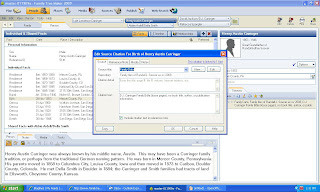
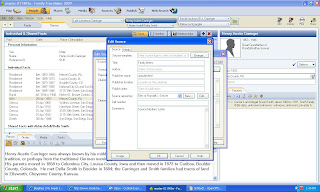
I selected the "Edit" button, and a second small window titled "Edit Source" opened for me to start the citation template process. This window has entries for "Source Template," "Author," "Publisher," etc. I needed to choose a template first, so I clicked the "Change" button on the top line:
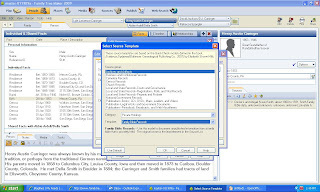
Another small window opened titled "Select Source Template" with a selection of template types. I chose "Archives and Artifacts" and then chose "Private Holdings" from the Categories box and "Family Bible Records" from the Template box, as shown below:

There was no explicit direction as to how to obtain the upgrade, so I just opened FTM 2009 and a notcie came up saying there was an Upgrade and I followed the directions and the upgrade quickly downloaded. Then it took FTM 2009 quite a while (I'm guessing two minutes) to start up (it usually takes only one minute or so) and I maneuvered to some source citations and sure enough, there was a way to create new source citations and edit earlier citations using a series of source citation templates based on the Quick Check models in Elizabeth Shown Mills' book, Evidence Explained.
Before I dove into this exercise, I downloaded and read the PDF that was in Tana blog post - titled 2009 Software Update (one section covers the Source Citation templates). This was a big help in getting me started.
I have a series of screen shots for my first exercise in editing an existing source citation. I chose the Carringer Family Bible for which my source citation had been:
"Family Data, D.J. Carringer Family Bible (loose pages), no book title, author, or publiication information."
On the [People] > [Person] screen for Henry Austin Carringer, I selected the Birth Fact, and clicked on the "Edit" (the pencil icon) on the "Sources" field in the right panel of the screen. This opened the small window, which had my earlier information in the window items, as shown below:

I selected the "Edit" button, and a second small window titled "Edit Source" opened for me to start the citation template process. This window has entries for "Source Template," "Author," "Publisher," etc. I needed to choose a template first, so I clicked the "Change" button on the top line:

Another small window opened titled "Select Source Template" with a selection of template types. I chose "Archives and Artifacts" and then chose "Private Holdings" from the Categories box and "Family Bible Records" from the Template box, as shown below:

I clicked "OK" and a small window titled "Change Source Type" opened with a number of empty boxes to be filled in. The screen looked like this:

I could have added information to the boxes, but I didn't because I had no knowledge of the Bible title, author, publisher, etc. I clicked "OK" in my haste to finally complete a great source citation. A window titled "Edit source" came up with many of the same boxes to fill in, plus more. I filled them in with what I knew about each item. The screen looked like this:


I clicked "OK" and was back to the first "Edit Source Citation" window and I added some information into the "Citation Detail" box, and eliminated the previous text from the "Citation Text" box. The screen looked like this:


I thought I was almost done...so I clicked "OK" and was back to my [People] > [Person] screen with the Birth record highlighted, and the edited Source in the right-hand frame on the screen:
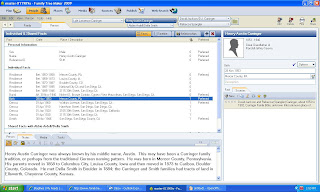
It shows only two lines on this screen - a long source citation is cut off by the window width. If I dragged the window divider to the left, more of the citation would show up.

It shows only two lines on this screen - a long source citation is cut off by the window width. If I dragged the window divider to the left, more of the citation would show up.
However, I went to the [Sources] button and chose this Source and the Reference Note that appeared was:
"David Jackson and Rebecca (Spangler) Carringer, about 1853 to 1902, Carringer Family Bible, unknown title (unknown place of publication: unknown publisher, unknown year); privately held by Randall J. Seaver, Chula Vista CA 91911 USA, 1988 to present. The Bible pages are in the hands of Rebecca (Spangler) Carringer, Della (Smith) Carringer, and Lyle L. Carringer. The loose pages were in the family papers of Lyle L. Carringer handed to Betty (Carringer) Seaver in 1977 and to Randall J. Seaver in 1988."
Isn't that cool? Did I do it right? (I really hate criticism, you know, but tell me!). What should I have done to make this better?
I could have attached my images of the Bible pages to the Media tab in the Sources screen.
I could have included a transcription or abstraction in the Reference Note if I had entered them into the "Citation Text" box on one of the small windows.
I can use this master source for all of the persons mentioned in this Family Bible.
Whew! One down, hundreds more to go. It only took an hour or so for this one! I'm sure that I will get better at doing this.
I wonder if the Legacy 7 process is any easier? I'll try it soon and tell you all about it!
I Use the Internet for Genealogy Research by...
John D. Reid has an interesting post today titled How genealogists use the internet on his Anglo-Celtic Connections blog. John describes the content of a Fraser Dunford column on the subject which claimed there were only four uses, and then John provides his own list of ways he uses the Internet. Read his entire post.
This is a very useful topic for genea-bloggers and blog readers, because the list can be useful in expanding knowledge of genealogy resources and ways to find distant cousins
Here are the ways that I use the Internet to perform genealogy research:
* Stay abreast of genealogy industry news and announcements (e.g., company web sites, online magazines, online newsletters, conferences, blogs, etc.)
* Continue my genealogy and history education through reading online articles, magazines, and web sites, listening to podcasts, watching videos, etc.
* Publish my genealogy research reports so that other researchers can find and use them, and contact me (e.g., on web sites, blogs, etc.)
* Publish my family trees on web sites so that other researchers can find and use them, and contact me.
* Post messages on Rootsweb mailing lists, Ancestry and GenForum message boards to solicit help and information from other researchers, and to help other researchers.
* Maintain contact and communicate with family members and genealogy friends through social networks (e.g., www.MyFamily.com, www.Geni.com, www.Facebook.com, www.LinkedIn.com, etc.)
* Search for genealogy and family history information about elusive ancestors in online indexes and databases (e.g., www.Ancestry.com, www.Rootsweb.com, www.Genealogy.com, www.Footnote.com, www.WorldVitalRecords.com, www.GenealogyBank.com, www.FamilySearch.org, www.NewEnglandAncestors.org, www.HeritageQuestOnline.com, www.FindAGrave.com, www.EllisIsland.org, www.OliveTreeGenealogy.com, www.DeathIndexes.com, www.MyHeritage.com, www.GeneaNet.org, www.LiveRoots.com, www.GenealogyToday.com, etc.)
* Obtain images of original documents from genealogy database companies.
* Search for genealogy and family history about elusive ancestors on web sites using search engines (e.g., Google, Yahoo, etc.)
* Search for information about local history and available resources on web sites (e.g., www.USGenWeb.org, www.WorldGenWeb.org, www.USGenNet.com, etc.)
* Access library catalogs to determine which institution has holdings of interest (e.g., www.WorldCat.org, Library of Congress, Family History Library Catalog, local, state and regional libraries)
* Access local and state government office web sites to search for and obtain court, land and vital records
* Access, pay for and download genealogy software to help me enter my genealogy information, organize my research and create charts, reports and books.
* A genealogy writing and publishing outlet for individuals, groups or societies (e.g., blogs, web sites, newsletters, message boards, etc.)
Many of the items on my list are included by John and Fraser Dunford in their lists. As John pointed out, there are many more opportunities than just Fraser's four uses of the Internet for genealogy.
What would you add to these lists? How do you use the Internet in your genealogy activities? Make a comment to this post, or write your own blog post.
My thanks to John and Fraser for a stimulating question, and for the blog fodder.
This is a very useful topic for genea-bloggers and blog readers, because the list can be useful in expanding knowledge of genealogy resources and ways to find distant cousins
Here are the ways that I use the Internet to perform genealogy research:
* Stay abreast of genealogy industry news and announcements (e.g., company web sites, online magazines, online newsletters, conferences, blogs, etc.)
* Continue my genealogy and history education through reading online articles, magazines, and web sites, listening to podcasts, watching videos, etc.
* Publish my genealogy research reports so that other researchers can find and use them, and contact me (e.g., on web sites, blogs, etc.)
* Publish my family trees on web sites so that other researchers can find and use them, and contact me.
* Post messages on Rootsweb mailing lists, Ancestry and GenForum message boards to solicit help and information from other researchers, and to help other researchers.
* Maintain contact and communicate with family members and genealogy friends through social networks (e.g., www.MyFamily.com, www.Geni.com, www.Facebook.com, www.LinkedIn.com, etc.)
* Search for genealogy and family history information about elusive ancestors in online indexes and databases (e.g., www.Ancestry.com, www.Rootsweb.com, www.Genealogy.com, www.Footnote.com, www.WorldVitalRecords.com, www.GenealogyBank.com, www.FamilySearch.org, www.NewEnglandAncestors.org, www.HeritageQuestOnline.com, www.FindAGrave.com, www.EllisIsland.org, www.OliveTreeGenealogy.com, www.DeathIndexes.com, www.MyHeritage.com, www.GeneaNet.org, www.LiveRoots.com, www.GenealogyToday.com, etc.)
* Obtain images of original documents from genealogy database companies.
* Search for genealogy and family history about elusive ancestors on web sites using search engines (e.g., Google, Yahoo, etc.)
* Search for information about local history and available resources on web sites (e.g., www.USGenWeb.org, www.WorldGenWeb.org, www.USGenNet.com, etc.)
* Access library catalogs to determine which institution has holdings of interest (e.g., www.WorldCat.org, Library of Congress, Family History Library Catalog, local, state and regional libraries)
* Access local and state government office web sites to search for and obtain court, land and vital records
* Access, pay for and download genealogy software to help me enter my genealogy information, organize my research and create charts, reports and books.
* A genealogy writing and publishing outlet for individuals, groups or societies (e.g., blogs, web sites, newsletters, message boards, etc.)
Many of the items on my list are included by John and Fraser Dunford in their lists. As John pointed out, there are many more opportunities than just Fraser's four uses of the Internet for genealogy.
What would you add to these lists? How do you use the Internet in your genealogy activities? Make a comment to this post, or write your own blog post.
My thanks to John and Fraser for a stimulating question, and for the blog fodder.
Selected Family Tree web site traffic statistics
The daily traffic in 2008 for several Family Tree web sites, as measured by www.Quantcast.com, are shown for:
1) www.MyHeritage.com
2) www.GeneaNet.org
3) www.OneGreatFamily.com
4) www.KindredKonnections.com
The daily People for these sites are shown below:

The daily visits for these sites are shown below:

We can see that www.MyHeritage.com had a major increase in traffic in July 2008, although only US traffic was measured. www.GeneaNet.org had a steady increase in traffic throughout 2008, although the US penetration is small. www.OneGreatFamily.com and www.KindredKonnections.com traffic was constant but small, relative to the other two sites.
The Quantcast statistics provide monthly statistics also (which I believe is for the last month tested):
* www.MyHeritage.com: 142.4K people, 289.4K visits (US traffic only)
* www.GeneaNet.org: 59.4K People, 108.2K Visits (Global traffic(
* www.OneGreatFamily.com: 14.6K People, 16.0K Visits (US traffic only)
* www.KindredKonnections.com: 3.5K People, 4.0K Visits (US traffic only)
I tried to include www.Geni.com in this comparison, but Quantcast was not permitted to measure the web site for some reason.
1) www.MyHeritage.com
2) www.GeneaNet.org
3) www.OneGreatFamily.com
4) www.KindredKonnections.com
The daily People for these sites are shown below:

The daily visits for these sites are shown below:

We can see that www.MyHeritage.com had a major increase in traffic in July 2008, although only US traffic was measured. www.GeneaNet.org had a steady increase in traffic throughout 2008, although the US penetration is small. www.OneGreatFamily.com and www.KindredKonnections.com traffic was constant but small, relative to the other two sites.
The Quantcast statistics provide monthly statistics also (which I believe is for the last month tested):
* www.MyHeritage.com: 142.4K people, 289.4K visits (US traffic only)
* www.GeneaNet.org: 59.4K People, 108.2K Visits (Global traffic(
* www.OneGreatFamily.com: 14.6K People, 16.0K Visits (US traffic only)
* www.KindredKonnections.com: 3.5K People, 4.0K Visits (US traffic only)
I tried to include www.Geni.com in this comparison, but Quantcast was not permitted to measure the web site for some reason.
Wednesday, February 4, 2009
Dynastree's US Surname Distribution Maps
I received an email from the http://www.dynastree.com/ team explaining their US Surname distribution Maps that was announced the other day.
Rather than print out the announcement, I chose to go visit the site www.dynastree.com/maps-usa/ and see what I could find. I input "Seaver" in the surname box and got this web page (separated into three screens):


The map gives me a distribution of the names. The text below indicates that Seaver has 1,349 entries in US phone books and is the 7,398th most common name in the USA. It is most frequent in Massachusetts (139 entries) and California (125 entries). There is a link for the distribution in Canada also.
Rather than print out the announcement, I chose to go visit the site www.dynastree.com/maps-usa/ and see what I could find. I input "Seaver" in the surname box and got this web page (separated into three screens):


The map gives me a distribution of the names. The text below indicates that Seaver has 1,349 entries in US phone books and is the 7,398th most common name in the USA. It is most frequent in Massachusetts (139 entries) and California (125 entries). There is a link for the distribution in Canada also.
The surname Smith is the most common surname in the USA - with 783,588 entries in US phone books.
The surname Obama is the 490,118th most common surname with 6 entries.
This surname distribution tool can be useful if you don't know where the surname is predominant. Of course, it measures the current (or nearly current) distribution and not the historical distribution.
Subscribe to:
Posts (Atom)