It's Saturday Night - time for some Genealogy Fun! Please join in!
John G. West on the Tri-State Genealogical Society of Evansville, Indiana "TSGS Cruiser" blog (which is one of the longer blog names in the geneablog world) posted From My Email Box - "100 Years Ago!" today. This is an email that's been around for awhile, but it's still useful for our purposes tonight.
Tonight's Genealogy Fun is to:
1) Which of your ancestors were alive in 1909?
2) Tell us where your ancestral families were living in 1909. What country, state, county, city/town, etc. Who was in the family at the time? Use the 1910 census as "close enough."
3) Have you found each of these families in the 1910 census?
4) Write a blog post about your response. Or write a comment to this post.
5) Have fun. Learn something!
Here are my responses:
* Great-grandfather Henry Austin Carringer (age 56), Great-grandmother Della (Smith) Carringer (age 46), Grandfather Lyle L. Carringer (age 18), and 2nd-great-grandmother Abigail (Vaux) Smith (age 65), were residing at 2105 30th Street in San Diego, San Diego, California. Harvey Edgar Carringer also resided in the house.
* Great-grandfather Charles Auble (age 60), Great-grandmother Georgianna (Kemp) Auble (age 41) and Grandmother Emily K. Auble (age 10) were residing in Chicago, Cook, Illinois. In the 1910 City directory, they resided at 611 West 76th Street, and in the 1910 census they resided at 611 North 70th Street in the 32nd Ward. Strange that the street address is the same!
* Grandfather Frederick Walton Seaver (age 33) and Grandmother Alma Bessie (Richmond) Seaver (age 27) were residing at 116 Lawrence Street in Fitchburg, Worcester, Massachusetts. Their children Marion, Evelyn and Ruth also resided in the house.
* Great-grandfather Frank Walton Seaver (age 57), Great-grandmother Hattie (Hildreth) Seaver (age 52), and 2nd-great-grandmother Sophia (Newton) Hildreth were residing at 146 Lancester Street in Leominster, Worcester, Massachusetts.
* Great-Grandfather Thomas Richmond (age 61) and Great-grandmother Julia (White) Richmond (age 61) were probably residing in Killingly, Windham, Connecticut.
* 2nd great-grandfather James Richmond (age 88) and 2nd-great-grandmother Hannah (Rich) Richmond (age 85) were residing at 1 Richmond Road in Putnam, Windham, Connecticut. John A. Richmond, Mary A. Richmond, Louise Richmond and Thomas H.M. Richmond were also in the household.
So I have all four of my grandparents, all eight of my great-grandparents and four of my 16 2nd-great-grandparents living in 1909, and I know where they all were (at least in the 1910 census).
Saturday, June 6, 2009

It's Official -- NARA Laguna Niguel to Close
Joel Weintrraub sent along this notice from the NARA Staff Bulletin No. 584, May 2009:
"Moves and upgrades for our regional archives"
by Adrienne C. Thomas,
Acting Archivist of the United States
"Laguna Niguel - We are moving out of the massive Chet Holifield Federal office building, which formerly housed both the FRC [Federal Records Center] and the Archives, as well as many other Federal agencies. The Holifield building cannot be renovated to meet standards. In addition, visitorship and usage is low and does not justify the very high rent. Therefore, the archives will rejoin the FRC at its new facility in Riverside, which is about 50 miles from Laguna Niguel. The move is expected to be complete by spring 2010."
The new FRC facility in "Riverside" is located at 23123 Cajalco Road in Perris, CA 92570. The facility is described here, with directions from Los Angeles and San Diego. The web site says:
"Maintains temporary storage records from Federal agencies and courts in Arizona, southern California, and Clark County, Nevada.
"The Federal Records Center is open to the public from 9:00 AM to 4:00 PM, by appointment only. Call 951-956-2000 between 9 A.M. and 2:30 P.M. weekdays, except Federal holidays, to schedule an appointment.
"Please note: There are no genealogical or historical research facilities available at this location."
The Court Records currently available at the FRC include Bankruptcy, Civil and Criminal Case files - the list is provided here.
Surely they will be open to the public on a non-appointment basis after the NARA Laguna Niguel archival material is incorporated into their holdings.
"Moves and upgrades for our regional archives"
by Adrienne C. Thomas,
Acting Archivist of the United States
"Laguna Niguel - We are moving out of the massive Chet Holifield Federal office building, which formerly housed both the FRC [Federal Records Center] and the Archives, as well as many other Federal agencies. The Holifield building cannot be renovated to meet standards. In addition, visitorship and usage is low and does not justify the very high rent. Therefore, the archives will rejoin the FRC at its new facility in Riverside, which is about 50 miles from Laguna Niguel. The move is expected to be complete by spring 2010."
The new FRC facility in "Riverside" is located at 23123 Cajalco Road in Perris, CA 92570. The facility is described here, with directions from Los Angeles and San Diego. The web site says:
"Maintains temporary storage records from Federal agencies and courts in Arizona, southern California, and Clark County, Nevada.
"The Federal Records Center is open to the public from 9:00 AM to 4:00 PM, by appointment only. Call 951-956-2000 between 9 A.M. and 2:30 P.M. weekdays, except Federal holidays, to schedule an appointment.
"Please note: There are no genealogical or historical research facilities available at this location."
The Court Records currently available at the FRC include Bankruptcy, Civil and Criminal Case files - the list is provided here.
Surely they will be open to the public on a non-appointment basis after the NARA Laguna Niguel archival material is incorporated into their holdings.
Friday, June 5, 2009
Working in RootsMagic 4 - Post 23: Creating a Source citation (Part 3)
Previous posts in this series are listed in Working in RootsMagic 4 - Summary of Posts.
In this series of posts, I'm creating a Source in RootsMagic 4 using the Evidence Explained style templates. This is one of the major selling points for the several software programs, and it is important that they get it right. I worked in RootsMagic 4 and created the actual Source Citation in Working in RootsMagic 4 - Post 21: Creating a Source Citation (Part 1). Then in Working in RootsMagic 4 - Post 22: Creating a Source Citation (Part 2) I added Quality, Repository and Note information to the Source.
In this post, I'm going to add a Media item to the Source and then share the Source with everyone that it applies to in my database.
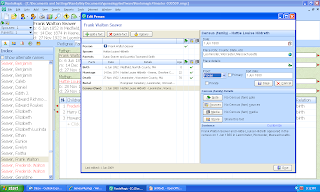
Here is the "Edit Person" screen before I created the source in Part 1. Notice the "Media" button in the lower right-hand corner? I'm going to click on it:
When I clicked on the "Media" button, a "Media Album" for my great-grandparents appeared, and I clicked on the "Add new media" button and the "Add Media Item" menu appeared:
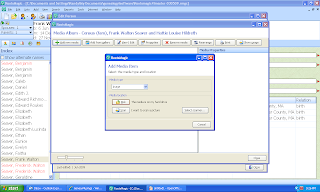
I chose "Image" from the drop down Media Type menu, and clicked on the "Disk" button to find the media on my hard drive:
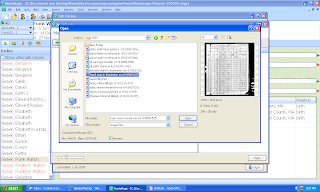
I found the 1880 US census image for the Seaver family in my file folders, and highlighted it, noted that a thumbnail image appeared in the right side of the menu, and noted that the file name appeared in the "File name" field at the bottom of the menu. I clicked on the "Open" button and this screen appeared:

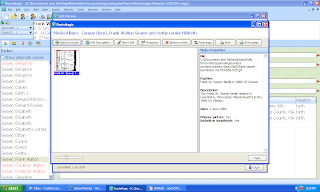
The Media properties of the highlighted image are shown on the right side of this menu. I clicked on the "Close" button and was back to the "Edit Person" screen with my "Census (fam)" Fact highlighted.
Am I done with the Source citation? Not quite. This is a Census source, so the information on this Source apply to all members of the family, not just the parents.
The fourth button on the "Edit Person" menu (the first screen shot in this post) is "Share" and should be used to attach the Source and Media item to every person that it pertains to. I clicked on the "Share" button:
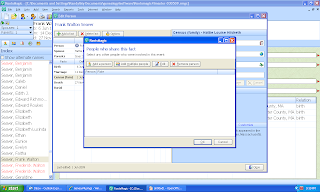
The "People who share this fact" menu has buttons for "Add a person" and "Add multiple people." I wanted to add the Source to three more people, so I clicked on "Add multiple people." The "Select People" menu opened and I selected Hattie Louise (Hildreth) Seaver and Frederick Walton Seaver from the list one at a time. After that, the screen looked like this:

In this series of posts, I'm creating a Source in RootsMagic 4 using the Evidence Explained style templates. This is one of the major selling points for the several software programs, and it is important that they get it right. I worked in RootsMagic 4 and created the actual Source Citation in Working in RootsMagic 4 - Post 21: Creating a Source Citation (Part 1). Then in Working in RootsMagic 4 - Post 22: Creating a Source Citation (Part 2) I added Quality, Repository and Note information to the Source.
In this post, I'm going to add a Media item to the Source and then share the Source with everyone that it applies to in my database.
Here is the "Edit Person" screen before I created the source in Part 1. Notice the "Media" button in the lower right-hand corner? I'm going to click on it:

When I clicked on the "Media" button, a "Media Album" for my great-grandparents appeared, and I clicked on the "Add new media" button and the "Add Media Item" menu appeared:

I chose "Image" from the drop down Media Type menu, and clicked on the "Disk" button to find the media on my hard drive:

I found the 1880 US census image for the Seaver family in my file folders, and highlighted it, noted that a thumbnail image appeared in the right side of the menu, and noted that the file name appeared in the "File name" field at the bottom of the menu. I clicked on the "Open" button and this screen appeared:

This "Media properties" menu allows me to zoom the image in or out using the zoom bar at the bottom, and scroll around the image using the scroll bars. On the right side of the menu are fields for the Caption, Description, Date and Reference Number for the image. If this wasn't the correct image, I could have clicked on the "Change media file" button to find another image.
This is the right image, so I clicked on the "OK" button and the media item was added to the Media Album for my great-grandparents:
This is the right image, so I clicked on the "OK" button and the media item was added to the Media Album for my great-grandparents:

The Media properties of the highlighted image are shown on the right side of this menu. I clicked on the "Close" button and was back to the "Edit Person" screen with my "Census (fam)" Fact highlighted.
Am I done with the Source citation? Not quite. This is a Census source, so the information on this Source apply to all members of the family, not just the parents.
The fourth button on the "Edit Person" menu (the first screen shot in this post) is "Share" and should be used to attach the Source and Media item to every person that it pertains to. I clicked on the "Share" button:

The "People who share this fact" menu has buttons for "Add a person" and "Add multiple people." I wanted to add the Source to three more people, so I clicked on "Add multiple people." The "Select People" menu opened and I selected Hattie Louise (Hildreth) Seaver and Frederick Walton Seaver from the list one at a time. After that, the screen looked like this:

I clicked the "OK" button and was back to the "Edit Person" menu, which looked like this:

There is also a customizable sentence in the lower right hand corner of this menu that shows what will be written for this Fact in a report: "Frank Walton Seaver and Hattie Louise Hildreth appeared in the Census of 1 June 1880 in Leominster, Worcester, Massachusetts."
All of that effort to create a Source citation, attach a Media item and Share the citation and media item with two other people took me about three minutes once I knew how to do it.
I found this entire Source citation process to be pretty easy to use, with the exception of finding the citation data to enter in the template. I had to go to the Notes for the person and copy the information to put in the fields. Other than that, it seemed very easy and intuitive to use, and fairly quick to complete.

For the "Census (fam)" Fact that I selected at the beginning, the "Census (family) details" area of the menu shows that I have one Census (fam) source, one Census (fam) Media item, and two People share this Census (fam) fact with the selected person.
There is also a customizable sentence in the lower right hand corner of this menu that shows what will be written for this Fact in a report: "Frank Walton Seaver and Hattie Louise Hildreth appeared in the Census of 1 June 1880 in Leominster, Worcester, Massachusetts."
All of that effort to create a Source citation, attach a Media item and Share the citation and media item with two other people took me about three minutes once I knew how to do it.
I found this entire Source citation process to be pretty easy to use, with the exception of finding the citation data to enter in the template. I had to go to the Notes for the person and copy the information to put in the fields. Other than that, it seemed very easy and intuitive to use, and fairly quick to complete.
Hmmm, one down, hundreds more to go...
Legacy Family Tree 7 Online Seminars
Geoff Rasmussen commented in my post Beginning Genealogy Helps - Post 1 that there were several beginning "getting started with Legacy" videos online on the www.LegacyFamilyTree.com web site.
The list of Legacy training videos on CDROM, and links to several free videos, are at http://www.legacyfamilytree.com/Videos.asp. The free training videos are:
* What's New in Legacy 7.0 - New for Version 7! - a PowerPoint presentation
* Legacy Family Tree: an Overview. Part of a live seminar presented to the Hemet-San Jacinto Genealogical Society on May 16, 2009. The summary:
"New to Legacy Family Tree? Join Legacy's Geoff Rasmussen as he introduces the main features of Legacy. In this 54 minute seminar, Geoff teaches about getting started with Legacy by importing from another computer program, setting and understanding relationships, 1/2 siblings, setting your direct line, AKAs, addresses, notes, sources, pictures, To Do List, Research Guidance, and reports. This seminar is intended for those who are new to Legacy Family Tree but is also a great refresher course for experienced Legacy users."
* Legacy Family Tree: Tips and Tricks. Part of a live seminar presented to the Hemet-San Jacinto Genealogical Society on May 16, 2009. The summary:
"Want the Legacy insider's tips/tricks? Join Legacy's Geoff Rasmussen for the next 58 minutes as he explains the following: news/updates, family group records, chronologies, effective use of events/facts, adding historical events to your timeline, successfully obtaining information from living relatives, creating books, using Legacy Charting, Descendant and Index View tips, using the split screen feature, what do do when you have an unproven relative, and how to add unlinked individuals. This seminar is intended for those who are experienced with Legacy Family Tree, but everyone is welcome to view it."
* Legacy for Beginners - a PowerPoint presentation. The Source citation process is discussed very well.
These videos are very well done and will be very helpful for someone that wants to learn how to use Legacy Family Tree 7 effectively.
There are two article downloads available - they are the handouts from the Hemet-San Jacinto Genealogical Society meeting. They are:
* Organize, Plan, and Share Your Family Tree Using Legacy Family Tree Software
* Using Legacy Family Tree to Get Your Family Excited about Genealogy
These articles are in PDF format and are useful for beginners and experienced users alike.
The list of Legacy training videos on CDROM, and links to several free videos, are at http://www.legacyfamilytree.com/Videos.asp. The free training videos are:
* What's New in Legacy 7.0 - New for Version 7! - a PowerPoint presentation
* Legacy Family Tree: an Overview. Part of a live seminar presented to the Hemet-San Jacinto Genealogical Society on May 16, 2009. The summary:
"New to Legacy Family Tree? Join Legacy's Geoff Rasmussen as he introduces the main features of Legacy. In this 54 minute seminar, Geoff teaches about getting started with Legacy by importing from another computer program, setting and understanding relationships, 1/2 siblings, setting your direct line, AKAs, addresses, notes, sources, pictures, To Do List, Research Guidance, and reports. This seminar is intended for those who are new to Legacy Family Tree but is also a great refresher course for experienced Legacy users."
* Legacy Family Tree: Tips and Tricks. Part of a live seminar presented to the Hemet-San Jacinto Genealogical Society on May 16, 2009. The summary:
"Want the Legacy insider's tips/tricks? Join Legacy's Geoff Rasmussen for the next 58 minutes as he explains the following: news/updates, family group records, chronologies, effective use of events/facts, adding historical events to your timeline, successfully obtaining information from living relatives, creating books, using Legacy Charting, Descendant and Index View tips, using the split screen feature, what do do when you have an unproven relative, and how to add unlinked individuals. This seminar is intended for those who are experienced with Legacy Family Tree, but everyone is welcome to view it."
* Legacy for Beginners - a PowerPoint presentation. The Source citation process is discussed very well.
These videos are very well done and will be very helpful for someone that wants to learn how to use Legacy Family Tree 7 effectively.
There are two article downloads available - they are the handouts from the Hemet-San Jacinto Genealogical Society meeting. They are:
* Organize, Plan, and Share Your Family Tree Using Legacy Family Tree Software
* Using Legacy Family Tree to Get Your Family Excited about Genealogy
These articles are in PDF format and are useful for beginners and experienced users alike.
Beginning Genealogy Helps - Post 2: Genealogy.com
In Beginning Genealogy Helps - Post 1, I listed four online genealogy tutorials and asked my readers for help finding others.
Reader Eileen recommended the articles and classes in the Learning Center at www.Genealogy.com. There are at least two different series here:
1) Genealogy How-To, with five sections, including:
* Getting Started -- five modules (Begin Your Research at Home, What's in a Name?, Collaborating with Others, Finding Existing Research on Your Ancestors, and Outfitting Your Genealogy Toolkit) with 27 articles.
* Getting Organized -- four modules (Turning Piles Into Files, Time Management, Using Photographs, Documenting Your Sources) with 19 articles.
* Developing Your Research Skills -- eight modules (Deciphering Documents and Handwriting, Finding Female Ancestors, Oral Histories, Researching Where Your Ancestor Lived, Looking Outside Your Family for Clues, Ideas to Help You Over the Brick Wall, Researching Your Medical History, Professional Genealogists) with 32 articles.
* Sharing Your Family's Story -- three modules (Reunions, Creating a Family Book, Genealogy Vacations) with 28 articles.
* Reference Guide -- six modules (Census Records, Church Records, International and Immigration Research, Researching Military Records, Using Federal, State and Local Records, Using Archives and Libraries) in 41 articles.
2) Genealogy Classes, with three sections, including:
* Beginning Genealogy - two modules (Part 1: Your Great Ancestral Hunt; Part 2: Record Groups as Building Material) in 14 articles.
* Internet Genealogy -- two modules (Beginning Internet Genealogy; Intermediate Internet Genealogy) in 31 articles.
* Tracing Immigrant Origins -- five modules (Introduction to Tracing Immigrant Origins; Post Civil War Immigrant Sources; Sources Between 1820 and 1865; Pre-1820 Immigration; European Sources) in 40 articles.
My impression is that both series were written before the year 2000, and have not been significantly updated since. The first series provides basic information about the genealogy research process, and provide little or no Internet resources. The second series on Beginning Genealogy and Immigrant Origins are fairly general, but the Internet Genealogy section is dated (e.g., Google is not listed as a Search Engine to use).
www.Genealogy.com also has an Article Archive with many articles on a variety of subjects.
For Beginning genealogists, the two tutorials may be helpful to introduce the scope and breadth of genealogy methods and records groups, but will not be helpful for Internet research.
Reader Eileen recommended the articles and classes in the Learning Center at www.Genealogy.com. There are at least two different series here:
1) Genealogy How-To, with five sections, including:
* Getting Started -- five modules (Begin Your Research at Home, What's in a Name?, Collaborating with Others, Finding Existing Research on Your Ancestors, and Outfitting Your Genealogy Toolkit) with 27 articles.
* Getting Organized -- four modules (Turning Piles Into Files, Time Management, Using Photographs, Documenting Your Sources) with 19 articles.
* Developing Your Research Skills -- eight modules (Deciphering Documents and Handwriting, Finding Female Ancestors, Oral Histories, Researching Where Your Ancestor Lived, Looking Outside Your Family for Clues, Ideas to Help You Over the Brick Wall, Researching Your Medical History, Professional Genealogists) with 32 articles.
* Sharing Your Family's Story -- three modules (Reunions, Creating a Family Book, Genealogy Vacations) with 28 articles.
* Reference Guide -- six modules (Census Records, Church Records, International and Immigration Research, Researching Military Records, Using Federal, State and Local Records, Using Archives and Libraries) in 41 articles.
2) Genealogy Classes, with three sections, including:
* Beginning Genealogy - two modules (Part 1: Your Great Ancestral Hunt; Part 2: Record Groups as Building Material) in 14 articles.
* Internet Genealogy -- two modules (Beginning Internet Genealogy; Intermediate Internet Genealogy) in 31 articles.
* Tracing Immigrant Origins -- five modules (Introduction to Tracing Immigrant Origins; Post Civil War Immigrant Sources; Sources Between 1820 and 1865; Pre-1820 Immigration; European Sources) in 40 articles.
My impression is that both series were written before the year 2000, and have not been significantly updated since. The first series provides basic information about the genealogy research process, and provide little or no Internet resources. The second series on Beginning Genealogy and Immigrant Origins are fairly general, but the Internet Genealogy section is dated (e.g., Google is not listed as a Search Engine to use).
www.Genealogy.com also has an Article Archive with many articles on a variety of subjects.
For Beginning genealogists, the two tutorials may be helpful to introduce the scope and breadth of genealogy methods and records groups, but will not be helpful for Internet research.
Thursday, June 4, 2009
New Ancestry.com Family Tree Enhancements
...
Kenny Freestone unveiled the new Family Tree Enhancements on Ancestry.com today with his post New Family Tree Enhancements in “Preview Mode” on the Ancestry.com blog. Users can click on a link to observe the enhancements in his post.
Kenny's blog post explains the enhancements extremely well, so I don't want to duplicate them with my own examples. However, I was curious as to "what was added" to the family tree presentation and "what was taken away."
The short answer, as far as I can tell, is that nothing was taken away, and s list of sources was added. In addition, the pages look different. Kenny's blog post claimed that the new page format is faster for the user and less server intensive for Ancestry.com.
But there are differences in navigation, and there is one navigation problem that I've found so far.
Here is the current Family Tree Person Page for my great-grandfather, Frank Walton Seaver (1852-1922):

The Navigation links in the above screen include the menu with Overview, People, Family Tree, Photos, Stories, and Audio. Below the person's name are links for Edit Profile, Search Historical Records and View Note. Below that are links for Ancestry Hints (which lead to records on Ancestry.com that might apply to the person).
The screen shot below is the same Person Page with the new enhancements:

There is a new link right below the person's name for "Show immediate family" which lists parents, spouses and children when clicked.
There are now two menu sets. The one just below the person's name has links for "View Family Tree," "Search historical records," "Print or publish," "View note," and "Options." There are no "Options" at this time.
The second menu set are tabs located just above the Person Page information labeled "Overview," "Facts and Sources," "Gallery," "Comments," "Hints" and "Community." The "Edit this Person" tab is on the right of the menu line.
The major new addition is, I think, the "Sources" page, which looks like this:

I could not find a similar page on the "old" Family Tree" page.
The old "People" screen is the new "Overview" screen. The old "Overview" screen (which summarized the database) is now missing, as far as I can tell.
The new "Facts and Sources" has a similar list of Facts to those in the old "Edit Profile" menu that included "Facts and Events" and had links to the Fact Source information. In the new pages, the Sources are much easier to find and are listed together rather than separately as in the old pages.
The new "Gallery" page is similar to the old "Photos" page. The "Comments," "Hints," and "Community" pages are new tabs.
Clicking on the "Family Tree" tab produces essentially the same pedigree chart, family chart and family group sheet content, although the new page looks a bit different.
The only problem I found was that I could not get back to the new Person Page "Overview" (the equivalent of the old "People" page) from the new "Family Tree" page. I had to go back to the old view, click on "People" and then click on the new Enhancement link to get back to it.
There are ways to get back to the "Overview" page by running the mouse over any person's name in the "Family Tree" view - a popup box has links in small print to "View Profile," "Edit" and "Search Records." That's fine, I guess, but it took me awhile to find it.
In my opinion, Ancestry.com should add a noticeable link to go to the "Profile" or "Overview" page for the selected person while on the "Family Tree" page.
Note that these enhancements apply only to the Ancestry Member Trees (Public or Private), and not to the One World tree or Ancestry World Tree databases.
The web page says for the "Pedigree Chart" view that:
"Updates coming soon to Pedigree View
Next up in our preview of tree updates will be a new version of the pedigree view that will let you see more generations at one time, see your tree full screen, drag and grab your tree, and zoom in and out. Improved navigation will make it faster and easier to return to an ancestor profile page."
Oh. They covered my one complaint in the last sentence. Just saw it. Okay. Forget what I said...
Overall, I'm pleased with the enhancements for the Person Pages in the Family Trees. The navigation is very easy to use once you figure out what all of the buttons and tabs mean.
Have you noticed that Ancestry.com always seems to be changing (enhancing? improving?) their web site - whether it is the "look and feel," the search algorithms, etc. I appreciate that - not many genealogy database providers are working as hard to improve their "user interface" and "look and feel" as Ancestry.com does.
Kenny Freestone unveiled the new Family Tree Enhancements on Ancestry.com today with his post New Family Tree Enhancements in “Preview Mode” on the Ancestry.com blog. Users can click on a link to observe the enhancements in his post.
Kenny's blog post explains the enhancements extremely well, so I don't want to duplicate them with my own examples. However, I was curious as to "what was added" to the family tree presentation and "what was taken away."
The short answer, as far as I can tell, is that nothing was taken away, and s list of sources was added. In addition, the pages look different. Kenny's blog post claimed that the new page format is faster for the user and less server intensive for Ancestry.com.
But there are differences in navigation, and there is one navigation problem that I've found so far.
Here is the current Family Tree Person Page for my great-grandfather, Frank Walton Seaver (1852-1922):

The Navigation links in the above screen include the menu with Overview, People, Family Tree, Photos, Stories, and Audio. Below the person's name are links for Edit Profile, Search Historical Records and View Note. Below that are links for Ancestry Hints (which lead to records on Ancestry.com that might apply to the person).
The screen shot below is the same Person Page with the new enhancements:

The light blue area at the top explains the enhancements made to the Family Tree pages.
There is a new link right below the person's name for "Show immediate family" which lists parents, spouses and children when clicked.
There are now two menu sets. The one just below the person's name has links for "View Family Tree," "Search historical records," "Print or publish," "View note," and "Options." There are no "Options" at this time.
The second menu set are tabs located just above the Person Page information labeled "Overview," "Facts and Sources," "Gallery," "Comments," "Hints" and "Community." The "Edit this Person" tab is on the right of the menu line.
The major new addition is, I think, the "Sources" page, which looks like this:

I could not find a similar page on the "old" Family Tree" page.
The old "People" screen is the new "Overview" screen. The old "Overview" screen (which summarized the database) is now missing, as far as I can tell.
The new "Facts and Sources" has a similar list of Facts to those in the old "Edit Profile" menu that included "Facts and Events" and had links to the Fact Source information. In the new pages, the Sources are much easier to find and are listed together rather than separately as in the old pages.
The new "Gallery" page is similar to the old "Photos" page. The "Comments," "Hints," and "Community" pages are new tabs.
Clicking on the "Family Tree" tab produces essentially the same pedigree chart, family chart and family group sheet content, although the new page looks a bit different.
The only problem I found was that I could not get back to the new Person Page "Overview" (the equivalent of the old "People" page) from the new "Family Tree" page. I had to go back to the old view, click on "People" and then click on the new Enhancement link to get back to it.
There are ways to get back to the "Overview" page by running the mouse over any person's name in the "Family Tree" view - a popup box has links in small print to "View Profile," "Edit" and "Search Records." That's fine, I guess, but it took me awhile to find it.
In my opinion, Ancestry.com should add a noticeable link to go to the "Profile" or "Overview" page for the selected person while on the "Family Tree" page.
Note that these enhancements apply only to the Ancestry Member Trees (Public or Private), and not to the One World tree or Ancestry World Tree databases.
The web page says for the "Pedigree Chart" view that:
"Updates coming soon to Pedigree View
Next up in our preview of tree updates will be a new version of the pedigree view that will let you see more generations at one time, see your tree full screen, drag and grab your tree, and zoom in and out. Improved navigation will make it faster and easier to return to an ancestor profile page."
Oh. They covered my one complaint in the last sentence. Just saw it. Okay. Forget what I said...
Overall, I'm pleased with the enhancements for the Person Pages in the Family Trees. The navigation is very easy to use once you figure out what all of the buttons and tabs mean.
Have you noticed that Ancestry.com always seems to be changing (enhancing? improving?) their web site - whether it is the "look and feel," the search algorithms, etc. I appreciate that - not many genealogy database providers are working as hard to improve their "user interface" and "look and feel" as Ancestry.com does.
UPDATED 6/5: Thanks to reader Geolover for the additional comments. I missed several things in my initial post.
New "Digging for Answers" article in the Graveyard Rabbit Online Journal
My latest article in The Graveyard Rabbit Online Journal ezine has been posted on the Journal's web site - see Digging For Answers – June 4, 2009. The subject is "Making Contact with Cemeteries."
Russ asked the question:
"What is the best approach at making contact with “the office?”
Read my responses in the article.
Do you have a question about cemeteries, gravestones, burial practices, and other topics that concern a Graveyard Rabbit (other than where his next carrot is coming from!). If so - please send some questions to the editor, who will pass them along and keep the columnist hopping. Hmmm, not too many, please - I can only do one every six weeks.
Are you interested in joining the Association of Graveyard Rabbits? See The Graveyard Rabbit blog for more information.
Russ asked the question:
"What is the best approach at making contact with “the office?”
Read my responses in the article.
Do you have a question about cemeteries, gravestones, burial practices, and other topics that concern a Graveyard Rabbit (other than where his next carrot is coming from!). If so - please send some questions to the editor, who will pass them along and keep the columnist hopping. Hmmm, not too many, please - I can only do one every six weeks.
Are you interested in joining the Association of Graveyard Rabbits? See The Graveyard Rabbit blog for more information.
SCGS Jamboree News
Paula Hinkel of the Southern California Genealogical Society posted a news update for the SCGS Genealogy Jamboree, scheduled for 26-28 June in Burbank, on several mailing lists yesterday - here is a link to one of the mailing list posts.
Her post said:
It's hard to believe that it's already June 3 and that Jamboree is just about three weeks away. There are so many Jamboree updates that I'm going to break this month's update into two emails - Jamboree and everything else that is going on at SCGS.
You can find links to all Jamboree mentions at our blog at http://www.genealogyjamboree.blogspot.com/. If you have not yet signed up to get email updates for Jamboree activities, please, please do so. It's the very best way to stay updated on all of the last-minute details, such as parking, schedule changes, special announcements, etc.
Friday-Sunday, June 26-28, 2009
Southern California Genealogy Jamboree
Burbank Airport Marriott Hotel and Convention Center
2500 Hollywood Way Burbank, CA 91505
JAMBOREE DEADLINE ALERT
Friday, June 5 - Last day for discounted Marriott Hotel reservations
Monday, June 15 - Last day for preregistration for Jamboree
Monday, June 15 - Last day to sign up for banquets or breakfasts Register for Jamboree at http://www.scgsgenealogy.com/
JAMBOREE CONFIRMATIONS AND SURVEY
We are experiencing some trouble getting through spam folders. If you have registered for any event at Jamboree, please check your spam folders to see if you are getting your Jamboree updates. If you have not already done so, please put us on your approved email list.You should receive your registration confirmation by Sunday, June 6.
- Look for email subject "2009 SCGS Jamboree Confirmation"
- Sent by Louise Calaway at lcalaway@emmcpa.com
Your survey invitation was sent earlier this week
- Look for email subject "Genealogy Jamboree Important Update
-Please Read"- Sent by Paula Hinkel at phinkel@pacbell.net or
phinkel@scgsgenealogy.com
JAMBOREE SESSIONS AVAILABLE ON CD
We are so glad that many of this year's sessions are going to be audio recorded and available on CD. You can purchase the CDs at Jamboree or later through the website of JAMB Tapes. We will have a link on the SCGS website after Jamboree
WELCOME TO NEW EXHIBITORS
Joining Jamboree for the first time will be Footnote.com, Arcalife.com, Scandigital.com, and Save Their Story, LA as Subject,and Uncle Ronnie's Pens.
For an updated floor plan, click on the"exhibitor" button on the Jamboree section of the SCGS website.
See the full post on the mailing list or on the Jamboree blog.
Linda and I are all set for the train trip to the Jamboree with my San Diego Genealogical Society colleagues. The last I heard, there were 17 going by train from San Diego, leaving the driving to Amtrak and getting off two blocks from the Jamboree hotel. It should be fun, and I can attend the Sunday sessions without having to drive home exhausted.
I'm really looking forward to meeting many more geneabloggers. Thomas MacEntee is putting together some meetups and some goodies - see his post Are You Attending the SoCal Jamboree? Let Thomas know if you are attending.
Don't forget the Bloggers Summit 2 presentation on Saturday morning at 9:30 a.m. - I posted more about it in SCGS Genealogy Jamboree News last month. The description of this meeting is:
"SA-09 Summit 2: Son of Blogger [Morgan, The Ancestry Insider, Cooke, Danko, Dardashti, DearMYRTLE, Eastman, Manson, Meitzler] Panel Discussion. Genealogy bloggers, podcasters, and video casters use the Internet in ways that have changed communications to genealogists and family historians. This panel discussion will cover a wide range of topics, including: How have bloggers changed the flow of information between vendors and their customers? How can family history blogs help to exchange information and locate cousins? What are the ethical issues of blogging? What tips do these pros have for starting your own blog? What tools are available to help bloggers get up and running? Email your questions to jamboree@scgsgenealogy.com. (Session runs from 9:30 a.m. to 12:00 noon.)"
I know that there will be many more geneabloggers in the audience than on the panel! How many will live blog and tweet the Blogger's panel? Will they ask really hard questions of the panel? Many of us in the audience will "know" (meaning they read their work and communicate with them) every geneablogger in the room - will the members of the panel be able to say that?
The entire SCGS Jamboree program is available in PDF format here. This conference is a really good deal - three days of top-notch genealogy presentations and an excellent exhibit hall for $80 in registration fees (pre-registration at $80 ends on 15 June). The Registration Form is here.
See you at the Jamboree! This is going to be fun... and exhilarating ... and exhausting. Genea-exhilarausting!
Her post said:
It's hard to believe that it's already June 3 and that Jamboree is just about three weeks away. There are so many Jamboree updates that I'm going to break this month's update into two emails - Jamboree and everything else that is going on at SCGS.
You can find links to all Jamboree mentions at our blog at http://www.genealogyjamboree.blogspot.com/. If you have not yet signed up to get email updates for Jamboree activities, please, please do so. It's the very best way to stay updated on all of the last-minute details, such as parking, schedule changes, special announcements, etc.
Friday-Sunday, June 26-28, 2009
Southern California Genealogy Jamboree
Burbank Airport Marriott Hotel and Convention Center
2500 Hollywood Way Burbank, CA 91505
JAMBOREE DEADLINE ALERT
Friday, June 5 - Last day for discounted Marriott Hotel reservations
Monday, June 15 - Last day for preregistration for Jamboree
Monday, June 15 - Last day to sign up for banquets or breakfasts Register for Jamboree at http://www.scgsgenealogy.com/
JAMBOREE CONFIRMATIONS AND SURVEY
We are experiencing some trouble getting through spam folders. If you have registered for any event at Jamboree, please check your spam folders to see if you are getting your Jamboree updates. If you have not already done so, please put us on your approved email list.You should receive your registration confirmation by Sunday, June 6.
- Look for email subject "2009 SCGS Jamboree Confirmation"
- Sent by Louise Calaway at lcalaway@emmcpa.com
Your survey invitation was sent earlier this week
- Look for email subject "Genealogy Jamboree Important Update
-Please Read"- Sent by Paula Hinkel at phinkel@pacbell.net or
phinkel@scgsgenealogy.com
JAMBOREE SESSIONS AVAILABLE ON CD
We are so glad that many of this year's sessions are going to be audio recorded and available on CD. You can purchase the CDs at Jamboree or later through the website of JAMB Tapes. We will have a link on the SCGS website after Jamboree
WELCOME TO NEW EXHIBITORS
Joining Jamboree for the first time will be Footnote.com, Arcalife.com, Scandigital.com, and Save Their Story, LA as Subject,and Uncle Ronnie's Pens.
For an updated floor plan, click on the"exhibitor" button on the Jamboree section of the SCGS website.
See the full post on the mailing list or on the Jamboree blog.
Linda and I are all set for the train trip to the Jamboree with my San Diego Genealogical Society colleagues. The last I heard, there were 17 going by train from San Diego, leaving the driving to Amtrak and getting off two blocks from the Jamboree hotel. It should be fun, and I can attend the Sunday sessions without having to drive home exhausted.
I'm really looking forward to meeting many more geneabloggers. Thomas MacEntee is putting together some meetups and some goodies - see his post Are You Attending the SoCal Jamboree? Let Thomas know if you are attending.
Don't forget the Bloggers Summit 2 presentation on Saturday morning at 9:30 a.m. - I posted more about it in SCGS Genealogy Jamboree News last month. The description of this meeting is:
"SA-09 Summit 2: Son of Blogger [Morgan, The Ancestry Insider, Cooke, Danko, Dardashti, DearMYRTLE, Eastman, Manson, Meitzler] Panel Discussion. Genealogy bloggers, podcasters, and video casters use the Internet in ways that have changed communications to genealogists and family historians. This panel discussion will cover a wide range of topics, including: How have bloggers changed the flow of information between vendors and their customers? How can family history blogs help to exchange information and locate cousins? What are the ethical issues of blogging? What tips do these pros have for starting your own blog? What tools are available to help bloggers get up and running? Email your questions to jamboree@scgsgenealogy.com. (Session runs from 9:30 a.m. to 12:00 noon.)"
I know that there will be many more geneabloggers in the audience than on the panel! How many will live blog and tweet the Blogger's panel? Will they ask really hard questions of the panel? Many of us in the audience will "know" (meaning they read their work and communicate with them) every geneablogger in the room - will the members of the panel be able to say that?
The entire SCGS Jamboree program is available in PDF format here. This conference is a really good deal - three days of top-notch genealogy presentations and an excellent exhibit hall for $80 in registration fees (pre-registration at $80 ends on 15 June). The Registration Form is here.
See you at the Jamboree! This is going to be fun... and exhilarating ... and exhausting. Genea-exhilarausting!
Wednesday, June 3, 2009
Working in RootsMagic 4 - Post 22: Creating a Source Citation (Part 2)
...
Previous posts in this series are listed in Working in RootsMagic 4 - Summary of Posts.
In this series of posts, I'm creating a Source in RootsMagic 4 using the Evidence Explained style templates. This is one of the major selling points for the several software programs, and it is important that they get it right. I worked in RootsMagic 4 yesterday and created the actual Source Citation in Working in RootsMagic 4 - Post 21: Creating a Source Citation (Part 1). Here's what it looked like before I added Quality, Repositories and Notes:
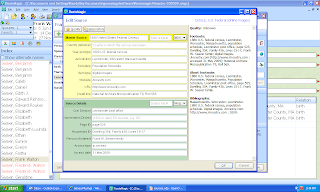
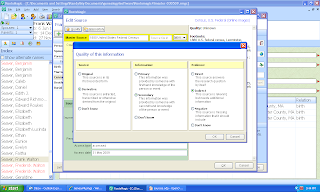
Clicking on the "Quality" button (in the top left corner of the menu, just under "Edit source" I got the "Quality of this information" menu. I clicked the appropriate bullets for Source (choices: Original, Derivative, Don't Know), Information (choices: Primary, Secondary, Don't Know), and Evidence (choices: Indirect, Direct, Negative, Don't Know):
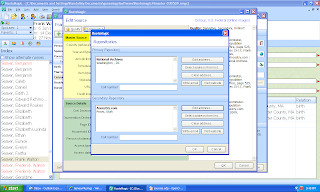
I clicked "OK" and then clicked the "Repositories" button on the "Edit source" menu. The "Repositories" menu opened with two fields - one for the Primary Repository and one for the Secondary Repository. To enter information in the fields, you click on the "Edit address" button on the right side of the menu. The user can "Select address from menu," "Clear address," "Write email" or "Visit web site" using buttons on the right side of the menu. I entered my repositories as best I knew them:
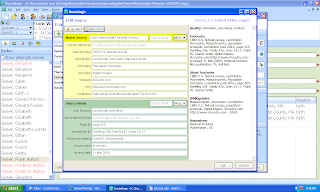
I clicked on the "OK" button and was back to the "Edit source" menu and the Quality and Repositories areas on the right side of the menu were filled in:
I clicked on the "OK" button and was back to the "Edit Person" menu. Here I clicked on the "Note" button on the bottom right quadrant of the menu. The "Notes" menu opened and I copied and pasted in the abstracted information for the family into the Notes section for this Census (fam) Fact:
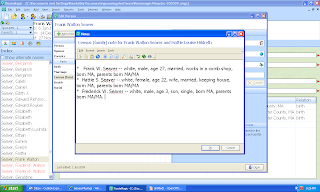
The only hangup here was finding the way to copy and paste the information from my general notes into the Census Fact note. The easiest way was to use my Family Tree Maker database information.
Previous posts in this series are listed in Working in RootsMagic 4 - Summary of Posts.
In this series of posts, I'm creating a Source in RootsMagic 4 using the Evidence Explained style templates. This is one of the major selling points for the several software programs, and it is important that they get it right. I worked in RootsMagic 4 yesterday and created the actual Source Citation in Working in RootsMagic 4 - Post 21: Creating a Source Citation (Part 1). Here's what it looked like before I added Quality, Repositories and Notes:

Clicking on the "Quality" button (in the top left corner of the menu, just under "Edit source" I got the "Quality of this information" menu. I clicked the appropriate bullets for Source (choices: Original, Derivative, Don't Know), Information (choices: Primary, Secondary, Don't Know), and Evidence (choices: Indirect, Direct, Negative, Don't Know):

I clicked "OK" and then clicked the "Repositories" button on the "Edit source" menu. The "Repositories" menu opened with two fields - one for the Primary Repository and one for the Secondary Repository. To enter information in the fields, you click on the "Edit address" button on the right side of the menu. The user can "Select address from menu," "Clear address," "Write email" or "Visit web site" using buttons on the right side of the menu. I entered my repositories as best I knew them:

I clicked on the "OK" button and was back to the "Edit source" menu and the Quality and Repositories areas on the right side of the menu were filled in:

I clicked on the "OK" button and was back to the "Edit Person" menu. Here I clicked on the "Note" button on the bottom right quadrant of the menu. The "Notes" menu opened and I copied and pasted in the abstracted information for the family into the Notes section for this Census (fam) Fact:

The only hangup here was finding the way to copy and paste the information from my general notes into the Census Fact note. The easiest way was to use my Family Tree Maker database information.
If I was entering this Source information for the first time, I probably would have had my handwritten notes (or perhaps an Ancestry.com printout) of the census records on hand and could have typed it into the Notes menu.
In the next post, I will add a Media item for this source and identify the other people who share this Census Fact.
Beginning Genealogy Helps - Post 1
It has been an interesting experience teaching my "Beginning Computer Genealogy" class at OASIS in San Diego, a mature adult education opportunity. The class is four two-hour sessions held in a computer laboratory with ten student work stations (Windows PC, IE7, etc.). The instructor has a laptop and an LCD projector to work with, and the laptop has RootsMagic 3, Legacy 6, Family Tree Maker 16 and Personal Ancestral File loaded on it.
My ten students have little or no genealogy research experience and their computer skills range from limited to extensive. Most of them had family papers and some genealogy reports or books prepared by relatives or other persons. Most of them had poked around on the Internet searching for their ancestors with limited results.
As part of the class curriculum, I did an introduction to genealogy research techniques, and provided a pedigree chart, family group sheets, a research log and lists of record types, local repositories, and genealogy web sites to visit and search.
In each class, I make a short presentation about genealogy research, genealogy software and Internet web sites and searching, and then try to help the students one-on-one with their research problems. The two hours go really fast! At the end, I give a homework assignment. I provide a handout for each class with a text summary of my presentation and additional information that I've developed over the years. I also provide a PDF version of the handout so that the students can click on the links in the handout.
As part of my curriculum, I provided a list of online "Beginning Genealogy Research" tutorials, including:
1) Four lesson study “Introduction to Genealogy” at http://genealogy.about.com/library/lessons/blintro.htm
2) The “Rootsweb Guide to Tracing Your Family Tree” at http://rwguide.rootsweb.ancestry.com/
3) The 13 article series of “A Beginner’s Guide to Family History Research” at http://www.arkansasresearch.com/guideindex.htm
4) The online interactive tutorial "Researching Your Family Tree” with five modules at http://www.learnwebskills.com/family/intro.html
I would appreciate knowing about other Beginning Genealogy tutorials in text, audio or video formats. I will review more of these tutorials in future posts. I will also make some comments on my experiences working with beginning genealogists using Internet databases and search engines.
My ten students have little or no genealogy research experience and their computer skills range from limited to extensive. Most of them had family papers and some genealogy reports or books prepared by relatives or other persons. Most of them had poked around on the Internet searching for their ancestors with limited results.
As part of the class curriculum, I did an introduction to genealogy research techniques, and provided a pedigree chart, family group sheets, a research log and lists of record types, local repositories, and genealogy web sites to visit and search.
In each class, I make a short presentation about genealogy research, genealogy software and Internet web sites and searching, and then try to help the students one-on-one with their research problems. The two hours go really fast! At the end, I give a homework assignment. I provide a handout for each class with a text summary of my presentation and additional information that I've developed over the years. I also provide a PDF version of the handout so that the students can click on the links in the handout.
As part of my curriculum, I provided a list of online "Beginning Genealogy Research" tutorials, including:
1) Four lesson study “Introduction to Genealogy” at http://genealogy.about.com/library/lessons/blintro.htm
2) The “Rootsweb Guide to Tracing Your Family Tree” at http://rwguide.rootsweb.ancestry.com/
3) The 13 article series of “A Beginner’s Guide to Family History Research” at http://www.arkansasresearch.com/guideindex.htm
4) The online interactive tutorial "Researching Your Family Tree” with five modules at http://www.learnwebskills.com/family/intro.html
I would appreciate knowing about other Beginning Genealogy tutorials in text, audio or video formats. I will review more of these tutorials in future posts. I will also make some comments on my experiences working with beginning genealogists using Internet databases and search engines.
Subscribe to:
Posts (Atom)