It's Saturday Night - time for our weekly Genealogy Fun!
John Milton originally said "luck is the residue of design" (and Branch Rickey is often credited with the saying). However, the definition of "luck" is "the chance happening of fortunate or adverse events."
I saw a post on the Genealogy Insider blog by Diane Haddad about Ways I'm Genealogically Lucky. I thought to myself "old Rand, that would be a good SNGF topic." Thank you, Diane, for the idea:
Here's the directions (and would you all please follow the directions? Thankfully, these are easy to follow):
1) When have you had a dose of good genealogy luck? What document or resource did you find just by happenstance or chance? By being in the right place at the right time? By finding a family history treasure in your family's attic or basement? By finding a helpful document or reference without even looking for it?
2) Tell us about it in Comments to this post, in Comments on Facebook, or in a blog post of your own.
Here's mine:
Read Treasures in the Closet for my extreme good luck after I thought that all family treasures had been found. This was certainly a case of being in the right place at the right time.
I'm still working my way through all of these items! I wonder where I put some of them? Hmmm, probably the file cabinet! I need to scan them and get them archived somewhere.
Saturday, July 25, 2009

Using GenealogyBank - Post 5: Using Keyword Searches
In Using GenealogyBank - Post 1: Getting Started, I described the GenealogyBank subscription site and started a search. Using GenealogyBank - Post 2: Seeing Search Results, described and demonstrated how the results look and how to save them and print them. Post 3:More Navigation Options showed easy ways to navigate within the Historical Newspapers collection. In Post 4: More Databases, I demonstrated navigating to the other collections from the Search results page and we looked at the SSDI result.
In this post, I'm going to use the Keyword search fields to demonstrate using quotes around names, and excluding certain keywords.
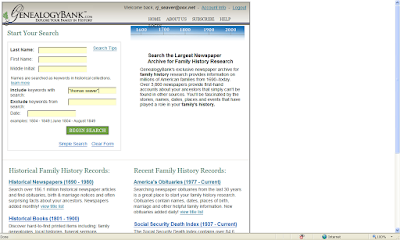
On the opening Search screen, the user can input keywords into the Search field labelled "Include keywords to search." I input the name "Thomas Seaver" in quotes in the "Include keywords" field, as shown below:
There were 273 matches in all of the GenealogyBank databases:

In this post, I'm going to use the Keyword search fields to demonstrate using quotes around names, and excluding certain keywords.
On the opening Search screen, the user can input keywords into the Search field labelled "Include keywords to search." I input the name "Thomas Seaver" in quotes in the "Include keywords" field, as shown below:

There were 273 matches in all of the GenealogyBank databases:

I clicked on the "Historical Newspapers" collection and saw the first five matches. I decided to rank them by "Oldest items" so I chose that in the "Sort by" field and saw:
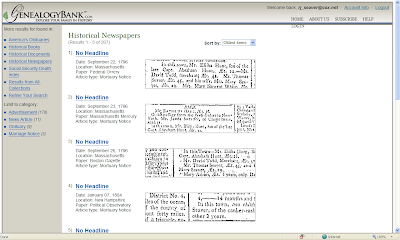
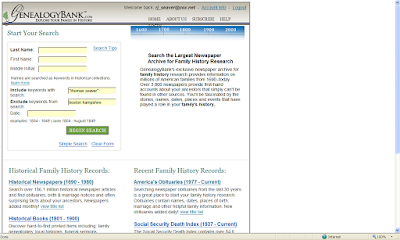
267 matches is a lot to go through. I was mainly interested in Thomas Seaver persons that did not reside in Boston or New Hampshire, so I went back to the Search box and added the terms [boston hampshire] in the "Exclude keywords from search" field, as shown below:
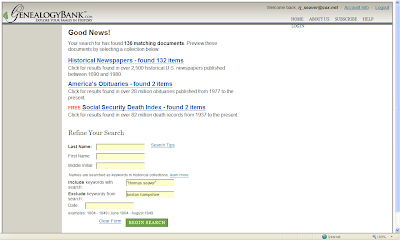
There were 132 matches in the Historical Newspaper collection, as shown below:
I clicked on the "Historical Newspaper" collection and saw the first five matches:
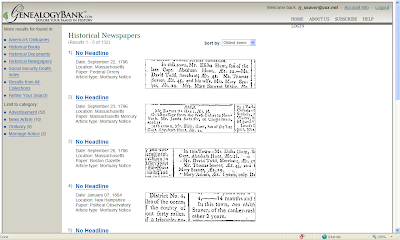
I noted that the fourth one on this list was a New Hampshire newspaper. Obviously, the term "Hampshire" did not appear on the page with the note about Thomas Seaver.

267 matches is a lot to go through. I was mainly interested in Thomas Seaver persons that did not reside in Boston or New Hampshire, so I went back to the Search box and added the terms [boston hampshire] in the "Exclude keywords from search" field, as shown below:

There were 132 matches in the Historical Newspaper collection, as shown below:

I clicked on the "Historical Newspaper" collection and saw the first five matches:

I noted that the fourth one on this list was a New Hampshire newspaper. Obviously, the term "Hampshire" did not appear on the page with the note about Thomas Seaver.
The user needs to be careful excluding certain words. For instance, since I excluded both Boston and Hampshire, I will not see matches that include counties named Hampshire, or persons named Boston.
The best use of the "Exclude keywords" feature is when the person is associated with a certain activity. If I had searched for "Tom Seaver" in the example above, I should have added "baseball" and "pitcher" to the Exclude Keyword field just to eliminate those matches, assuming I wasn't after my cousin, the Baseball Hall-of-Fame pitcher.
Sorting by "Oldest items" is very helpful to order things rather than reading every match presented in some haphazard order. The Search fields permit a year range for the matches to help narrow the search.
The best use of the "Include keywords" feature is to narrow the search to a specific name using the quote marks, and to add a place name to the search for persons with common surnames.
This completes my brief survey of the GenealogyBank commercial website. It has very useful resources in the Historical Newspapers, America's Obituaries, and Historical Papers collections. Many of these resources are unique to GenealogyBank - they are available in no other place on the Internet.
Friday, July 24, 2009
Interesting Maps
Most of the maps here are not exactly genealogy or family history, but these maps are, well, um, interesting. The blog is called Strange Maps...
Here is one map that is useful for understanding American population shifts:

Here is one map that is useful for understanding American population shifts:

footnoteMaven talks about genealogy blogging
footnoteMaven - The expert footnote creator, photo collector and world famous genealogy blogger speaks! Lisa Louise Cooke has featured fM on her latest podcast at Family History: Genealogy Made Easy.
The program summary for Genealogy Blogging Wisdom: Be Yourself - Everyone Else Is Already taken is on the Genealogy Gems News blog, the show notes are on Family History: Genealogy Made Easy. and the podcast with footnoteMaven's wit and wisdom is here on the Family History: Genealogy Made Easy podcast site.
You do read footnoteMaven's blogs, don't you? Check out www.FootnoteMaven.com and www.ShadesOfTheDeparted.com for excellent genealogy blog reading! Put them in your reader. She is one of my very favorite genealogy bloggers. And one of my favorite persons!
Thank you, Lisa, for letting footnoteMaven's share her experience, wit and wisdom with the genealogy world.
The program summary for Genealogy Blogging Wisdom: Be Yourself - Everyone Else Is Already taken is on the Genealogy Gems News blog, the show notes are on Family History: Genealogy Made Easy. and the podcast with footnoteMaven's wit and wisdom is here on the Family History: Genealogy Made Easy podcast site.
You do read footnoteMaven's blogs, don't you? Check out www.FootnoteMaven.com and www.ShadesOfTheDeparted.com for excellent genealogy blog reading! Put them in your reader. She is one of my very favorite genealogy bloggers. And one of my favorite persons!
Thank you, Lisa, for letting footnoteMaven's share her experience, wit and wisdom with the genealogy world.
Terry Thornton's Hill Country Blog is Back!
Terry Thornton has returned his Hill Country of Monroe County, Mississippi to its beautiful spot in the genea-blogosphere.
Terry says in his post WELCOME that:
"Welcome to Terry Thornton's HILL COUNTRY. Here you will find archival copies of more than 900 of the articles previously published at his retired blog, HILL COUNTRY OF MONROE COUNTY MISSISSIPPI."
Read all of Terry's post. If you don't know of Terry's work, then please spend some time reading his beautiful photo essays and descriptive articles about life in northeastern Mississippi. To see the Archives, use either the Search box on the left sidebar or click on Hill Country of Monroe County, Mississippi and scroll back in time.
I wish Terry well in all of his endeavors - writing, cooking, cemetery searching, loving, health, living, traveling. I hope that we see more of his efforts in some form or another.
Terry says in his post WELCOME that:
"Welcome to Terry Thornton's HILL COUNTRY. Here you will find archival copies of more than 900 of the articles previously published at his retired blog, HILL COUNTRY OF MONROE COUNTY MISSISSIPPI."
Read all of Terry's post. If you don't know of Terry's work, then please spend some time reading his beautiful photo essays and descriptive articles about life in northeastern Mississippi. To see the Archives, use either the Search box on the left sidebar or click on Hill Country of Monroe County, Mississippi and scroll back in time.
I wish Terry well in all of his endeavors - writing, cooking, cemetery searching, loving, health, living, traveling. I hope that we see more of his efforts in some form or another.
Fact Lists in RootsMagic 4
When I posted Comparing Genealogy Software - RootsMagic 4 - Part 1, I mentioned that there were more "Events" in the GEDCOM upload of my Family Tree Maker 16 database than in the native file upload of the same database. I wondered why.
Bruce Buzbee, the creator of RootsMagic, commented on Facebook that:
"I'd be curious about this too, especially that big difference in the events. It looks like the GEDCOM contains a lot of events that RM doesn't see in the FTM file. If you go into Lists > Fact type list do you see any fact types in the GEDCOM import that aren't in the direct one?"
I spent awhile this morning trying to figure this all out using Bruce's guidance. I'm a bit more confused than I was before!
The native file upload to RootsMagic 4 has 80 Fact Types, while the GEDCOM upload has 71 Fact Types.
The Fact Types in the native upload file that are not in the GEDCOM upload are:
* Facts 1 through Fact 13 (0)
* Medical (0)
The Fact Types in the GEDCOM upload that are not in the native file upload are:
* Friends (6)
* Other- Begin (4)
* Partners (3)
* Single (2)
* Unknown - Begin (4)
The numbers in parentheses are the number of entries on the Fact List for those Fact Types.
The other Fact Types on the Fact Lists include:
* Adoption
* Alternate Names
* Ancestral File Number
* Annulment
* Baptism
* Bar Mitzvah
* Bas Mitzvah
* Birth
* Blessing
* Burial
* Caste
* Census
* Census (family)
* Christen
* Christen (family)
* Confirmation
* Cremation
* Death
* Degree
* Description
* Divorce
* Divorce filed
* Divorced
* DNA Test
* Education
* Election
* Emigration
* Engagement
* Excommunication
* First Communion
* Graduation
* Illness
* Immigration
* LDS Baptism
* LDS Confirmation
* LDS Endowment
* LDS Initiatory
* LDS Seal to parents
* LDS Seal to spouse
* Living
* Marriage
* Marriage Banns
* Marriage contract
* Marriage License
* Marriage Settlement
* Military
* Miscellaneous
* Mission
* Namesake
* Nationality
* Naturalization
* Occupation
* Ordination
* Probate
* Property
* Reference Number
* Religion
* Residence
* Residence (family)
* Retirement
* Separation
* Social Security Number
* SSN Issued
* Stillborn
* Title (Nobility)
* Will
I did not go through all of the Fact Types in each database to determine where the "extra" 40,000 "Events" were. I did go through the Facts that I thought might have high numbers, such as:
* Births - 594 pages in native FTM upload, 623 pages in GEDCOM upload
* Marriage - 430 pages in native FTM upload, 452 pages in GEDCOM upload
* Death - 317 pages in native FTM upload, 318 pages in GEDCOM upload
There are about 45 names on each page, so that accounts for about 2,300 in the difference of Events uploaded. The total number of Births, Marriages and Deaths for the native FTM upload is about 60,300 - which is more than the reported number of "Events." [Note that the number above assumes 45 persons per page of each Fact Type. If the assumption was 40 persons per page, the sum would be 53,640. I didn't count all of the names, and the Fact List doesn't count them either.]
This is not unique to RootsMagic - I noted that there was an even larger difference between the two different uploads for Family Tree Maker 2009!
Like I said, this only adds confusion to the question raised about the difference in the number of Events in the summary statistics between the two different uploads.
Bruce Buzbee, the creator of RootsMagic, commented on Facebook that:
"I'd be curious about this too, especially that big difference in the events. It looks like the GEDCOM contains a lot of events that RM doesn't see in the FTM file. If you go into Lists > Fact type list do you see any fact types in the GEDCOM import that aren't in the direct one?"
I spent awhile this morning trying to figure this all out using Bruce's guidance. I'm a bit more confused than I was before!
The native file upload to RootsMagic 4 has 80 Fact Types, while the GEDCOM upload has 71 Fact Types.
The Fact Types in the native upload file that are not in the GEDCOM upload are:
* Facts 1 through Fact 13 (0)
* Medical (0)
The Fact Types in the GEDCOM upload that are not in the native file upload are:
* Friends (6)
* Other- Begin (4)
* Partners (3)
* Single (2)
* Unknown - Begin (4)
The numbers in parentheses are the number of entries on the Fact List for those Fact Types.
The other Fact Types on the Fact Lists include:
* Adoption
* Alternate Names
* Ancestral File Number
* Annulment
* Baptism
* Bar Mitzvah
* Bas Mitzvah
* Birth
* Blessing
* Burial
* Caste
* Census
* Census (family)
* Christen
* Christen (family)
* Confirmation
* Cremation
* Death
* Degree
* Description
* Divorce
* Divorce filed
* Divorced
* DNA Test
* Education
* Election
* Emigration
* Engagement
* Excommunication
* First Communion
* Graduation
* Illness
* Immigration
* LDS Baptism
* LDS Confirmation
* LDS Endowment
* LDS Initiatory
* LDS Seal to parents
* LDS Seal to spouse
* Living
* Marriage
* Marriage Banns
* Marriage contract
* Marriage License
* Marriage Settlement
* Military
* Miscellaneous
* Mission
* Namesake
* Nationality
* Naturalization
* Occupation
* Ordination
* Probate
* Property
* Reference Number
* Religion
* Residence
* Residence (family)
* Retirement
* Separation
* Social Security Number
* SSN Issued
* Stillborn
* Title (Nobility)
* Will
I did not go through all of the Fact Types in each database to determine where the "extra" 40,000 "Events" were. I did go through the Facts that I thought might have high numbers, such as:
* Births - 594 pages in native FTM upload, 623 pages in GEDCOM upload
* Marriage - 430 pages in native FTM upload, 452 pages in GEDCOM upload
* Death - 317 pages in native FTM upload, 318 pages in GEDCOM upload
There are about 45 names on each page, so that accounts for about 2,300 in the difference of Events uploaded. The total number of Births, Marriages and Deaths for the native FTM upload is about 60,300 - which is more than the reported number of "Events." [Note that the number above assumes 45 persons per page of each Fact Type. If the assumption was 40 persons per page, the sum would be 53,640. I didn't count all of the names, and the Fact List doesn't count them either.]
This is not unique to RootsMagic - I noted that there was an even larger difference between the two different uploads for Family Tree Maker 2009!
Like I said, this only adds confusion to the question raised about the difference in the number of Events in the summary statistics between the two different uploads.
Thursday, July 23, 2009
Comparing Genealogy Software - RootsMagic 4 - Part 1
One of the genealogy software programs I'm using is RootsMagic 4. In this series of posts, I will be comparing how RootsMagic 4 performs relative to What I Want in a Family Tree Program and relative to Family Tree Maker 2009 and to Legacy Family Tree 7.
My first test is to upload both a native FTM 16 file and a GEDCOM file to RootsMagic 4. I am using the same FTM 16 database, and a GEDCOM file created from it, to perform these tests.
RootsMagic 4 permits native file uploads from RootsMagic 1-3, Family Origins (Version 4 and later), Family Tree Maker (Version 2006 and earlier), Legacy Family Tree, Personal Ancestral File, and from a GEDCOM file. I uploaded the native FTM 16 file, the screen below summarizes the data file characteristics:

The file statistics showed:
* People = 38,420
* Families = 15,129
* Events = 55,379
* Places = 10,011
* Alternate Names = 151
* Sources = 301
* Citations = 5182
* Repositories = 83
* MultiMedia Items = 11
* MultiMedia Links = 11
This file took about 3 minutes to upload, and has a file size of 26,545 mb and the 11 media items have a total file size of 2.88 mb.
When I uploaded the GEDCOM created by the same FTM 16 database, the file statistics are:

* People = 38,420
* Families = 15,129
* Events = 95,538
* Places = 10,314
* Alternate Names = 150
* Sources = 304
* Citations = 5271
* Repositories = 0
* MultiMedia Items = 0
* MultiMedia Links = 0
My first test is to upload both a native FTM 16 file and a GEDCOM file to RootsMagic 4. I am using the same FTM 16 database, and a GEDCOM file created from it, to perform these tests.
RootsMagic 4 permits native file uploads from RootsMagic 1-3, Family Origins (Version 4 and later), Family Tree Maker (Version 2006 and earlier), Legacy Family Tree, Personal Ancestral File, and from a GEDCOM file. I uploaded the native FTM 16 file, the screen below summarizes the data file characteristics:

The file statistics showed:
* People = 38,420
* Families = 15,129
* Events = 55,379
* Places = 10,011
* Alternate Names = 151
* Sources = 301
* Citations = 5182
* Repositories = 83
* MultiMedia Items = 11
* MultiMedia Links = 11
This file took about 3 minutes to upload, and has a file size of 26,545 mb and the 11 media items have a total file size of 2.88 mb.
When I uploaded the GEDCOM created by the same FTM 16 database, the file statistics are:

* People = 38,420
* Families = 15,129
* Events = 95,538
* Places = 10,314
* Alternate Names = 150
* Sources = 304
* Citations = 5271
* Repositories = 0
* MultiMedia Items = 0
* MultiMedia Links = 0
This file took about 1 minute to upload, and has a file size of 30,533 mb and there are no media items.
Comparing this data to the others, I noted that:
* RootsMagic 4 provides much more file information - including places, alternate names, number of citations, number of repositories, etc.
* The number of individuals in each file is the same. The number of familes is slightly different between FTM 2009 (15,121) and RootsMagic 4 (15,129) and Legacy (15,129).
* The number of "Events" and "Places" is different for the two uploads to RootsMagic - I don't know why. I wonder if this is why the RootsMagic 4 file size is larger for the GEDCOM upload than for the native file upload.
* The number of sources (probably the "Master Sources") are different from the FTM 2009 count, but similar (but not exact) to the Legacy count.
* As with other programs, the GEDCOM upload does not bring multimedia items across from the first program.
* The RootsMagic file size is much smaller than the FTM 2009 and Legacy Family Tree file sizes.
I hope my readers didn't mind that I devoted today's blogging effort to these four posts. They will enable all of us to better understand what we are getting in our genealogy software.
Comparing Genealogy Software - Legacy Family Tree 7 - Part 1
One of the genealogy software programs I'm using is Legacy Family Tree 7. In this series of posts, I will be comparing how Legacy Family Tree 7 performs relative to What I Want in a Family Tree Program and relative to Family Tree Maker 2009 and to RootsMagic 4.
My first test is to upload both a native FTM 16 file (if possible) and a GEDCOM file to Legacy Family Tree. I am using the same FTM 16 database, and a GEDCOM file created from it, to perform these tests.
Legacy Family Tree 7 permits uploads from Personal Ancestral File Versions 2 through 5, Ancestral Quest Versions 2 and 3.x, and from a GEDCOM file. It cannot upload from a Family Tree Maker file.
I uploaded the GEDCOM, and the screen below summarizes the data file characteristics:

* 38,420 individuals
The GEDCOM file took about 10 minutes to upload.
The Legacy Family Tree file is 76.964 mb in size in my computer file folders.
The number of families (15,129), and number of sources (298), in the Legacy Family Tree 7 file are different from the numbers found in the Family Tree Maker 2009 (15,121 and 1,466) file uploaded via GEDCOM. The number of Individuals is the same. Also, FTM 2009 indicated 1,466 sources, not 298. Hmmm, I wonder why the difference? I think that I have many more source citations than 1,466, but don't think that I have that many master sources. Obviously, FTM 16, FTM 2009 and Legacy Family Tree 7 are counting source things differently!
Because this was a GEDCOM file upload, any images that I had in my FTM 16 database did not import into the program.
Finally, the file size of the Legacy Family Tree 7 file (76.964 mb) is somewhat smaller than the Family Tree Maker 2009 file size (82.468 mb).
My first test is to upload both a native FTM 16 file (if possible) and a GEDCOM file to Legacy Family Tree. I am using the same FTM 16 database, and a GEDCOM file created from it, to perform these tests.
Legacy Family Tree 7 permits uploads from Personal Ancestral File Versions 2 through 5, Ancestral Quest Versions 2 and 3.x, and from a GEDCOM file. It cannot upload from a Family Tree Maker file.
I uploaded the GEDCOM, and the screen below summarizes the data file characteristics:

The Legacy Family Tree 7 file contains:
* 38,420 individuals
* 15,129 families
* 298 sources
The GEDCOM file took about 10 minutes to upload.
The Legacy Family Tree file is 76.964 mb in size in my computer file folders.
The number of families (15,129), and number of sources (298), in the Legacy Family Tree 7 file are different from the numbers found in the Family Tree Maker 2009 (15,121 and 1,466) file uploaded via GEDCOM. The number of Individuals is the same. Also, FTM 2009 indicated 1,466 sources, not 298. Hmmm, I wonder why the difference? I think that I have many more source citations than 1,466, but don't think that I have that many master sources. Obviously, FTM 16, FTM 2009 and Legacy Family Tree 7 are counting source things differently!
Because this was a GEDCOM file upload, any images that I had in my FTM 16 database did not import into the program.
Finally, the file size of the Legacy Family Tree 7 file (76.964 mb) is somewhat smaller than the Family Tree Maker 2009 file size (82.468 mb).
UPDATED 9 p.m. to change the number of families - I didn't read the number correctly on a small screen!
Comparing Genealogy Software - FTM 2009 Data - Part 2
In Comparing Genealogy Software - FTM 2009 Data - Part 1, I uploaded a native FTM 16 database into Family Tree Maker 2009.
For this post, I uploaded a GEDCOM of the same FTM 16 file into Family Tree Maker 2009. Here is the summary of the file statistics:

For this post, I uploaded a GEDCOM of the same FTM 16 file into Family Tree Maker 2009. Here is the summary of the file statistics:

The file statistics given say:
* 38,420 individuals
* 15,121 families
* 120,931 records
* 1,466 sources
* 0 media items
The file took 4 minutes and 49 seconds to upload according to FTM 2009.
The FTM 2009 file size is 82.468 mb for the database, and the 0 media items are not included.
There are some interesting differences between the uploading of the native FTM 16 file and the GEDCOM file:
* The number of "records" for the native upload is 55,013 records, while for the GEDCOM upload it is 120,931. That is a big difference. I wonder why this happens? What are the added records? Are Records = Facts?
* The number of sources is slightly different - 1,472 vs. 1,466. Are these master sources, or source citations? I can't tell.
* The native upload for media items was 11, but was 0 for the GEDCOM upload. This is typical - a GEDCOM file won't upload media files, at least from FTM 16 to some other program.
* The time to upload the file was much shorter for the GEDCOM upload than the native file upload - about 16% of the native file time. I did not expect that large a difference.
* The FTM 2009 file size for the GEDCOM upload was lsightly smaller than for the native upload. I wonder why? Fewer sources? Fewer links to media items?
I hope someone who is working with FTM 2009 can explain these differences!
In the next post, we'll look at the FTM 16 to Legacy Family Tree 7 upload statistics.
Comparing Genealogy Software - FTM 2009 Data - Part 1
Astute readers of Genea-Musings know that I'm still working on selecting a preferred genealogy software program. I've narrowed my selection to Family Tree Maker, Legacy Family Tree and RootsMagic because I have a Windows computer system and can really handle only three programs at once. I posted What I Want in a Family Tree Program a month ago in an effort to help me make my final selection. Trying to work my way down that list has been difficult - I put too much on the list, I fear. I needed a "standard database" to work with, so I selected the 38,420 person database I described in Putting it all together - Finally! I will use this database to upload to each program and report on the file statistics in each of the programs.
Some programs will permit a direct upload of the native FTM 16 file, and others require a GEDCOM file to upload. If possible, I will do it both ways just to see the differences.
I uploaded the native FTM 16 file (35,984 kb in file size, which includes the media items) into Family Tree Maker 2009. FTM 2009 can upload native files from Family Tree Maker (version 5 or later), Legacy, The Master Genealogist, Personal Ancestral File and GEDCOM files.
The FTM 2009 statistics screen showed:
* 38,420 individuals
* 15,121 families
* 55,013 records
* 1,472 sources
* 11 media items
The file took 24 minutes and 40 seconds to upload according to the FTM 2009 screen below:

Some programs will permit a direct upload of the native FTM 16 file, and others require a GEDCOM file to upload. If possible, I will do it both ways just to see the differences.
I uploaded the native FTM 16 file (35,984 kb in file size, which includes the media items) into Family Tree Maker 2009. FTM 2009 can upload native files from Family Tree Maker (version 5 or later), Legacy, The Master Genealogist, Personal Ancestral File and GEDCOM files.
The FTM 2009 statistics screen showed:
* 38,420 individuals
* 15,121 families
* 55,013 records
* 1,472 sources
* 11 media items
The file took 24 minutes and 40 seconds to upload according to the FTM 2009 screen below:

The FTM 2009 file size is 82.715 mb for the database, and the 11 media items are in a separate directory with a total of 2.86 mb.
I will do a similar exercise for the GEDCOM file to FTM 2009 and then do the same exercises for Legacy 7 and RootsMagic 4 too.
I will do a similar exercise for the GEDCOM file to FTM 2009 and then do the same exercises for Legacy 7 and RootsMagic 4 too.
UPDATED 11 a.m. to add the image.
Subscribe to:
Posts (Atom)